How to track time with the stopwatch in Clock on iPhone

You can use the stopwatch in the Clock app on iPhone to time an event and record laps or splits.

By Stacey Butler - Senior Staff Writer
0 Min Read

On iPhone, in the Clock app, you can use the stopwatch to measure the duration of an event. It keeps timing even when you open another app or iPhone goes to sleep, and you can record laps or splits. You can also switch between digital and analog stopwatch faces in portrait orientation.
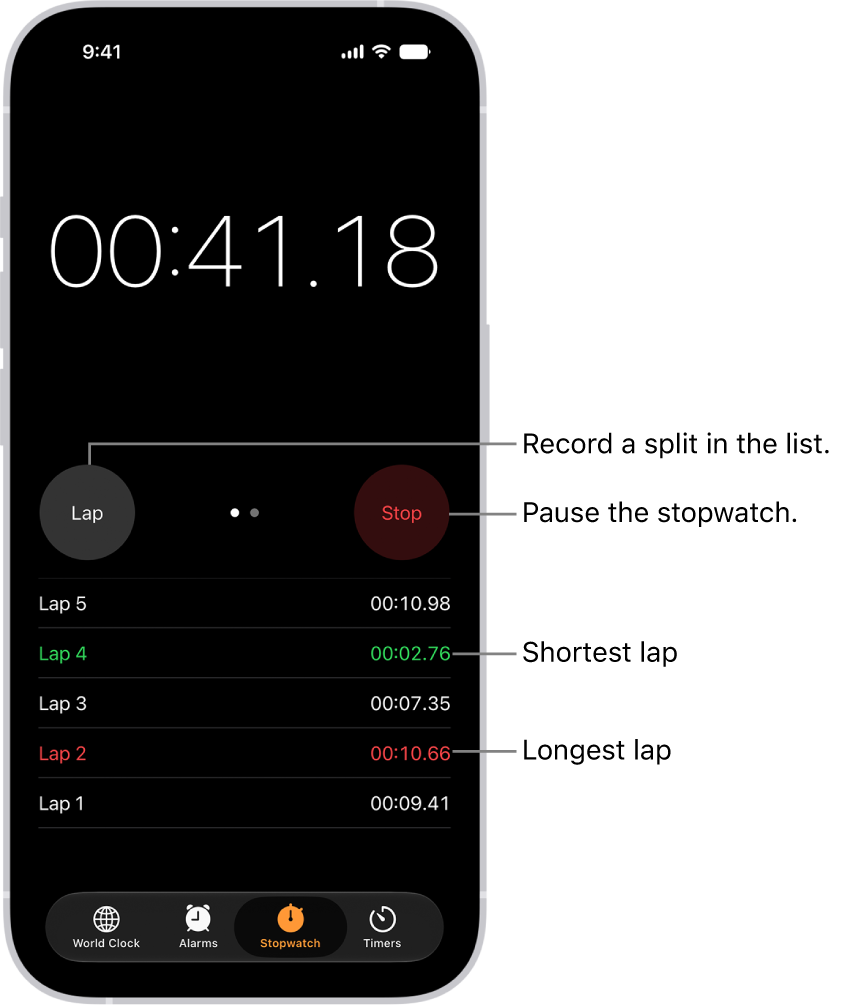
A stopwatch in the Clock app shows the overall time passed in an event, and below it are several laps listed within that event.

  1. Open the Clock app on your iPhone.
  2. Tap Stopwatch.

    To switch between the digital and analog faces, swipe the stopwatch.

  3. Tap Start.

    The timing continues even if you open another app or if iPhone goes to sleep.

  4. To record a lap or split, tap Lap.
  5. Tap Stop to record the final time.
  6. Tap Reset to clear the stopwatch.

TAGGED:
Senior Staff Writer
Follow:
Stacey is a senior staff writer at GeeksChalk and has been writing about Apple for nearly a decade. She covers all things Apple for GeeksChalk, including iPhones, iPads and Mac. Based in Honolulu, Hawaii, Stacey is often found hiking precarious landscapes or tinkering with a camera.
Leave a Comment