iPad mini (6th generation) hardware: buttons, cameras, and ports

You can learn the location of the cameras, buttons, and other essential hardware features on iPad mini (6th generation).

By Dave Johnson - Senior Staff Writer
0 Min Read

Learn the location of the cameras, buttons, and other essential hardware features on iPad mini (6th generation).

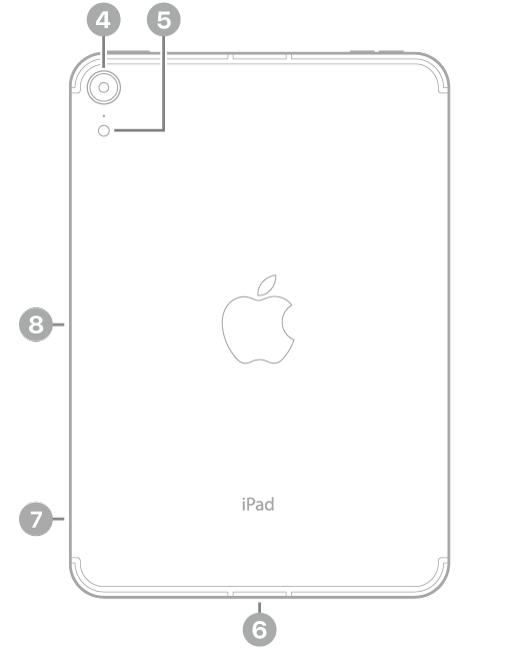
It shows where to find the volume buttons, front camera, top button/Touch ID, rear camera, flash, USB-C connector, SIM tray (Wi-Fi + Cellular), and magnetic connector for Apple Pencil. There are links to turn on and set up iPad, too.
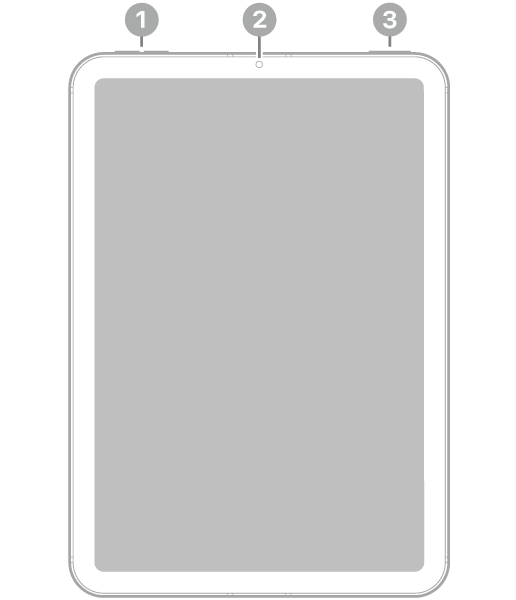
The front view of iPad mini with callouts to the volume buttons at the top left, the front camera at the top center, and the top button and Touch ID at the top right.

  • 1 Volume buttons
  • 2 Front camera
  • 3 Top button/Touch ID

The back view of iPad mini with callouts to the rear camera and flash at the top left, the USB-C connector at the bottom center, the SIM tray (Wi-Fi + Cellular) at the bottom left, and the magnetic connector for Apple Pencil on the left.

  • 4 Rear camera
  • 5 Flash
  • 6 USB-C connector
  • 7 SIM tray (Wi-Fi + Cellular)
  • 8 Magnetic connector for Apple Pencil

Get started with iPad mini

TAGGED:
Senior Staff Writer
Follow:
Dave Johnson is a staff writer for GeeksChalk based in New Jersey. He covers news, how-tos, and user guides for iPhone, iPad, Mac, and Apple Watch.
Leave a Comment