iPhone includes charging features that help extend your battery’s lifespan by reducing the time your battery stays fully charged. With Optimized Battery Charging, iPhone pauses charging at 80%, then finishes charging closer to when you usually unplug your iPhone.
For example, if you typically unplug your iPhone at 7 a.m., charging may pause at 80% overnight and finish just before that time. It needs a routine, though, and when you need a full charge sooner than scheduled, you can temporarily override it.
What to expect
- It needs a routine: Optimized Battery Charging activates when your iPhone predicts it will be connected to a charger for an extended period, like overnight. The feature requires time to learn your charging habits, so it works most consistently in the locations where you spend the most time, such as your home and office. It may not activate when your charging habits are more varied, like when you’re traveling.
- It may not always be active: If your charging schedule is inconsistent or you’re in a new place, Optimized Battery Charging may not activate. In these situations, your iPhone will charge to 100% without pausing.
Temporarily override Optimized Battery Charging
If your iPhone needs a full charge sooner than scheduled, you can temporarily override Optimized Battery Charging.
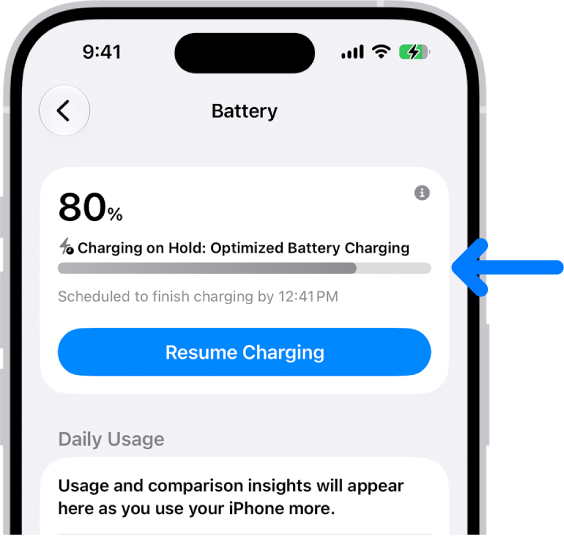
- Open the Settings app on your iPhone.
- Tap Battery and tap Resume Charging.
Turn Optimized Battery Charging on or off
- Open the Settings app on your iPhone.
- Do one of the following:
- On iPhone 14 or earlier: Tap Battery, then tap Battery Health & Charging. Turn Optimized Battery Charging on or off.
- On iPhone 15 or later: Tap Battery and then tap Charging. Turn Optimized Battery Charging on or off.