How to add a reaction to a collaborative playlist in Music on iPhone

You can react to songs in a collaborative playlist with emoji from the Now Playing screen on iPhone if you subscribe to Apple Music.

By Moses Johnson - Editor
0 Min Read

On iPhone, if you subscribe to Apple Music and you join a collaborative playlist, you can react to songs in the playlist with emoji. It’s quick. From the Now Playing screen, you can choose a reaction, for example a thumbs up emoji, or find a specific emoji to add.

Note: Apple Music isn’t available in all countries or regions.

  1. Open the Music app on your iPhone.
  2. Tap a collaborative playlist. Tap the MiniPlayer to open the Now Playing screen.
  3. Tap the Reaction button and choose a reaction (for example, a thumbs up emoji) or tap the Add button to find a specific emoji.
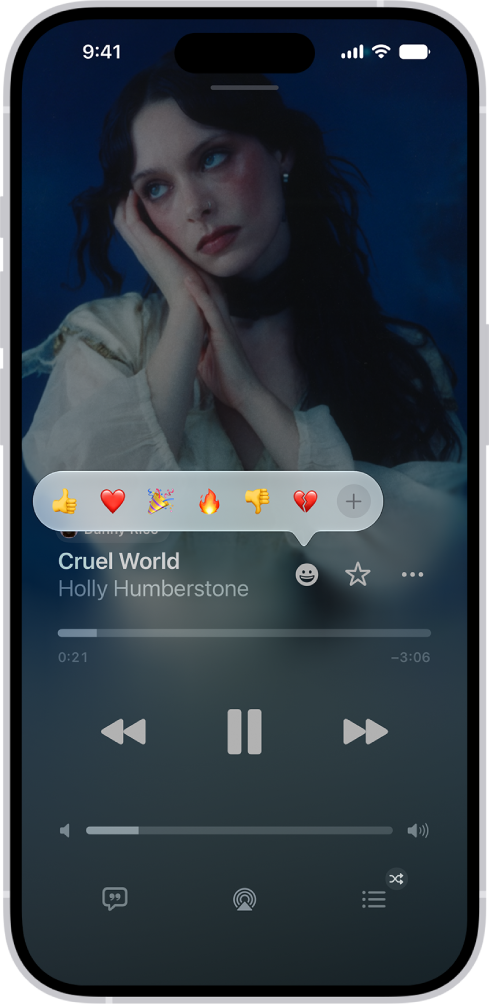
    The Now Playing screen with the Reactions button showing several emoji and an Add button that you can click to find more emoji.

TAGGED:
Follow:
Moses Johnson is the Editorial Director of GeeksChalk.com, who has a keen eye for news, rumors, and all the unusual stuff around Apple products. Moses is commonly referred to online as The Professor, with decades of experience in tech under his belt.
Leave a Comment