iPad Pro 12.9-inch (5th generation) hardware: buttons, cameras, and ports

You can learn the location of the cameras, buttons, and other essential hardware features on iPad Pro 12.9-inch (5th generation).

By Kristina Terech - Staff Writer
0 Min Read

Learn the location of the cameras, buttons, and other essential hardware features on iPad Pro 12.9-inch (5th generation).

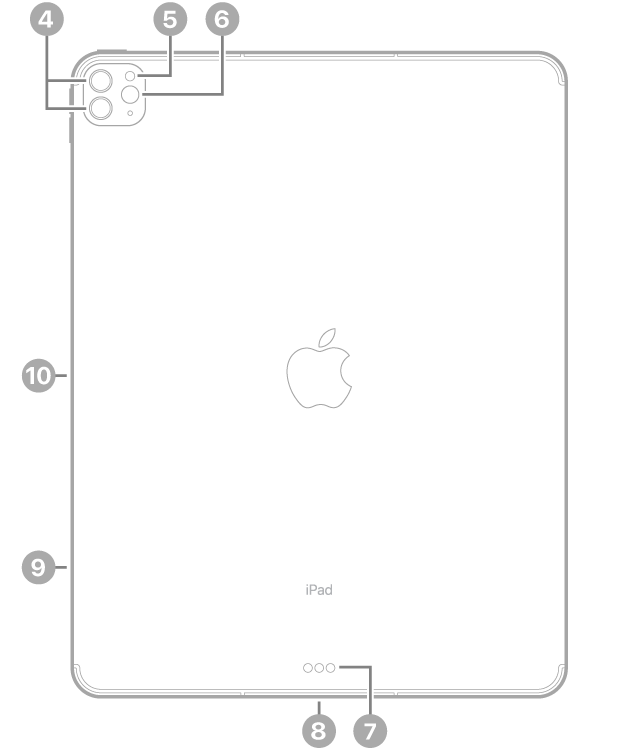
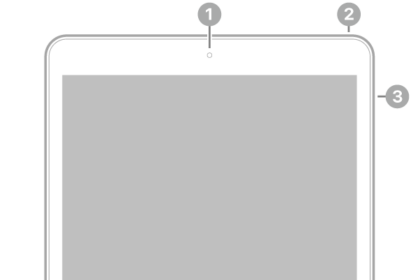
The guide points out the front camera, top button, volume buttons, rear cameras, flash, LiDAR Scanner, Smart Connector, Thunderbolt / USB 4 connector, SIM tray (Wi-Fi + Cellular), and magnetic connector for Apple Pencil.
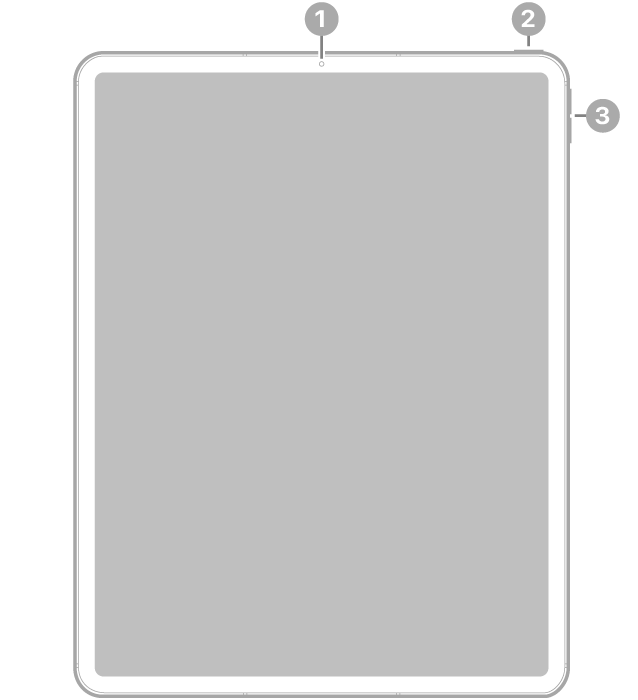
The front view of iPad Pro with callouts to the front camera at the top center, the top button at the top right, and the volume buttons on the right.

  • 1 Front camera
  • 2 Top button
  • 3 Volume buttons

The back view of iPad Pro with callouts to the rear cameras and flash at the top left, Smart Connector and Thunderbolt / USB 4 connector at the bottom center, the SIM tray (Wi-Fi + Cellular) at the bottom left, and the magnetic connector for Apple Pencil on the left.

  • 4 Rear cameras
  • 5 Flash
  • 6 LiDAR Scanner
  • 7 Smart Connector
  • 8 Thunderbolt / USB 4 connector
  • 9 SIM tray (Wi-Fi + Cellular)
  • 10 Magnetic connector for Apple Pencil
Get started with iPad Pro

TAGGED:
Staff Writer
Follow:
Kristina is a staff writer at GeeksChalk, and is interested in all things Apple. This includes its best products such as the iPad, iPhone, Mac, AirPods, and Apple Watch. When she's not tinkering with the latest Apple gear, you’ll find her watching movies, taking pictures and exploring the great outdoors.
Leave a Comment