How to remove and change Apple Watch bands

You can remove and change Apple Watch bands with the band release button, using the same general steps for different bands.

By Kevin Shaw - Editor
0 Min Read

Different Apple Watch bands use the same release mechanism, so follow these general steps to remove and attach a band. It’s simple. Never force a band into the slot, though, and if you’re having trouble removing or inserting a band, the steps cover that, too. You can also see the Apple Watch models.

Remove and change a watch band

  1. Hold down the band release button on your Apple Watch.
  2. Slide the band across to remove it. Then slide the new band in.

    Never force a band into the slot. If you’re having trouble removing or inserting a band, hold down the band release button again.
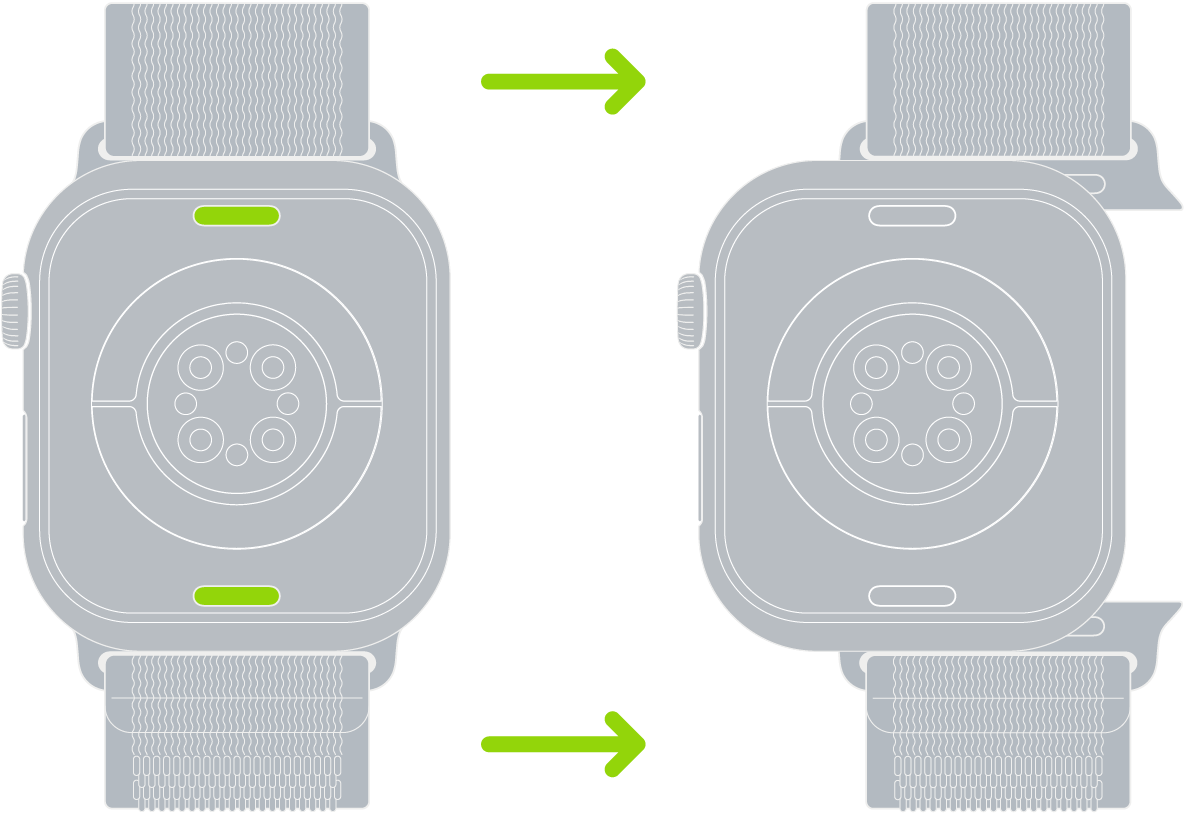
    Two images of Apple Watch. The image on the left shows the band release button. The image on the right shows a watch band partially inserted into the band slot.

See also

TAGGED:
Editor
Follow:
Kevin Shaw is a seasoned tech journalist based in Los Angeles with a penchant for all things Apple. He started writing about Apple products in 2007 and it's been a love affair ever since. He has spent over a decade testing and writing about iPhones, iPads, Macs, and other Apple products. In his spare time, he likes nothing more than catching up with the latest news and sports podcasts on the beach.
Leave a Comment