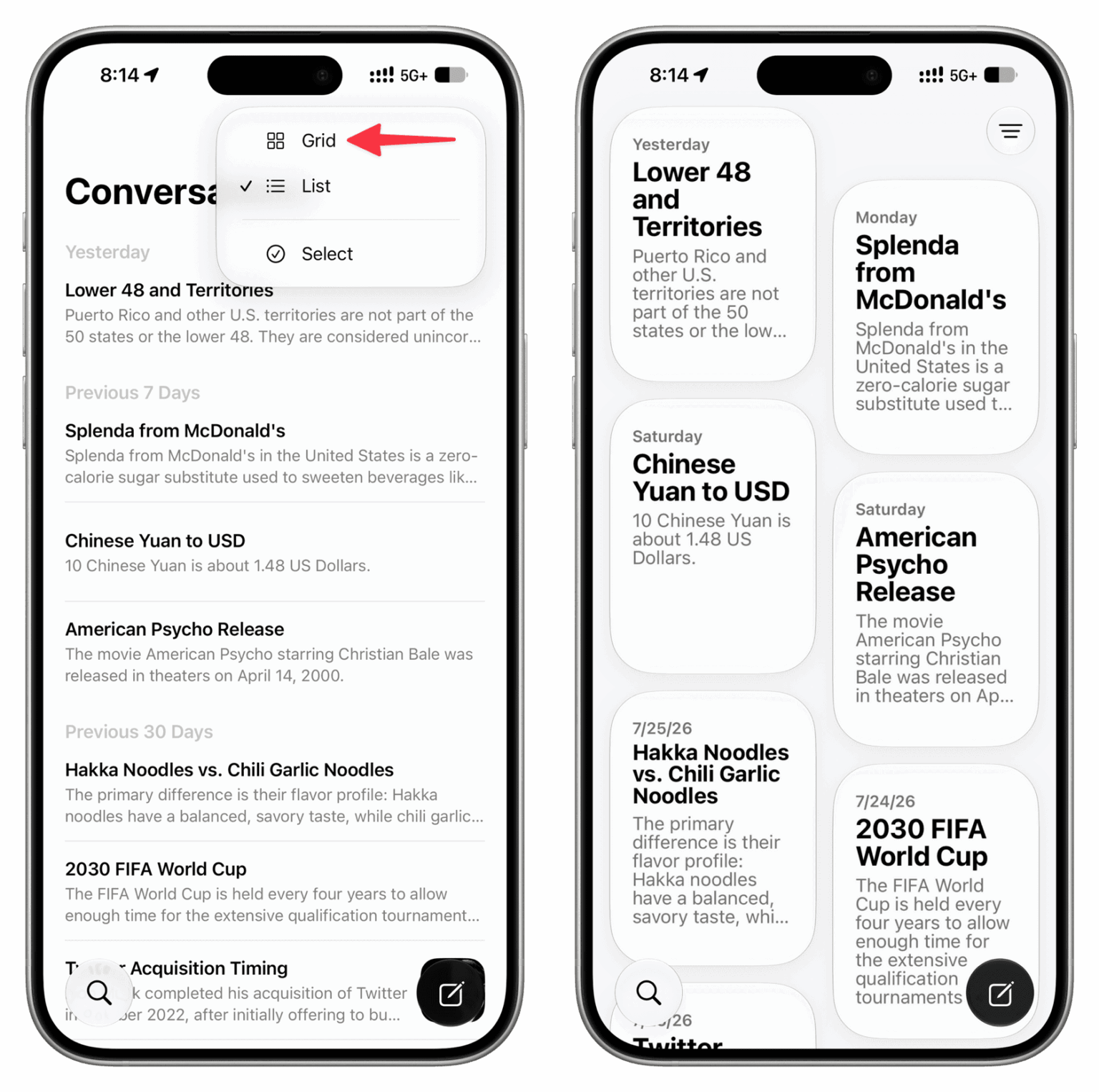
The Siri app in iOS 27 lets you revisit all your conversations with Siri and easily start new ones. The Siri app syncs with iCloud, so you can continue conversations across all of your Apple devices. It features a chat-style interface with a stream of your previous conversations. You can upload photos and files to the Siri app for analysis. you’ve had with Siri. You can use the search button to find conversations, and there’s a pin option for conversations that you revisit frequently; but most importantly, you can choose to see all your past Siri conversations in list or grid view. This guide will show you how to change Siri conversation view style on iPhone.
How to Change Siri conversation view style in iOS 27
- Open the new Siri app, and you should see your conversations. If not, tap the X icon at the top.
- Tap the three lines menu icon and select Grid or List styles.
Although Apple uses the grid view in marketing screenshots, I had to disable it immediately because I couldn’t quickly parse my threads and find what I was looking for. I prefer the list view as it shows me more on one screen.
The new Siri app is a convenient home for conversations with the assistant. I can ask follow-up questions and revisit past chats with ease.
What’s your experience with the new Siri App in iOS 27 been like? Let us know in the comments.