Several users have reported that they are receiving the “Cannot Open, This media format is not supported” error message, when trying to play media on Apple Music.
Fix Apple Music Error
After each step, check to see if your problem is resolved.
1-Go to Settings and turn on Airplane Mode. Wait a few seconds and then turn off.
2-Restart your iPhone 18 Pro.
3-If you are having this issue when you are connected to a Wi-Fi network, turn off your Wi-Fi and router. Close the Apple Music app. Then reset network settings by going to Settings > General > Transfer or Reset iPhone > Reset > Reset Network Settings. Then restart your Wi-Fi and router.
4-iOS update? Go to Settings > General > Software Update and update your iPhone 18 Pro.
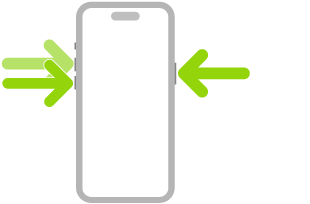
5-Force restart your iPhone 18 Pro. Press and quickly release the volume up button. Press and quickly release the volume down button. Press and hold the side button. When the Apple logo appears, release the side button.
6-If you are having issues with music you purchased from iTunes, try this:
- Open the iTunes Store app
- Tap Purchased
- Select your purchase type: Music
- Select “Not on this iPhone”
- Find your song
- Tap the download-cloud icon