How to recover a password you deleted from your iPhone

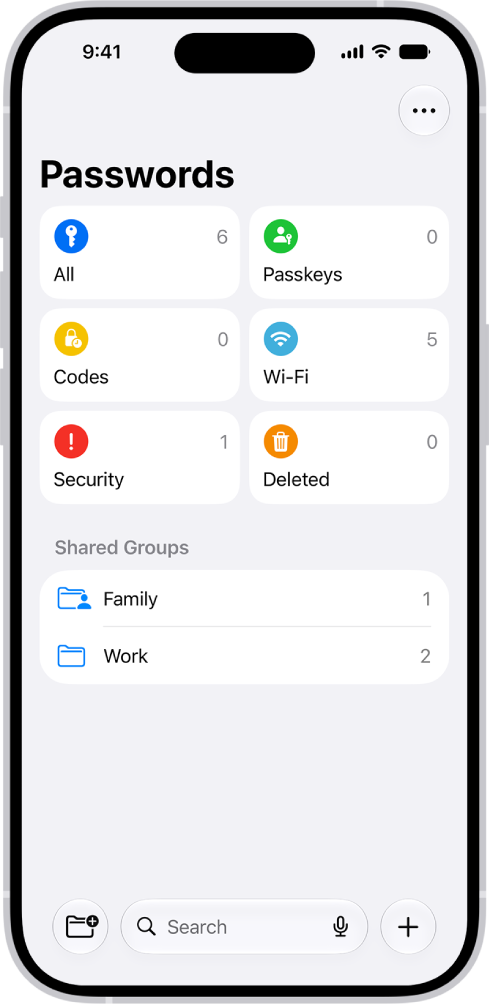
You can recover a password you deleted from your iPhone within 30 days from the Deleted section of the Passwords app.

By Tom Griffin - Executive Editor
0 Min Read

If you delete a password from your iPhone, you have 30 days to recover the password before it’s permanently deleted. Deleted passwords wait in the Deleted section of the Passwords app, and if you shared the password with a group, you can choose whether to resume sharing it.

  1. Open the Passwords app on your iPhone.
  2. Tap Deleted.
  3. Locate the account for the deleted password and tap the account.
  4. Tap Recover.

If you previously shared the password with a group, choose one of the following:

  • Recover to Group: Resume sharing the password with the group.
  • Recover and Stop Sharing: Stop sharing the password with the group.

Your password returns to your iPhone and iCloud Keychain.
TAGGED:
Executive Editor
Follow:
Tom Griffin is the editor-in-chief at GeeksChalk where he oversees all of site’s evergreen content to ensure it’s up to date with the latest information. Hailing from London in the UK, he has over seven years of experience in the tech journalism space and holds a degree in English Literature. In his spare time, Tom can found checking out the latest video games, immersing himself in his favorite sporting pastime of football, and petting every dog he comes across in the outside world.
Leave a Comment