How to use passwords on iPhone

You can find all your passwords, passkeys, and verification codes in one place, synced across devices in the Passwords app on iPhone.

By Abigail Shilets - Staff Writer
0 Min Read

On iPhone, the Passwords app gathers all your passwords, passkeys, and verification codes in one place. They’re available on every device where you sign in with the same Apple Account and turn on Passwords & Keychain in iCloud settings. Here are all your types of password credentials:
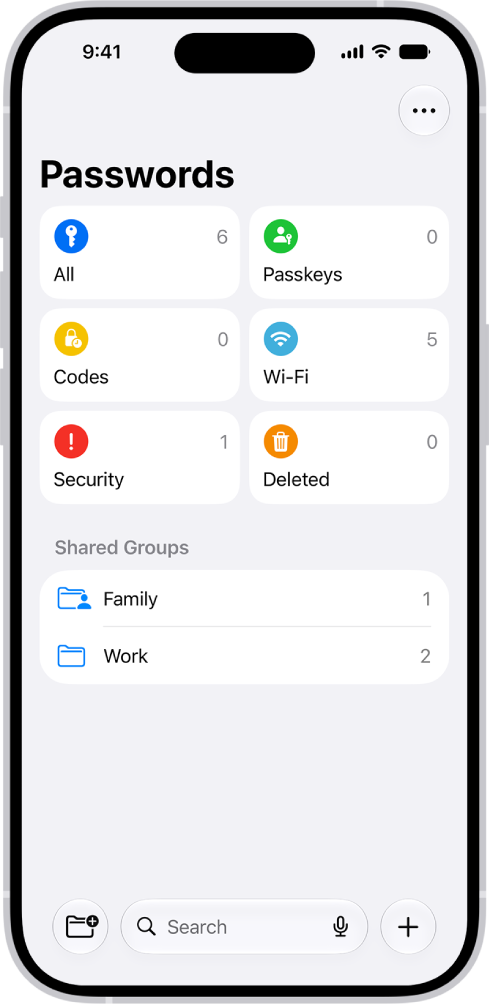
The Home Screen for the Passwords app, with buttons for All, Passkeys, Verification Codes, W-Fi, Security, and Deleted, along with a list of Shared Groups.

  • App passwords
  • Website passwords
  • Sign in with Apple
  • Passkeys
  • Verification codes
  • Wi-Fi passwords
  • Passwords shared with groups

Find a password by sorting or searching. Then tap Edit to reveal the password, or to change or delete the password. Tip: In Passwords, tap Security for recommendations to change weak passwords.
TAGGED:
Staff Writer
Follow:
Abigail is a staff writer for GeeksChalk based in Pennsylvania. She covers news, how-tos, and user guides for iPhone, iPad, Mac, and Apple Watch. Before becoming a writer Abigail studied computer science at University and also worked at Apple for more than two years. When not creating masterpiece for GeeksChalk, you can usually find Abigail hiking, climbing, or otherwise unplugged.
Leave a Comment