On iPhone, in the Photos app, you can make stickers from the subjects in your photos and animated stickers from the subjects in your Live Photos. Then use your stickers to decorate messages, photos, notes, and more.
It starts with the subject of a photo. Once you add it as a sticker, it shows up in your stickers menu, ready to use from the onscreen keyboard or Markup tools. You can delete a sticker later, too.
Turn a photo or Live Photo into a sticker
The main subject of a photo can become a sticker.
- Start the Photos app on your iPhone.
- Tap a photo to open it in full screen.
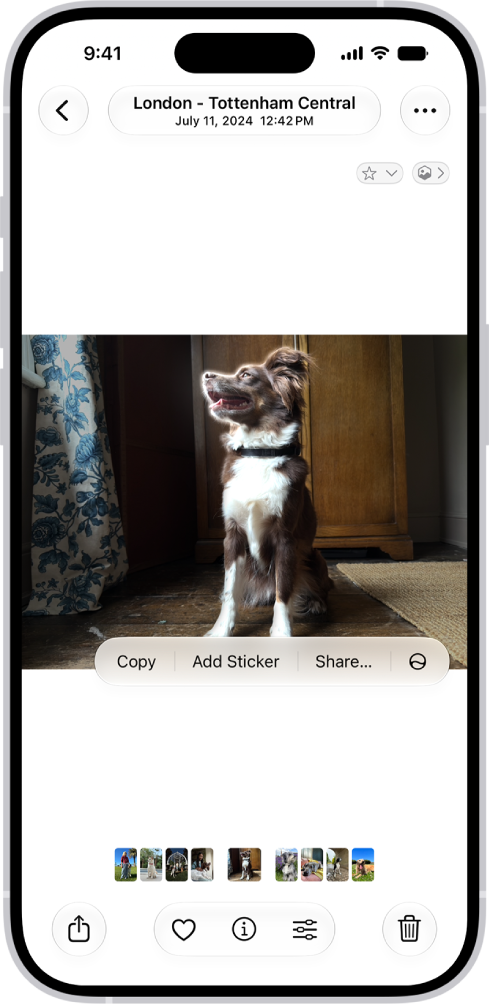
- Touch and hold the subject, then release.
- Tap Add Sticker.
The sticker appears in your stickers menu, which you can access when you use the iPhone onscreen keyboard or Markup tools.
- Tap Add Effect to apply a visual effect such as Outline, or Comic, or turn the Live Photo animation on or off.
- Tap the Close button to close the stickers menu.
Quick tip: You can use stickers you’ve created to decorate a photo.
Delete a sticker
- Start the Photos app on your iPhone.
- Open a photo and then tap the Edit button.
- Tap the Markup button, then tap the Add button.
- Tap Add Sticker, touch and hold the sticker you want to delete, and tap Remove.
Since your stickers sync with iCloud, they’re available on any iPhone, iPad, Mac, or Apple Vision Pro where you’re signed in to the same Apple Account.