iPad Pro 11-inch (3rd generation) hardware: buttons, cameras, and ports

You can learn the location of the cameras, buttons, and other essential hardware features on iPad Pro 11-inch (3rd generation).

By Abigail Shilets - Staff Writer
0 Min Read

Learn the location of the cameras, buttons, and other essential hardware features on iPad Pro 11-inch (3rd generation).

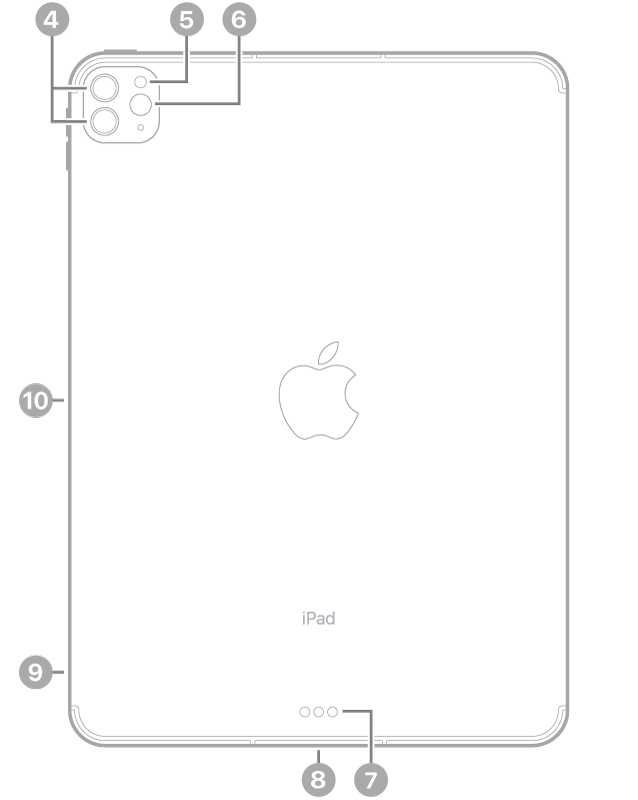
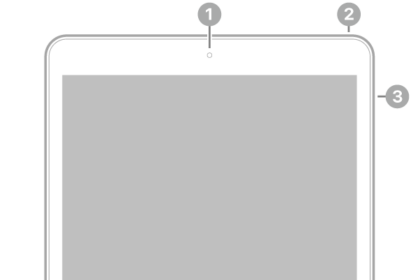
It shows where to find the front camera, top button, volume buttons, rear cameras, flash, LiDAR Scanner, Smart Connector, Thunderbolt / USB 4 connector, SIM tray (Wi-Fi + Cellular), and magnetic connector for Apple Pencil.
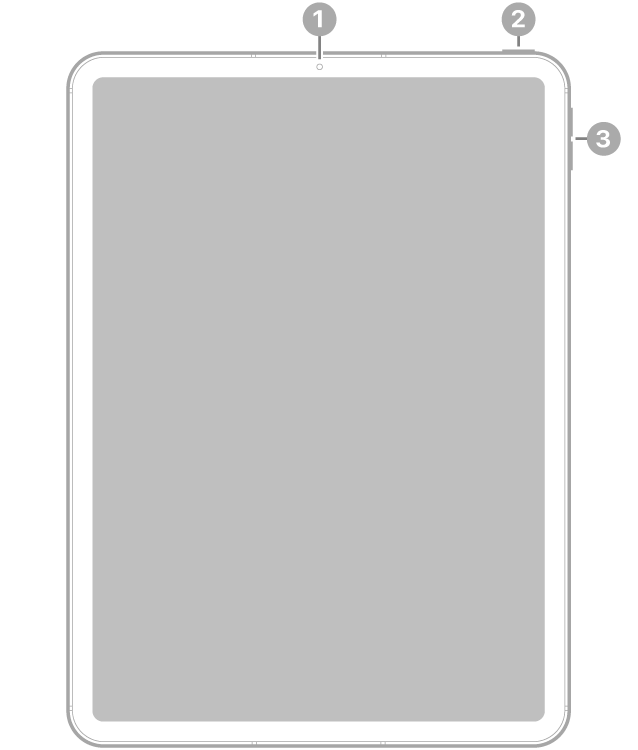
The front view of iPad Pro with callouts to the front camera at the top center, the top button at the top right, and the volume buttons on the right.

  • 1 Front camera
  • 2 Top button
  • 3 Volume buttons

The back view of iPad Pro with callouts to the rear cameras and flash at the top left, Smart Connector and Thunderbolt / USB 4 connector at the bottom center, the SIM tray (Wi-Fi + Cellular) at the bottom left, and the magnetic connector for Apple Pencil on the left.

  • 4 Rear cameras
  • 5 Flash
  • 6 LiDAR Scanner
  • 7 Smart Connector
  • 8 Thunderbolt / USB 4 connector
  • 9 SIM tray (Wi-Fi + Cellular)
  • 10 Magnetic connector for Apple Pencil
Get started with iPad Pro

TAGGED:
Staff Writer
Follow:
Abigail is a staff writer for GeeksChalk based in Pennsylvania. She covers news, how-tos, and user guides for iPhone, iPad, Mac, and Apple Watch. Before becoming a writer Abigail studied computer science at University and also worked at Apple for more than two years. When not creating masterpiece for GeeksChalk, you can usually find Abigail hiking, climbing, or otherwise unplugged.
Leave a Comment