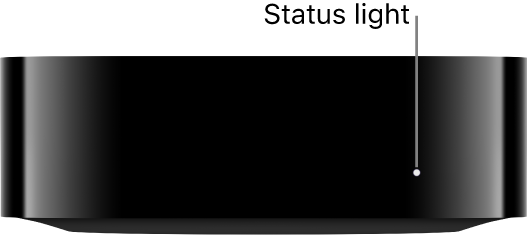
The status light on the front of Apple TV 4K shows what your Apple TV 4K is doing. It glows when Apple TV 4K is on, flashes slowly while it’s starting up, and flashes quickly when it’s updating software. If you see it flash once, Apple TV 4K is accepting a command from the remote.
Here’s what the status light on the front of Apple TV 4K indicates:
| If Apple TV 4K is | The status light |
|---|---|
| On | Glows |
| Off or in standby | Is off |
| Starting up | Flashes slowly |
| Accepting a command from the remote | Flashes once |
| Updating software | Flashes quickly |
Not all features and content are available in all countries or regions or on all Apple TV hardware models.
See also