SUMMARY
- Wallpapers are one of the simplest and most impactful ways to customize your iPhone.
- Some apps may require watching ads or a paid subscription to access all wallpapers.
- Surprisingly, Reddit offers unique wallpapers with various threads dedicated to sharing device-specific backgrounds.
Changing your iPhone wallpaper is one of the easiest ways to spruce up your phone and inject some personality into it. As silly as it might sound, giving your iPhone a makeover with some new wallpaper (live or static), is a small but not insignificant way to get a virtual refresh.
Whether you like nature wallpapers, abstract backgrounds, illustrations, and much more, here are the ten best wallpaper apps for iPhone. These iPhone wallpaper apps are free to download, so you don’t need to worry about paying for anything.
What are the best wallpaper apps for iPhone?
1. Zedge
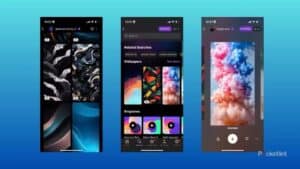
Zedge is one of the best apps for downloading wallpapers on iPhone. The app categorizes wallpapers in collections, offering a myriad of options, including anime, animals, games, nature, technology, space, and more. On top of its rich collection of wallpapers, Zedge stands out due to its community focus.
The app has artists who create wallpapers and upload them on the platform. There’s also a vibrant community of users who create custom collections that you can add to your library of wallpapers if you create an account. Despite this community focus, you don’t need to create an account or log in to download wallpapers.
Zedge also has a recommendation algorithm that learns your taste and recommends new wallpapers you might like.
Zedge offers not only wallpapers but also ringtones to customize your iPhone with. The app is available for iOS and Android, and uses a credit system to limit how many wallpapers you download. A new background typically starts around 10 credits, and you earn more by watching 30-second ads. It’s annoying, but Zedge’s real advantage is the wide variety of wallpapers it offers, including some that are animated, if your operating system supports it.
The ads can be annoying — though you can remove them with a paid subscription — and you’ll have to filter through some clearly AI-generated art that floats to the top of certain search terms (it doesn’t help that the Zedge app has a built-in AI image generator), but if you can look past them, you’ll have an excellent selection of images to choose from, ranging from landscapes to popular characters from pop culture.
Download: Zedge (Free, in-app purchases available)
2. Walli
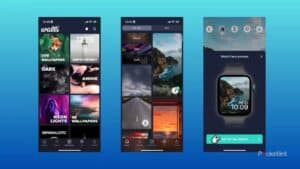
Walli is a high quality and unique collection of artistic wallpapers for your iPhone. By opening the app, you’re greeted with a well-sorted collection of categories that you can tap to open related wallpapers. Walli has a large selection of over 3,000 iPhone wallpapers. These include: quotes, beaches, tattoos, cityscapes, Halloween, and sports.
The app’s interface is easy to navigate and use. The app uses TikTok-style swipe-up and swipe-down gestures to move from one wallpaper to the next. The artist profile, like, and save buttons are also placed on the bottom right, which should be familiar if you’ve used TikTok in the past. Even if you haven’t, it won’t take long before you get the hang of the app.
Walli is a special option in this list because, despite the wide selection of wallpapers, you can create images with AI that you can download and use instead. If you’d like custom wallpapers, this is a great option to explore on Walli.
Download: Walli (Free, subscription available)
3. Backdrops
Backdrops has an excellent selection of colorful illustrations and photos that make for great backgrounds for a iPhone. The app mainly focuses on illustrations and graphic-design-driven wallpapers over pure photography — though a few choice photo selections are available, too. The app offers multiple collections that are for paid Pro subscribers only, but there are still plenty of fun backgrounds available for free, including a rotating wallpaper of the day that’s refreshed regularly.
You don’t have to rely on Backdrops’ curatorial eye if you don’t want to — the app lets you search through images using broad categories like “abstract” or “food,” along with individual tags and specific colors. If you only want to see wallpapers that will match your bright blue “Ultramarine” iPhone 16, you can do that pretty easily.
Download: Backdrops (Free, premium version available)
4. Vellum
Vellum is another great free app for downloading wallpapers on iPhone. Unlike other apps on the list, Vellum has a comparatively smaller selection of original wallpapers.
The app sources wallpapers from different platforms, including copyright and royalty-free image sites (like Unsplash and Pexels), organizations (like NASA, Google, and Apple), and independent artists. But despite sourcing from different sources, the app only features the best of the best.
Additionally, the best thing about Vellum is that it has a well-organized image library, so it’s easier to get what you’re looking for by browsing the available categories on the app’s homepage. It’s also easier to download images to your Photos library. Plus, all images are free to download, unlike most apps in this list.
Download: Vellum (Free, premium version available)
5. Unsplash
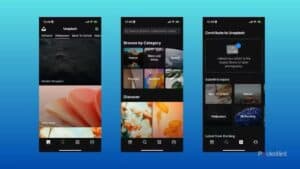
Unsplash is a Flickr-esque collection of excellent, free-to-use photos that make great backgrounds for a iPhone. If you want to upload your own photos, you can do it from the app too.
If you’re interested in photography in particular, Unsplash offers a library of high-quality (and often, very high-contrast) photos that look great on a bright iPhone screen. While not every image Unsplash hosts makes for an excellent background, as of iOS 18 — offer you fine-tuned control over where app icons are placed on your wallpaper, you should be able to make everything work.
The app also allows you to sort image results by orientation and color, which makes it convenient to find appropriate wallpapers for your iPhone. You can create collections of your favorite images you’d like to download and set them as your iPhone wallpaper.
Since Unsplash is a one-stop shop for stock photos, you should specifically search for wallpapers to find appropriate images that you can use as wallpapers. An easy way to do this is by tapping Wallpapers category in the top bar on the app’s homepage.
What’s key to Unsplash’s appeal is how it’s an open library of photos. The creators of images are clearly credited and everything in the app is free to download and use. The only thing that requires an account is uploading your own photos to Unsplash or, if you want to subscribe to Unsplash and use photos from Unsplash in your own professional work, much like the OG photo-sharing service, Flickr.
Please note that what you’ll find in the wallpaper section of Unsplash is more curated and slower to update than some other apps.
Download: Unsplash (Free, in-app purchases available)
6. Wallcraft
Wallcraft is a dedicated wallpaper app with a wide selection of original wallpapers you won’t find anywhere else. A major theme in the app’s library is illustrations. Still, you will also find other kinds of pictures across different categories.
Whether you’re into architecture, space, sports, art, cars, and more, Wallcraft has you covered. Besides using the categories, you can search through the app’s wallpaper library to find images based on a given term.
Wallcraft also makes it easy to find pictures related to a wallpaper you’d like to download. Its related images functionality is handy as it saves you so much time browsing through the library when you like a specific theme or set of images. The app has adaptive wallpapers, too, suited for different iPhone screens.
Download: Wallcraft (Free, subscription available)
7. Wallpapers Now

Wallpapers Now offers thousands of free iPhone wallpapers, including those designed to take advantage of the lock screen’s depth effect. Other themes include Holidays, Winter, and Nature. While some pictures on the app are locked behind a paywall, many wallpapers are available for free. Users also get an option to preview an image before downloading.
The app doesn’t require users to watch an ad whenever they choose a wallpaper, which is good. Although the user interface displays ads, it’s not as bad as some other free apps.
Download Wallpapers Now (Free, subscription available)
8. Wallpapers For iPhone

Next up on our list is Wallpapers for iPhone app. The app opens on the Categories page, which groups wallpapers based on themes like Summer, Abstraction, Architecture, Beach, and more. Upon selecting a theme, the app shows all the related wallpapers in that collection. A nice feature of the app is the ability to preview a wallpaper for the home screen and the lock screen by placing a dummy clock and app icons over it. Users can also blur an image or add it as their Apple Watch face.
To download a wallpaper, users will need to watch an ad which can be up to 30 seconds long. Despite this, images in some collections, especially Art, Cars, and City, are worth downloading. The ad-free premium version costs $2.99 per week or $4.99 per month.
Download Wallpapers For iPhone (Free, subscription available)
9. OGQ Backgrounds
The next iOS app in our list of best wallpaper apps for Apple iPhone is an app called OGQ Backgrounds. This app is very simple in a way that it gives you a huge collection of wallpapers for your device. Along with categories from which you can search for different types of wallpapers. In a way, this application is very straightforward. As it lets you preview and apply backgrounds. Additionally, it is also unique in a way that you will not get tired of looking at different wallpapers from its collection.
Download OGQ Backgrounds (Free, subscription available)
10. Reddit
Reddit is best known as a social app, but there are multiple dedicated threads with instructional information, and even wallpapers you can use for your iPhone.
While it’s probably best known as the home for some of the most inane, hyper-specific conversations on the internet, Reddit is a surprisingly great source for unique wallpapers. There are more general wallpaper subreddits like r/wallpaper and r/wallpapers with thousands and, in some cases, millions of members sourcing backgrounds and wallpapers. There are even more specialized subreddits like r/iphonewallpapers if you’re looking for something for a specific device.
You should verify where a wallpaper comes from on Reddit to make sure you’re not taking an image without someone’s permission.
Now, your taste might not be the same as a random redditor — the most popular wallpaper threads weren’t always mine — but they’re communities, meaning if you don’t see what you like, there’s a good chance someone has asked what you’re looking for before, or someone will be willing to help if you ask politely in a thread of your own.
Download Reddit (Free)
Find Unique Images to Use as Your iPhone’s Wallpaper
Install one or more of these apps if you’re looking for great places to hunt for wallpapers. If you want an app with a great selection of custom images, you should try Zedge. Walli is great for its wide variety of wallpaper categories; it also allows you to create custom wallpapers with the in-app AI functionality.
If you’re more into abstract images and illustrations, Wallcraft and Backdrops are great choices. Lastly, you should go for Unsplash if you’d like a bigger library that spans different categories. But whichever app you choose, you’ll certainly find wallpapers that suit your personality.