How to see the time worldwide in Clock on iPhone

You can see the local time in cities around the world with World Clock in the Clock app on iPhone, and add, delete, or reorder cities.

By Abigail Shilets - Staff Writer
0 Min Read

On iPhone, you can see the local time in time zones around the world. In the Clock app on your iPhone, World Clock lets you manage your list of cities, so you can add a city, delete a city, or reorder the cities whenever it’s useful.

Siri: Ask Siri something like: “What time is it?” or “What time is it in London?”
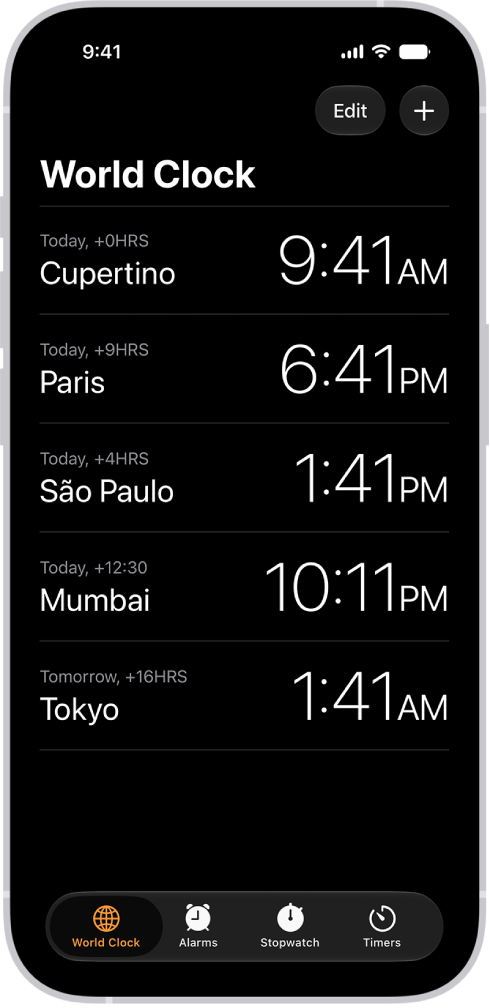
The World Clock tab, showing the time in various cities. The Edit button near the upper-left corner lets you reorder or delete clocks. The Add button near the upper-right corner lets you add more clocks. World Clock, Alarm, Stopwatch, and Timers buttons are along the bottom.

  1. Start the Clock app on your iPhone.
  2. Tap World Clock.
  3. To manage your list of cities, do any of the following:

    • Add a city: Tap the Add button and choose a city.
    • Delete a city: Swipe left on the city. Then tap the Trash button.
    • Reorder the cities: Tap Edit, then drag the Reorder button up or down.

      When you’re finished, tap the Done button.
TAGGED:
Staff Writer
Follow:
Abigail is a staff writer for GeeksChalk based in Pennsylvania. She covers news, how-tos, and user guides for iPhone, iPad, Mac, and Apple Watch. Before becoming a writer Abigail studied computer science at University and also worked at Apple for more than two years. When not creating masterpiece for GeeksChalk, you can usually find Abigail hiking, climbing, or otherwise unplugged.
Leave a Comment