You can choose a default calling option for audio calls on your iPhone. You can also choose whether to use your phone number or your Apple Account to make and receive FaceTime calls.
With your Apple Account, you choose whether people can reach you by email address, phone number, or both. Or you can skip signing in and use FaceTime with just your phone number.
Here’s how to set up FaceTime on iPhone.
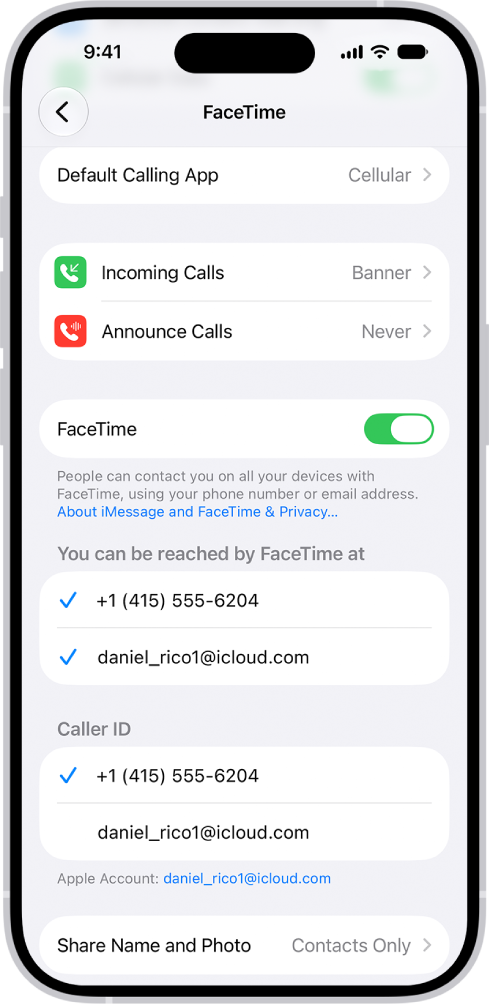
Set up FaceTime
- Open the Settings app on your iPhone.
- Tap Apps, then tap FaceTime.
- If FaceTime is turned off, turn it on.
- Choose how you want to use FaceTime:
- With your Apple Account: If you see a sign-in screen, sign in to your Apple Account and enter your password.
Below “You can be reached by FaceTime at,” choose whether people can reach you through your email address, your phone number, or both. Below Caller ID, choose whether your email address or phone number appears on Caller ID for outgoing calls.
- With just your phone number: You can skip signing in and use FaceTime with only your phone number as your contact method.
- With your Apple Account: If you see a sign-in screen, sign in to your Apple Account and enter your password.
- Optionally, tap Default Calling App and then choose a default calling option for audio calls.
To stop using FaceTime, go to the Settings app , tap Apps, then tap FaceTime. Turn off FaceTime (or if you’re signed in to your Apple Account, tap your Apple Account, then tap Sign Out).