Several users have said that they are having trouble taking screenshots on the iPhone 18 Pro. More specifically, users have said that their iPhone freezes up when taking screenshots. For some users, it appears that users run into lag issues when they want to capture their device’s screen. In this article, I explain how you can fix this problem. And lastly, some users are experiencing this issue when attempting to share or edit a screenshot.
Please try the tips below. After trying each step, try to take a screenshot to see if you’ve fixed your issue. This article focuses on the iPhone screenshots problems.
Force restart
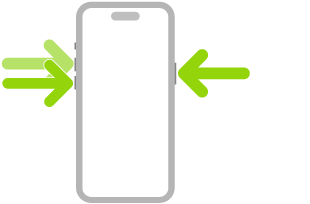
Force restart your iPhone 18 Pro to see if this helps. Here is how you can do this:
- Press and quickly release the volume up button. Press and quickly release the volume down button. Press and hold the side button. When the Apple logo appears, release the side button.
Update
It is always a very good idea to keep your software up to date. Update to the latest version of iOS and then try again. You can update your device wirelessly by going to Settings > General > Software Update. This will check for updates. If there is an update, follow the onscreen instructions to update your device.
You may also want to turn on Automatic Updates. You can customize this setting by going to Settings > General > Software Update > Automatic Updates.
Storage
Ensure that your iPhone 18 Pro has enough storage. On your device, go to Settings > General > iPhone Storage. This page may show a list of recommendations that you may follow to free up space.
Try to maintain at least 1 GB of free space on your device. Your screenshots may not be saved in Photos because there is not enough space for new files.
If you want to free up space on your iPhone 18 Pro so you have enough storage, you can delete apps, music, photos you do not use or need.
Battery
If your device’s battery health is poor, your device’s performance will suffer. Maybe it’s time for a replacement. On your device, go to Settings > Battery and tap Battery Health. This page will show a percentage indicating its maximum capacity: the closer to 100 percent it is, the better. It should show a capacity percentage of at least 80%.
Reset all settings
Resetting all settings may help you fix this problem. Doing so will not erase your data but all of your settings (saved Wi-Fi passwords, location settings, screen settings, etc) will be restored to the default iPhone settings. Here is how:
- On your iPhone, go to Settings > General > Transfer or Reset iPhone > Reset.
- Tap Reset All Settings.
- Then follow the onscreen instructions.