You want to connect your family’s iPads, but you’re not sure how. Family Sharing allows you to connect up to six family members onto a shared family account. In this article, I’ll explain what Family Sharing is and show you how to set it up on your iPad!
What Is Family Sharing?
Family Sharing lets you share App Store purchases, Apple subscriptions, and much more with all of the devices connected to your family network. You can also add children who are under the age of 13, who can now have their own Apple Account.
Setting up Family Sharing can help you save money, especially when you share subscriptions. For example, an individual Apple Music subscription costs $10.99 / month. A family subscription costs $16.99 / month. You’ll save money with Family Sharing, even if you only connect two devices!
How Family Sharing Works
Every family has a “family organizer” who invites other members of the family to join. The organizer’s Family Sharing settings are automatically applied to other devices when they’re added to the network.
When the family organizer updates their settings, makes a new purchase, or adds a new picture to the shared family album, that gets updated on all the devices in the Family Sharing network.
How To Set Up Family Sharing
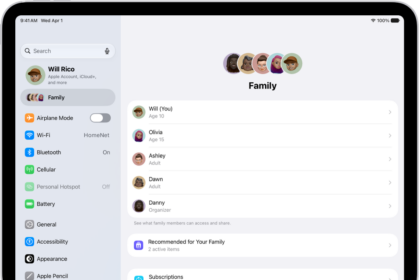
First, open the Settings app on the iPad belonging to the person who wants to be the family organizer. Tap on their name at the top of the screen and enter their Apple Account password. Then, tap Family. Finally, tap Continue to begin setting up Family Sharing.
You’ll be given the option to decide what you share with your family (Purchases, Locations, and much more), select your family payment method, and invite family members using the Messages app.
If you turn on purchase sharing, all of the content that has been purchased by a family member in the network will be available to everyone else. You can find those purchases by opening the App Store, tapping on the Account icon in the upper right-hand corner of the screen, and tapping on Purchased.
Family Sharing gives parents some excellent tools for keeping track of their children and managing what they can do on their iPads. We talked to Eva Amurri about the benefits of setting up Screen Time features through Family Sharing.
There’s a lot you can do with Family Sharing. Apple has an overview of the things you can set up with Family Sharing.
Family Sharing: Explained!
You’ve successfully set up Family Sharing on your iPad! Make sure to share this article on social media so you can teach your friends and followers about Family Sharing too. Feel free to leave a comment below if you have any other questions about this iPad feature.