This article explains how you can fix if Yahoo Mail is not working properly on your iPhone 18 Pro. Are you experiencing issues with sending or receiving email messages using the iOS Mail app? Then this article is for you. The most common problems are:
- Yahoo Mail is not updating.
- It is not loading.
- It is very slow.
- Unable to open or read emails.
- Messages are stuck.
You may also get error messages such as “Cannot get mail”, “Authentication failed” or “Connection to the server failed”. For example, the “Cannot get mail” error says ‘the mail server “imap.mail.yahoo.com” is not responding. Verify that you have entered the correct account info in Mail settings’.
Please see the tips below in order. After trying each step below, test your mail again to see if you’ve fixed your issue.
1. Check to see if your Yahoo Mail account works
It is possible that you are having this problem because there is something wrong with your account. Here is how you can check this:
- On your iPhone, open Safari.
- Visit the Yahoo Mail website: https://mail.yahoo.com/
- After logging in, try to read your emails and send emails.
- Are you having any issues?
If you are not having any issues with the Yahoo Mail web site, this means that there are issues with the Mail app and/or with your settings.
2. Restart your iPhone 18 Pro
Simply restarting your device may fix your device. Here is how:
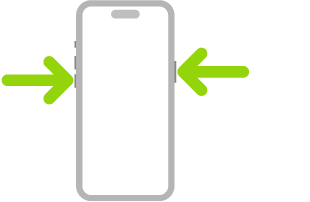
- Simultaneously press and hold the side button and either volume button until the sliders appear, then drag the Power Off slider.
3. Update your iPhone 18 Pro
Make sure that your device is using the latest version of the iOS software. Here is how you can check for software update and update your device:
- Tap Settings.
- Tap General.
- Tap Software Update. And if there is an update available, follow the onscreen instructions to update your device.
4. Delete and re-add
Your current settings may be corrupt. You may want to delete your mail account and then add it again. Here is how:
- Remove your Yahoo mail from your iPhone:
- Go to Settings > Apps > Mail > Mail Accounts.
- Find your Yahoo Mail account.
- Tap the red Delete Account button.
- Add your Yahoo account to your iPhone. You can do so manually or automatically. We will first try the automatic setup. And after this, if you are still having issues then we will try the manual IMAP setup. Here is how:
- Automatic setup:
- Go to Settings > Apps > Mail > Mail Accounts.
- Tap Add Account.
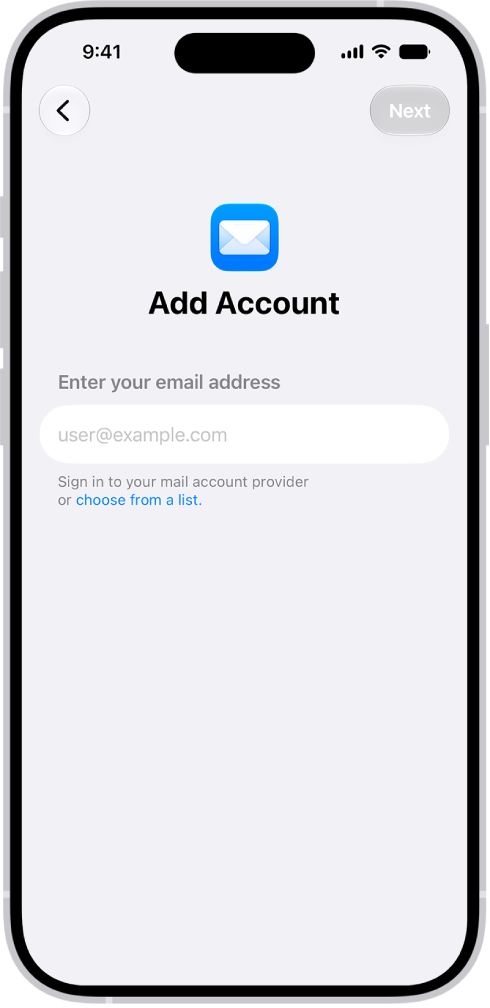
- Tap “choose from a list.”
- Tap the Yahoo icon.
- Then follow the onscreen instructions.
- Now check your Yahoo Mail. Are you having issues? If yes, then delete the account again (see number #1 above) then re-add with IMAP. Here is how:
- Manual setup:
- Tap Settings > Apps > Mail > Mail Accounts.
- Go to Add Account > choose from a list > Add Other Account > Mail Account.
- Enter the details, name, email, password, etc. and tap Next. For the password, use a Yahoo app password. To generate a third-party app password for Yahoo Mail, sign in to the Yahoo Account Security page, click Create app password under “External connections,” and follow the prompts.
- Tap the IMAP tab and here are the settings you should enter:
- Email: your full email address ([email protected]).
- Incoming Mail (IMAP) Server: Hostname – imap.mail.yahoo.com; Port – 993; Requires SSL – Yes.
- Outgoing Mail (SMTP) Server: Hostname – smtp.mail.yahoo.com; Port – 465 or 587; Requires SSL – Yes; Requires authentication – Yes.
- Automatic setup:
If you are still having this problem, then you may want to contact Yahoo, perhaps there’s a service outage meaning Yahoo Mail Servers may be down.
Another thing you should consider is to start using the Yahoo Mail app instead of the iOS Mail app. You can go to the App Store and download the Yahoo Mail app and install it.