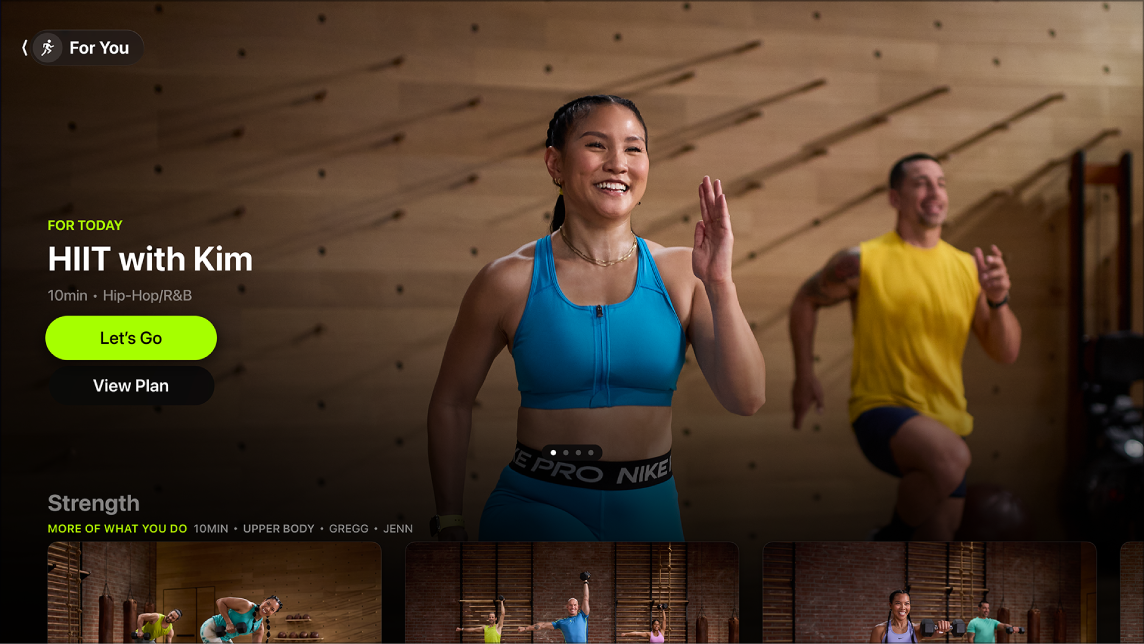
When you’re ready to start working out on Apple TV 4K, the For You screen in the Fitness app brings your favorite workouts and meditations to the forefront. You can find workouts of the type and duration you like there, with your favorite trainers and music. You can also access workouts and meditations that help you keep your streaks going and progress towards fitness awards. There are also shortcuts to your favorite activity types and trainers.
Note: Apple Fitness+ workouts require a subscription and an Apple Watch or iPhone connected to the Fitness app on Apple TV 4K.
Find your favorite workouts and meditations
On the For You screen, you can quickly find workouts that match the type and duration you like, plus your favorite trainers and music.
- Go to the Fitness app on Apple TV 4K.
- Open the sidebar and select For You.
- Do either of the following:
- Navigate left and right in the top row to view your top-recommended workouts.
- Scroll down to navigate workouts categorized by your favorite activity types, or other workouts you might like based on trainer, music, duration, and more.
- Select a workout to view more information, watch a preview, see what music is used, or save the workout for later.
- Select Let’s Go or Let’s Begin to start the workout or meditation.
Browse your favorite activities and trainers
If you have favorite activity types and trainers, the For You screen has shortcuts to them.
- Go to the Fitness app on Apple TV 4K.
- Open the sidebar and select For You.
- Navigate down to Activity Types to view your favorite activities, or Fitness+ Trainers to view your favorite trainers.
- Select an activity type or a trainer. Then find a workout by filtering results based on the categories on the left side of the screen.
Make progress on streaks or fitness awards
For a quick look at your progress toward streaks and fitness awards, check the For You screen.
- Go to the Fitness app on Apple TV 4K.
- Open the sidebar and select For You.
- Navigate down to view the streaks and fitness awards relevant to you.
- Select a streak or award to view workouts that help you make progress on that streak or award.
Apple TV 4K may also show you notifications with suggested workouts to help you stay on track with a streak or fitness award. To adjust notification settings, see Set notification preferences on Apple TV 4K.
Not all features and content are available in all countries or regions or on all Apple TV hardware models.
See also