How to change how you view events in Calendar on iPad

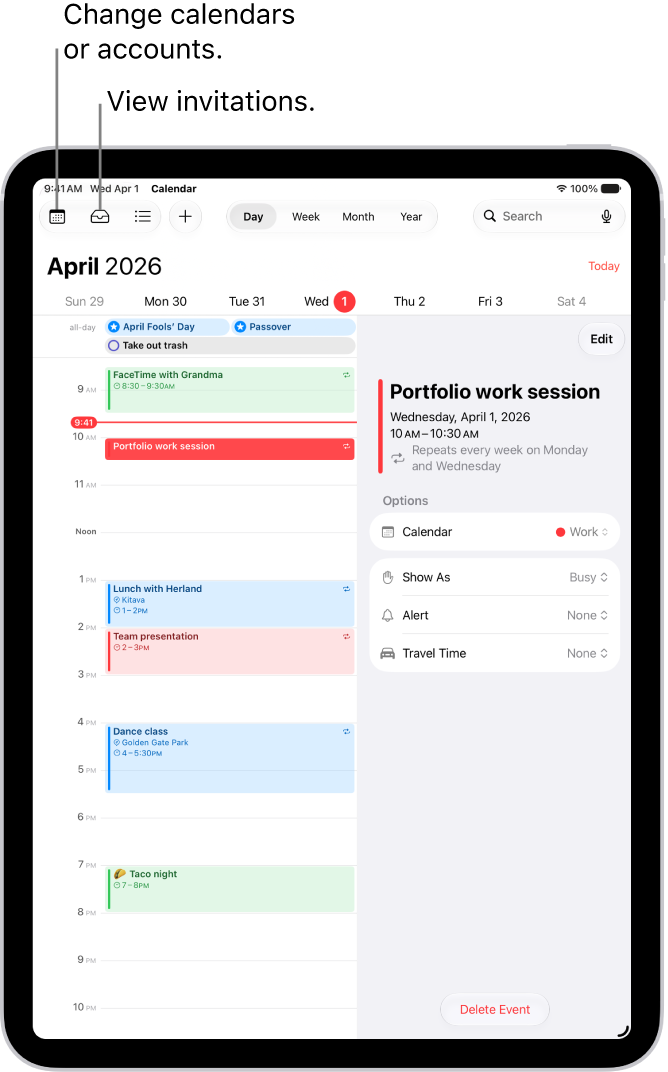
You can change how you view events in Calendar on iPad, by day, week, month, or year, or as a list of upcoming events.

By Kristina Terech - Staff Writer
0 Min Read

On iPad, in the Calendar app, you can view one day, week, month, or year at a time, or view a list of upcoming events. You can zoom in or out on your calendar. You can also search for events and change your Calendar settings.

  1. Open the Calendar app on your iPad.
  2. Do any of the following:
    • Zoom in or out: Tap Day, Week, Month, or Year at the top of the screen to zoom in or out on your calendar. In Week or Day view, pinch to zoom in or out.
    • View upcoming events: Tap the List button to view upcoming events as a list.

See also
TAGGED:
Staff Writer
Follow:
Kristina is a staff writer at GeeksChalk, and is interested in all things Apple. This includes its best products such as the iPad, iPhone, Mac, AirPods, and Apple Watch. When she's not tinkering with the latest Apple gear, you’ll find her watching movies, taking pictures and exploring the great outdoors.
Leave a Comment