When you use supported AirPods with iPhone, iPad, or Mac, you can play calming background sounds, such as ocean or rain, to mask unwanted environmental noise. They’re there to help minimize distractions, so you can focus or rest.
You choose the sound and the volume. You can even stop the sounds with a timer.
- Wear your AirPods, and make sure they’re connected to your device.
- Do one of the following:
- iPhone or iPad: Go to the Settings app, then tap Accessibility. Tap Audio & Visual and tap Background Sounds. Turn on Background Sounds.
- Mac: Go to the System Settings app, then click Accessibility in the sidebar. Click Audio, then turn on Background Sounds.
- Set any of the following:
- Sound: Choose a sound; the audio file is downloaded to your device.
- Volume: Drag the slider.
- Use When Media Is Playing: Adjust the volume of the background sound when your device is playing music or other media.
- Equalizer: Turn this setting on or off. Choose your options.
- Stop Sounds with a Timer: Turn this setting on or off. Choose your options.
- Turn off background sounds when your Mac is not in use (Mac only): Turn this setting on or off.
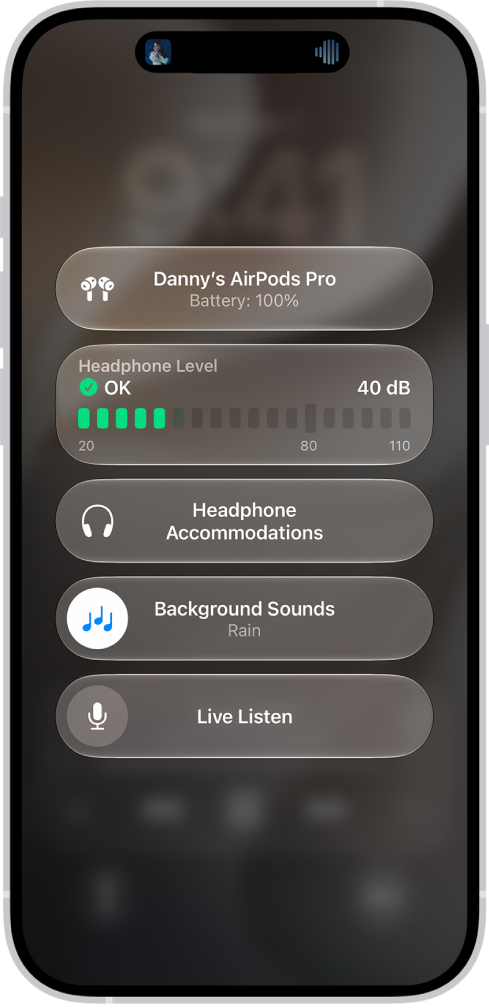
Quick tip: Hearing in Control Center is a fast way to turn background sounds on or off and adjust the volume from your iPhone or iPad. To add it, open Control Center, touch and hold the screen, and tap Add a Control at the bottom. Then tap Hearing.
This guide is for iOS 27, iPadOS 27, macOS 27, tvOS 27, watchOS 27, or later.
See also