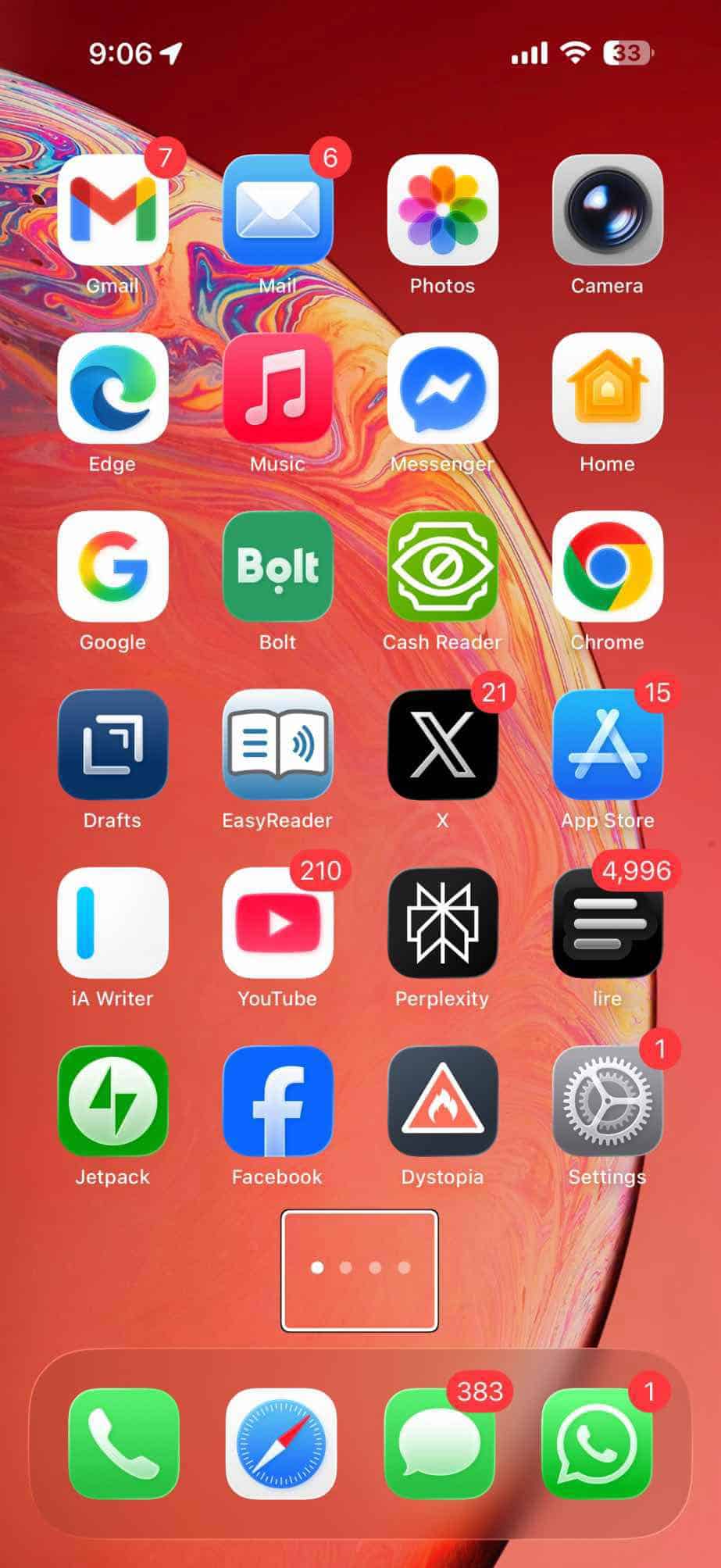
Your iPhone’s Home screen includes a Search field that allows you to find anything on your device and the web. This field is located at the bottom of the screen under the app icons and above the Dock. If you have more than one page, Search appears on all of them. This is called Spotlight Search. This is a live search; you will see the results updating as you type. You can also launch Spotlight Search by swiping down from the middle of the Home screen.
The Home Screen Search bar was introduced with iOS 16. Before this, the same spot was occupied by a string of dots indicating the different pages of the Home screen.
This Search field is available on iPhones with larger displays. It is not available on iPhone SE models with smaller 4.7-inch screens, regardless of whether they have Face ID or Touch ID. If your iPhone supports this feature, it is enabled by default. This option and the related settings won’t be available on smaller iPhone models.
Since it is really easy to start a Spotlight Search by swiping down on the Home Screen or the Lock Screen, some users may prefer to remove this Search option. You may see this as redundant and want to get rid of it. In this article, I will show you how you can do this.
Hide the Search Bar on iPhone Home Screen
- On your iPhone, tap Settings.
- Tap Home Screen & App Library.
- Under the Search option, turn off the Show on Home Screen switch.
Now you will notice that the Search field is replaced by the dots, as you can see in the screenshot below. You cannot hide the dots. It is either the dots or the Search field.

If you have the Search field enabled, it will briefly disappear automatically when you are navigating through the pages.
My last note is that when you hide the Search field, you won’t get an extra row of apps. Nothing else will be changed visually.