How to share contacts on iPad

You can share contacts on iPad from the Contacts app with Messages, Mail, or another sharing option.

By Abigail Shilets - Staff Writer
0 Min Read

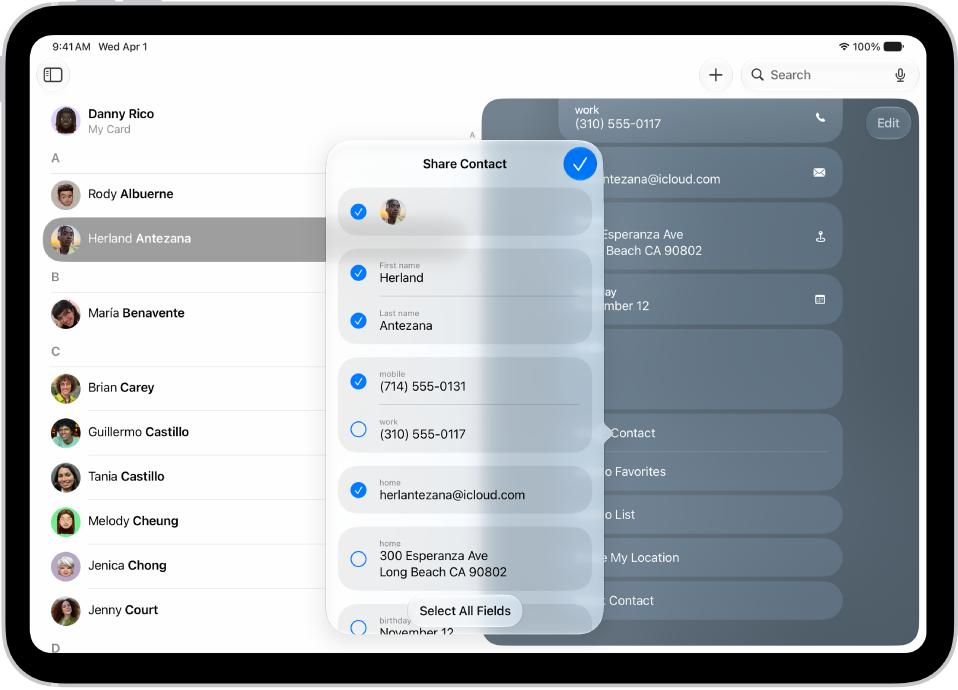
On iPad, you can use the Contacts app to share your own contact information, or another person’s, with someone else using Messages, Mail, or another sharing option. You just choose the contact and the fields you want to include, and send it. You can also add or remove accounts in Contacts.

  1. Start the Contacts app on your iPad.
  2. Select the contact you want to share.
  3. Tap Share Contact, select the fields you want to include, and tap Done.
  4. Select a method to share the contact, then tap Send.

See also
TAGGED:
Staff Writer
Follow:
Abigail is a staff writer for GeeksChalk based in Pennsylvania. She covers news, how-tos, and user guides for iPhone, iPad, Mac, and Apple Watch. Before becoming a writer Abigail studied computer science at University and also worked at Apple for more than two years. When not creating masterpiece for GeeksChalk, you can usually find Abigail hiking, climbing, or otherwise unplugged.
Leave a Comment