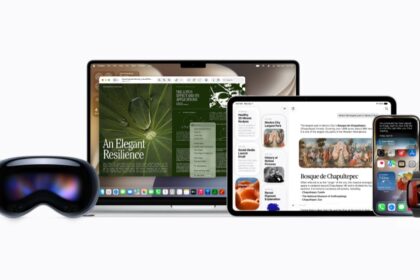
Apple released iOS 26 beta on June 9,. The update brings many new features and improvements to the iPhones of developers beta testers, like the a stunning new design, powerful Apple Intelligence capabilities, new ways to stay connected in the Phone and Messages apps, and exciting updates to CarPlay, Apple Music, Maps, and Wallet.
iOS 26 is a major update that brings a beautiful new design, intelligent experiences, and improvements to the apps users rely on every day.
On June 9 2025, Apple previewed iOS 26, a major update that brings a beautiful iOS 26 new design, intelligent experiences, and improvements to the apps users rely on every day. The new design provides a more expressive and delightful experience across the system while maintaining the instant familiarity of iOS. Integrated throughout the system and built with privacy from the ground up, Apple Intelligence gets even more capable. Updates to the Phone and Messages apps help users stay connected while eliminating distractions like unwanted calls. iOS 26 also introduces new features in CarPlay, Apple Music, Maps, and Wallet, as well as Apple Games, a brand-new app that gives players a single destination for all their games.
“iOS 26 shines with the gorgeous new design and meaningful improvements to the features users rely on every day, making iPhone even more helpful,” said Craig Federighi, Apple’s senior vice president of Software Engineering. “Experiences are more expressive and personal, from the Lock Screen and Home Screen, to new capabilities across Phone and Messages that help users focus on the connections that matter most. And with powerful new Apple Intelligence capabilities integrated across the system, users can get things done easier than ever.”
I’ve been using the iOS 26 beta on my iPhone 16 since WWDC. This iOS 26 beta review is based on my own personal experience.
I recommend downloading a beta on a device other than your primary iPhone. Because this isn’t the final version of iOS 26, the update might be buggy and battery life may be shortened, and it’s best to keep those potential troubles on a secondary device.
Note that the beta isn’t the final version of iOS 26, so more features could land on your iPhone when it’s released in the fall. There’s no release date, but Apple usually releases new iOS versions shortly after its September event.
If you can’t wait until the fall, here’s what to know about many of iOS 26’s new features in the beta version of the software.
IOS 26 COMPATIBILITY: WHAT IPHONES SUPPORT IOS 26?
According to Apple, these iPhone models can get iOS 26:
- iPhone 16e
- iPhone 16
- iPhone 16 Plus
- iPhone 16 Pro
- iPhone 16 Pro Max
- iPhone 15
- iPhone 15 Plus
- iPhone 15 Pro
- iPhone 15 Pro Max
- iPhone 14
- iPhone 14 Plus
- iPhone 14 Pro
- iPhone 14 Pro Max
- iPhone 13
- iPhone 13 mini
- iPhone 13 Pro
- iPhone 13 Pro Max
- iPhone 12
- iPhone 12 mini
- iPhone 12 Pro
- iPhone 12 Pro Max
- iPhone 11
- iPhone 11 Pro
- iPhone 11 Pro Max
- iPhone SE (2nd generation or later)
Of course, iOS 26 will also be compatible with all future iPhone 17 models.
iOS 26 has a a Beautiful New Look
The new iOS 26 design makes apps and system experiences more expressive and delightful, while keeping iOS instantly familiar. It’s crafted with Liquid Glass — a new translucent material that reflects and refracts its surroundings, bringing greater focus to content, and delivering a new level of vitality across controls, navigation, app icons, widgets, and more. The new design extends to the Home Screen and Lock Screen, making them more personal and expressive than ever. Liquid Glass also brings new customization options to app icons and widgets, including a stunning clear look.
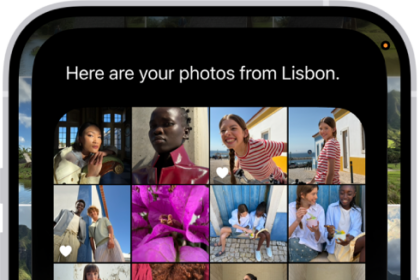
On the Lock Screen, the time fluidly adapts to the available space in an image, and spatial scenes bring wallpapers to life with a 3D effect when users move iPhone. Updated design elements also deliver fresh experiences in apps. A simplified, streamlined Camera layout helps users keep their attention on the moment they’re capturing, and the Photos app is updated to feature separate tabs for Library and Collections views. In Safari, web pages flow from the top edge to the bottom of the screen, enabling users to see more of the page while maintaining access to frequently used actions like refresh and search. In Apple Music, News, and Podcasts, the tab bar is redesigned to float above users’ content, dynamically shrink when users are browsing to put content front and center, and then expand when they scroll back up.
New Capabilities Powered by Apple Intelligence
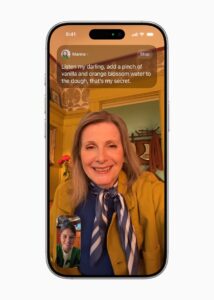
With iOS 26, Apple Intelligence elevates the iPhone experience and helps users get things done easier than ever, while unlocking new ways to communicate and do more with what’s on their screen. Live Translation is integrated into Messages, FaceTime, and Phone to help users communicate across languages, translating text and audio on the fly.1 Live Translation is enabled by Apple-built models that run entirely on device, so users’ personal conversations stay personal.
Live Translation is integrated into Messages, FaceTime, and Phone to help users communicate across languages, translating text and audio on the fly.
Building on Apple Intelligence, visual intelligence extends to a user’s iPhone screen so they can search and take action on anything they’re viewing across apps. Users can ask ChatGPT questions about what they’re looking at onscreen to learn more, as well as search Google, Etsy, or other supported apps to find similar images and products. Visual intelligence also recognizes when a user is looking at an event and suggests adding it to their calendar, repopulating key details like date, time, and location.
Genmoji and Image Playground provide users with even more ways to express themselves, including mixing their favorite emoji, Genmoji, and descriptions together to create something new.
Shortcuts are now more powerful and intelligent than ever. Users can tap into intelligent actions, a whole new set of shortcuts enabled by Apple Intelligence, and will see dedicated actions for features like Writing Tools and Image Playground.
In iOS 26, Apple Intelligence can automatically identify and summarize order tracking details from emails sent from merchants and delivery carriers, giving users the ability to see their full order details and progress notifications all in one place — even for purchases not made with Apple Pay.
Additionally, a new Foundation Models framework opens up access for any app to tap directly into the on-device foundation model at the core of Apple Intelligence, giving developers direct access to powerful intelligence that’s fast, built with privacy at its core, and available offline, using AI inference that is free of cost.
Features for Staying Connected and Eliminating Interruptions
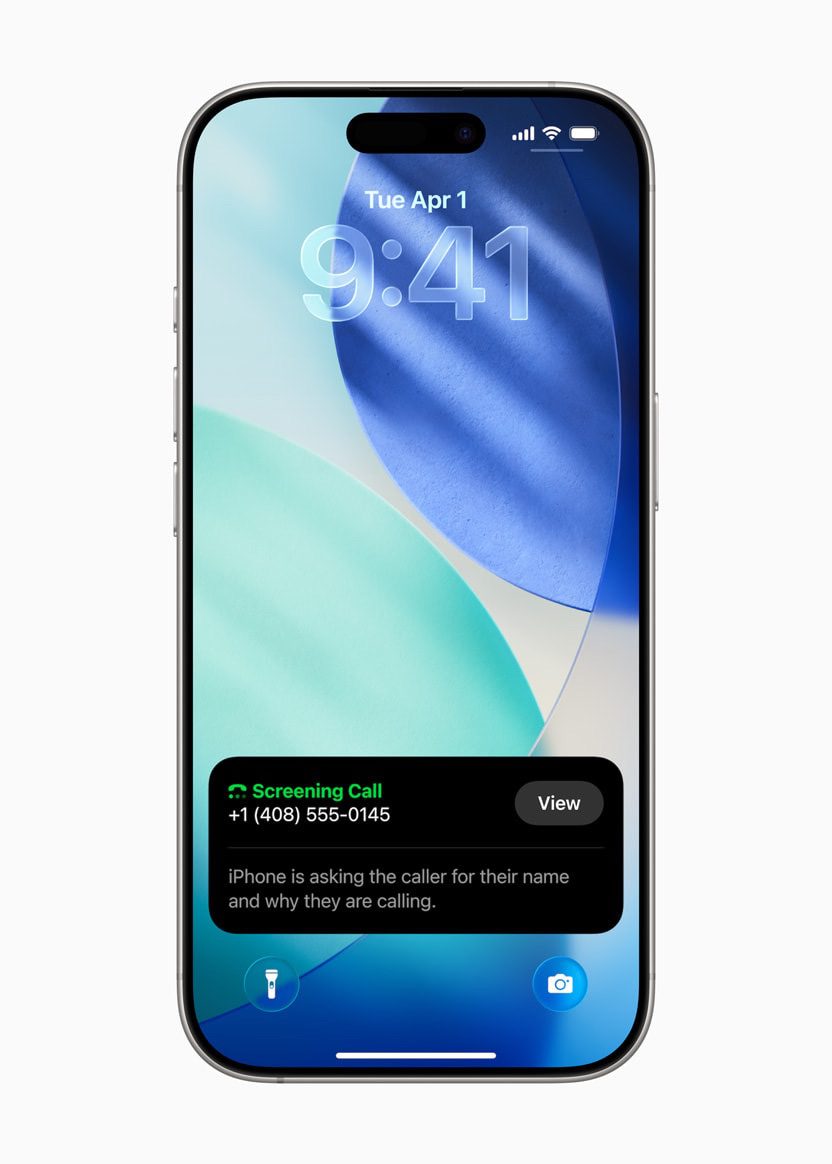
With iOS 26, the Phone app now offers a unified layout that combines Favorites, Recents, and Voicemails all in one place. Call Screening builds on Live Voicemail and helps eliminate interruptions by gathering information from the caller and giving users the details they need to decide if they want to pick up or ignore the call.4 And for the times when a user is stuck on hold, Hold Assist notifies the user when a live agent is available.
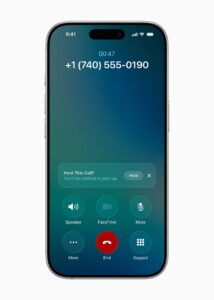
Call Screening builds on Live Voicemail and helps eliminate interruptions by gathering information from the caller and giving users the details they need to decide if they want to pick up or ignore the call.
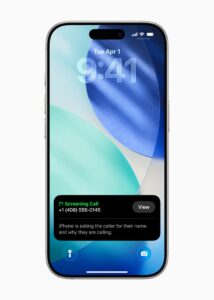
For the times when a user is stuck on hold, Hold Assist notifies the user when a live agent is available.
The Phone app now offers a unified layout that combines Favorites, Recents, and Voicemails all in one place.
In Messages, users can now screen messages from unknown senders, giving them more control over who appears in their conversation list. Messages from unknown senders will appear in a dedicated folder where users can then mark the number as known, ask for more information, or delete. These messages will remain silenced until a user accepts them.
In Messages, users can now screen messages from unknown senders, giving them more control over who appears in their conversation list.
iOS 26 also offers enhancements to conversations, including custom backgrounds and the ability to create polls. With Apple Intelligence, Messages can detect when a poll might come in handy and suggest one, and users can generate unique backgrounds that fit their conversation with Image Playground. Additionally, in group chats, users can now see typing indicators, and request, send, and receive Apple Cash.6
In a group conversation in Messages, a user creates a poll for their friends to respond to.
Enhancements to CarPlay
CarPlay — the smarter, safer way to use iPhone while driving — is used over 600 million times per day, and now with iOS 26, it receives updates that make it even more beautiful and easy to use. The stunning design includes a new compact view for incoming calls, allowing users to see who’s calling without missing key information like upcoming directions. iOS 26 also brings Tapbacks and pinned conversations to Messages in CarPlay, and with widgets and Live Activities, users can stay in the loop without losing focus on the road. These updates also come to CarPlay Ultra, which brings the best of iPhone and the best of the car together for a deeply integrated, unified experience across every screen.
CarPlay Ultra — which brings a unified and consistent experience across all the driver’s screens, and the ability to control vehicle functions like radio and climate — is now even more beautiful with the new design.

Updates to Apple Music, Maps, and Wallet
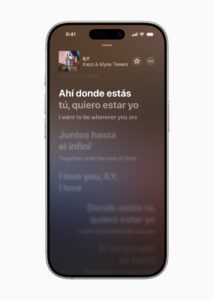
In Apple Music, iOS 26 adds Lyrics Translation that helps users understand the words to their favorite songs, while Lyrics Pronunciation allows everyone to sing along, regardless of language. AutoMix uses intelligence to transition from one song to the next like a DJ, using time stretching and beat matching to seamlessly move from one song to the next.
The iOS 26 updates in Apple Wallet help make everyday interactions with the physical world easier than ever. Users can choose to pay with installments or rewards when they make in-store purchases with Apple Pay using iPhone. Refreshed boarding passes in Wallet offer the ability to see and share Live Activities for real-time updates on a flight. They also provide convenient access to a traveler’s most relevant information, such as Maps to navigate airports, Find My to track important items and report missing bags, and more.
Wallet also provide convenient access to a traveler’s most relevant information, such as Maps to navigate airports, Find My to track important items and report missing bags, and more.
Refreshed boarding passes in Apple Wallet also provide convenient access to a traveler’s most relevant information, such as Maps to navigate airports, Find My to track important items and report missing bags, and more.
Additional features in iOS 26:
Apple Games is a new app that gives players an all-in-one destination for their games. It helps players jump back into titles they love, find their next favorite, and have even more fun with friends. They’ll find out what’s happening across all their games, including major events and updates, so they never miss a moment. The Games app is also the best way to experience Apple Arcade, Apple’s game subscription service with more than 200 award-winning and highly rated games for the whole family.
AirPods are more versatile than ever with new features for AirPods 4, AirPods 4 with Active Noise Cancellation (ANC), and AirPods Pro 2. Building on the benefits of Voice Isolation, studio-quality audio recording allows iPhone, iPad, and Mac users to record their content with great sound quality and enjoy even clearer calls. With camera remote, users can press and hold the AirPods stem to take a photo or start and stop a video recording on iPhone or iPad.
Parents can now create or move kids into Child Accounts even more easily, taking advantage of a wide set of parental controls designed to keep children safe. Enhancements across Communication Limits, Communication Safety, and the App Store include parental approvals for contact requests from kids, blurring out sensitive content in FaceTime calls and photos in Shared Albums, and enabling parents to grant an exception for their child to download an app with an age rating that exceeds the app content restriction they set.
Browsing in Safari gets even more private with advanced fingerprinting protection extending to all browsing by default.
Powerful accessibility features include Accessibility Reader, which provides a customized systemwide reading experience, and Braille Access, an all-new interface for iPhone devices with connected braille displays. Updates to Live Listen, Background Sounds, Personal Voice, and more bring a new level of accessibility across the Apple ecosystem.
iOS 26 Availability
All of these features are available for testing through the Apple Developer Program at developer.apple.com, and a public beta will be available through the Apple Beta Software Program next month at beta.apple.com. New software features will be available this fall as a free software update for iPhone 11 and later. The Apple Intelligence features detailed require supported devices, which include all iPhone 16 models, iPhone 15 Pro, iPhone 15 Pro Max, iPad mini (A17 Pro), and iPad and Mac models with M1 and later that have Apple Intelligence enabled and Siri and device language set to the same supported language: English, French, German, Italian, Portuguese (Brazil), Spanish, Japanese, Korean, or Chinese (simplified). More languages will be coming by the end of this year: Danish, Dutch, Norwegian, Portuguese (Portugal), Swedish, Turkish, Chinese (traditional), and Vietnamese.
Should you download iOS 26?
This comes down to whether any of the iOS 26 beta features are things you really want. If not, I’d hold back for now.
IOS 26 BETA REVIEW: VERDICT
That’s our iOS 26 beta review. This is the first developer beta for iOS 26, so there will be more beta versions before iOS 26 is released to the public. That means there’s plenty of time for Apple to add things or remove features to be released with later updates. Apple said it will release iOS 26 to the general public in the fall, but there’s no word on an exact date yet.
What are your own thoughts and first impressions? Please share them in the comments.
THE BOTTOM LINE
For more on iOS 26, here’s how to download the developer beta now and how to prepare your iPhone before downloading the beta.