This short article provides information on how AirPods sound volume issues can be fixed. Users usually report two common issues:
- Sound from your AirPods is low
- One AirPod is louder than the other
In fact, I was having this problem also. I noticed that my left AirPod was louder than the right. Are you having this problem too? Are your AirPods not working properly on one side or both? Do you think that you do not get good sound quality? Or do you think that you hear low sound from your AirPods? Here is how you can fix it.
Please note that you can use Siri to control it or you can go to Bluetooth settings for the AirPods to adjust the volume level.
Resolution
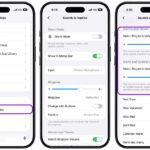
- The first thing is to go to Settings > Accessibility > Audio & Visual. This section lets you set a left/right audio balance. Do this step if you think one pod is quieter than the other. It might be this setting. The AirPods are supposed to have the same volume level unless the balance is changed. You can adjust the volume level for each pod.
- Restart your iPhone 18 Pro or other connected device.
- Turn off Bluetooth and wait a few seconds and turn back on. On your iPhone 18 Pro, you can do this by going to Settings > Bluetooth.
- While using your AirPods (e.g.; listening to music), turn down the volume to zero, on your device, go to the Bluetooth settings (e.g.; if it is iPhone: Settings > Bluetooth) and disconnect your AirPods. To do that, tap on the blue “i” icon next to your AirPods and tap Disconnect (just disconnect, do not unpair). On your iPhone 18 Pro, launch the Music app and play some music. And turn the volume all the way down to zero. Then reconnect your AirPods and turn up the volume.
- AirPods are updated automatically. Apple releases updates on a regular basis. Perhaps there’s a firmware update available. To make sure that your AirPods are updated, do the following:
- Place your AirPods in the charging case
- Make sure that you plug in the charging case
- Make sure that your connected iPhone is connected to the Internet and not too far from the charging case
- Is one of the pods getting quieter? Or do you hear muffled sound? Perhaps it is time to clean it. As you wear your AirPods, your skin cells and ear wax may block the openings. This gunk can also get inside the AirPods speakers and cause these problems. What we recommend is that you clean your AirPods with a soft, clean toothbrush. Brush the larger opening (sound opening) of your AirPods and remove any debris. Be careful, do not brush too hard. This can and will push debris and wax inside. Then “suck” on the opening. Suck until you could feel air flowing through. Then carefully brush and wipe again.
Hopefully, one of the tips above will help you fix your low volume problem. If not, you may be having a hardware related problem. You can make a Genius Bar reservation.