How to open an app on Apple TV 4K

You can open an app on Apple TV 4K from the Home Screen using the clickpad or touch surface on your remote.

By Abigail Shilets - Staff Writer
1 Min Read

Every app on Apple TV 4K is on the Apple TV 4K Home Screen, and you use your remote to get there, highlight an app icon, and open the app. You can do it all with the clickpad or touch surface on your remote, along with the Back button or the Menu button.

Use your remote to do the following:

  1. Press and hold the Back button or the Menu button to go to the Apple TV 4K Home Screen.
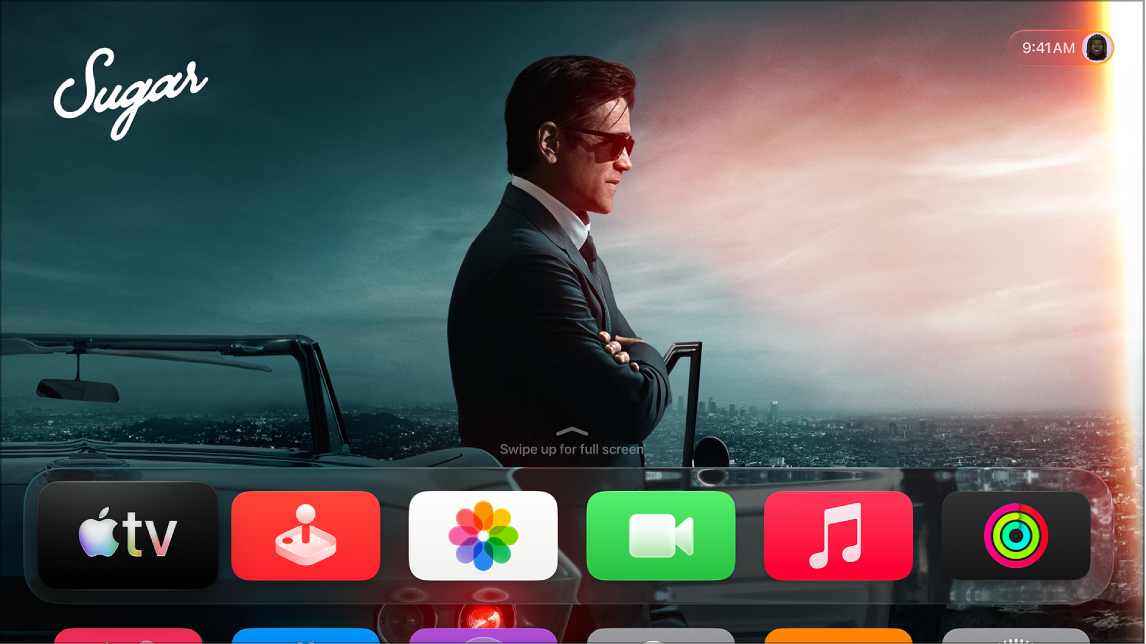
    The Apple TV Home Screen.

  2. Swipe on the clickpad or touch surface to go to and highlight an app icon.
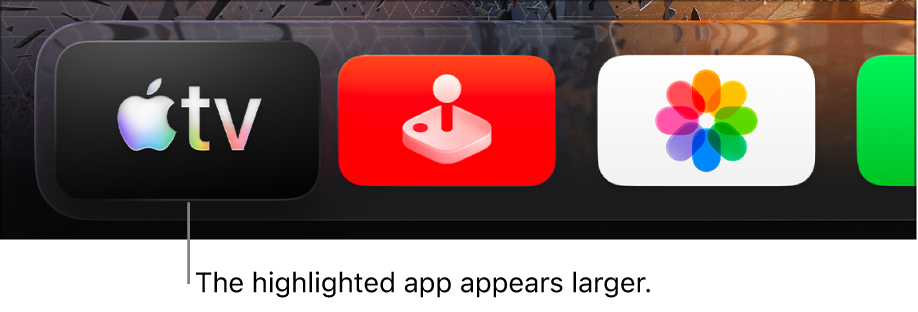
    The Apple TV app highlighted in the top row of the Apple TV Home Screen.

  3. Press the clickpad center or touch surface to open the app.

Not all features and content are available in all countries or regions or on all Apple TV hardware models.

See also

TAGGED:
Staff Writer
Follow:
Abigail is a staff writer for GeeksChalk based in Pennsylvania. She covers news, how-tos, and user guides for iPhone, iPad, Mac, and Apple Watch. Before becoming a writer Abigail studied computer science at University and also worked at Apple for more than two years. When not creating masterpiece for GeeksChalk, you can usually find Abigail hiking, climbing, or otherwise unplugged.
Leave a Comment