After several of weeks, Apple finally released iOS 26 beta 2 to developers. While users shouldn’t expect too much from this build, since Apple typically starts making big changes with beta 3, this update still brings several improvements. With that in mind, _GeeksChalk_has gathered all the changes included in iOS 26 beta 2, along with what Apple is preparing for later this fall.
General stability and battery draining: The most noticeable change in iOS 26 beta 2 is that it’s much more stable. While a few bugs remain, overall usability has significantly improved. The iPhone also no longer overheats during simple tasks.
See also: iOS 26 beta problems and how to fix them
Recovery Assistant: Apple is introducing a new way to recover your iPhone from software issues. Instead of needing a Mac to factory reset after a faulty update, the Recovery Assistant might fix the problem before you even need to plug your iPhone into a Mac.
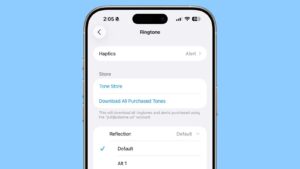
New ringtone: There’s a new "Alt 1" ringtone option for the Reflection ringtone. Developers using iOS 26 beta 2 can choose it as their ringtone by going to the Settings app, tapping on Sounds and Haptics, tapping on Ringtone, and then choosing Alt 1 under Reflection.
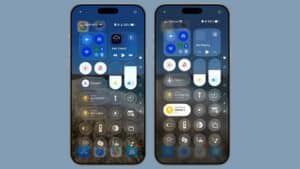
Visual changes: The background behind the Liquid Glass Control Center buttons has more blur, allowing for a more opaque look that makes everything easier to see than before. Unknown messages now appear with a blue badge, and Safari has tweaked its UI with an improved "More" button in the bottom right corner.
Wallet improvements: iOS 26 beta 2 adds full support for the order tracking feature that Apple announced at WWDC. In the Wallet app, there is an option to let Siri to scan your Mail app to find all orders and emails from merchants, even if those orders weren’t made with Apple Pay.
New Apple Music widget: iOS 26 beta 2 adds a new Live Radio widget.
App Store: In the App Store, Apple added an Accessibility section to product pages. Developers will need to provide details listing the accessibility features they support for this section in the App Store to be populated.
Read More
For an overview of the features in iOS 26, make sure to check out our list of 100 new iOS 26 features for iPhone.