How to block pop-ups in Safari on iPad

You can block pop-ups in Safari on iPad by turning on Block Pop-ups in the Settings app.

By Moses Johnson - Editor
0 Min Read

You can block pop-ups in Safari on iPad, so pop-up windows don’t open while you browse. It takes just one setting, Block Pop-ups, and you can turn it off again anytime. You can also hide distractions when browsing in Safari on iPad.

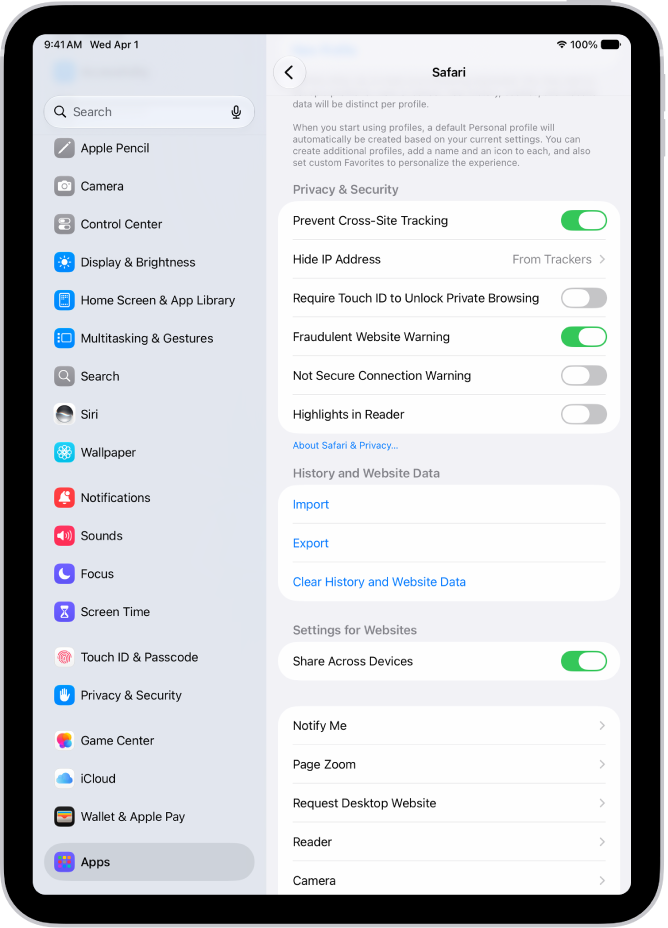
  1. Start the Settings app on your iPad.
  2. Tap Apps, then tap Safari.
  3. Turn on Block Pop-ups.

See also
TAGGED:
Follow:
Moses Johnson is the Editorial Director of GeeksChalk.com, who has a keen eye for news, rumors, and all the unusual stuff around Apple products. Moses is commonly referred to online as The Professor, with decades of experience in tech under his belt.
Leave a Comment