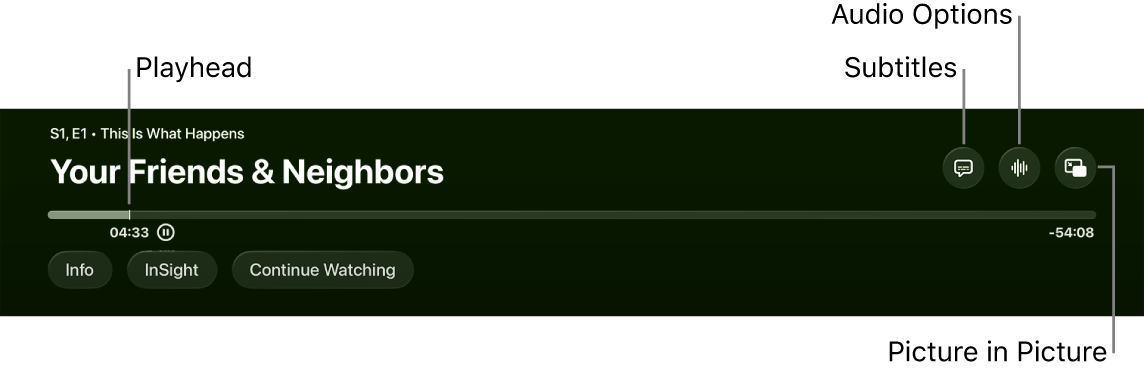
You can use the remote to control various aspects of playback on Apple TV 4K, and the options change based on whether you’re watching TV or listening to music. When a movie, TV show, song, or podcast is playing, onscreen controls can show elapsed time, remaining time, and other options. You can also play or pause, skip backward or forward 10 seconds, or scrub through the timeline to a new position.
Show or hide playback controls
Onscreen controls showing elapsed time, remaining time, and other options are available whenever you’re playing a movie, TV show, song, or podcast.
You can do either of the following with your remote:
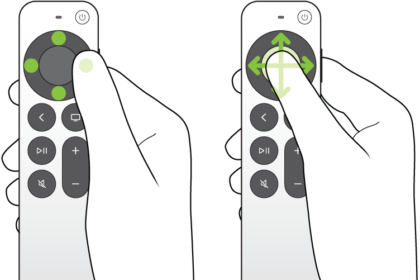
- Show playback controls: Rest your finger on the clickpad or touch surface, or press up on the clickpad ring.
- Hide playback controls: Press the Back button or the Menu button.
Play or pause
While something’s playing, you can do either of the following on your remote:
- Press the Play/Pause button.
- Press the center of the clickpad or touch surface.
Rewind or fast-forward
During playback, your remote can do any of the following:
- Skip backward or forward 10 seconds: Press left or right on the clickpad ring or touch surface. Press again to skip another 10 seconds.
- Continuously rewind or fast-forward: Press and hold left or right on the clickpad ring or touch surface. Press repeatedly to cycle through rewind or fast-forward speed options (2x, 3x, 4x).
To resume playback, press the Play/Pause button.
Scrub backward or forward on the timeline
- During playback, press the Play/Pause button on your remote to pause.
- Swipe left or right on the clickpad or touch surface to scrub backward or forward through the video or song.
- Do either of the following:
- Start playback at the new position: Press the Play/Pause button.
- Cancel and return to the original position: Press the Back button or the Menu button.
Not all features and content are available in all countries or regions or on all Apple TV hardware models.
See also