How to reach the top of the iPhone screen with one hand

You can lower the top half of the iPhone screen so it's within reach of your thumb when you use one hand with Reachability.

By Abigail Shilets - Staff Writer
0 Min Read

When you use iPhone with one hand in portrait orientation, you can use Reachability to lower the top half of the screen so it’s within easy reach of your thumb. It works on iPhone models with Face ID and with a Home button, and you turn it on in Accessibility settings.
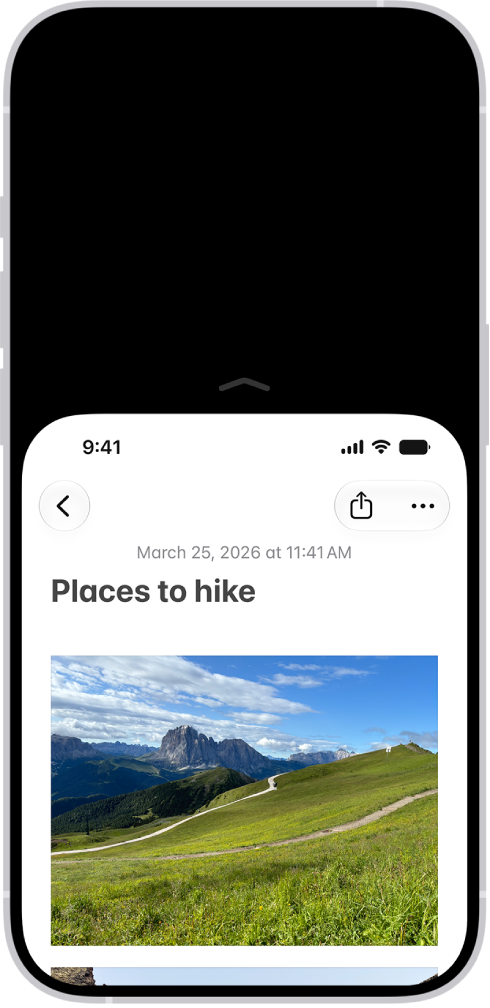
The iPhone screen with Reachability activated. The top of the screen has moved down so it’s within easy reach of your thumb.

  1. Open Settings, tap Accessibility, tap Touch, and turn on Reachability.
  2. To lower the top half of the screen, do one the following:
    • On an iPhone with Face ID: Swipe down on the bottom edge of the screen.
    • On an iPhone with a Home button: Lightly double-tap the Home button.
    • While VoiceOver is on: Swipe up from the bottom of the screen with one finger, then, without lifting your finger, swipe down.
  3. To return to the full screen, tap the upper half of the screen.
Staff Writer
Follow:
Abigail is a staff writer for GeeksChalk based in Pennsylvania. She covers news, how-tos, and user guides for iPhone, iPad, Mac, and Apple Watch. Before becoming a writer Abigail studied computer science at University and also worked at Apple for more than two years. When not creating masterpiece for GeeksChalk, you can usually find Abigail hiking, climbing, or otherwise unplugged.
Leave a Comment