What to Know
- The best way to tell if the iPhone 17 Pro or iPhone 17 Pro Max is fake is by entering its serial number into Apple’s coverage checking tool.
- If it show up there, the iPhone is genuine.
- You should also look for typos on the packaging.
- Also look out for shoddy exteriors and copycat software interfaces.
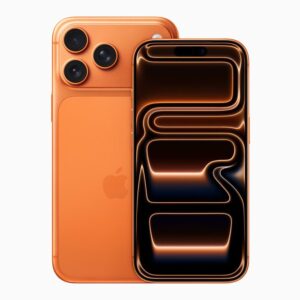
With every new iPhone, especially the Pro models, Apple promises better features. But whenever a new iPhone is unveiled, you can expect a boatload of imitators to follow, and it’s no different with the iPhone 17 Pro and iPhone 17 Pro Max.
There are hundreds of counterfeit iPhone 17 Pro and iPhone 17 Pro Max brands on the market, and at first glance it’s not always easy to pick out the frauds.
If you want to avoid wasting your cash on a fake iPhone 17 Pro or iPhone 17 Pro Max, here’s our easy guide to help check that the new phone is authentic.
How to spot a fake iPhone 17 Pro and iPhone 17 Pro Max
If you’re buying an iPhone 17 pro or 17 Pro Max directly from Apple, you can rest easy that it’s the real deal. But, if you’re purchasing the device from someone else or an unknown store, then there are few checks you can do to confirm if it’s legit.
How to identify a fake iPhone 17 Pro or iPhone 17 Pro Max by inspecting the packaging
I find that the easiest way to identify a fake iPhone 17 Pro or iPhone 17 Pro Max is to inspect the packaging. Apple has pretty high production standards, and dubious manufacturers rarely meet them. The boxes’ fit is tight, the quality of the printing high, the placement of stickers perfect. Apple’s quality control for its products is exacting, so if the iPhone 17 Pro or 17 Pro Max doesn’t meet that mark, it could be fake.
Here are some things to look for:
- Check the box for typos. Fake iPhone 17 Pro and iPhone 17 Pro Max boxes are usually covered with English spelling and grammar errors.
- Inside the box, you should find the following:
- iPhone 17 Pro or iPhone 17 Pro Max.
- A braided cable that has a USB-C plug at both ends.
- SIM ejector tool (only for models sold outside US).
- User manual.
If any of the above items is missing inside the box, you might have knock-off iPhone 17 Pro or iPhone 17 Pro Max. Similarly, if you find a Lightning cable, screen protector, earphones, power adapter, or a case inside the box, you’ve spotted a fake iPhone 17 Pro or iPhone 17 Pro Max.
How to spot fake iPhone 17 Pro or iPhone 17 Pro Max by finding defects
The most obvious place to detect a fake smartphone is the exterior design; buttons in the wrong place, or bezels that don’t look quite right. Here are several things to check before you hand over the money. We can’t be certain it’s legitimate – it could just be a fantastic counterfeit – but these will rule out 95 percent of fakes.
- Real iPhone 17 Pro and iPhone 17 Pro Max have an aluminum unibody design. They have a brushed finish and the material itself is very durable. The material on iPhone 17 Pro and iPhone 17 Pro Max clones tends to feel cheaper and flimsier than the real thing.
- Genuine iPhone 17 Pro and iPhone17 Pro Max have slightly contoured edges which makes them just a bit more comfortable to hold. If the phone has perfectly sharp edges, it’s a fake.
- Original iPhone 17 Pro and iPhone 17 Pro Max have the Camera Control button located below the power button. If the button is missing, pokes out at all, or feels loose, chances are that it’s a fake.
- On an official iPhone 17 Pro and iPhone 17 Pro Max, there should be an Action button on the left side of the phone, right above the volume buttons. Check that this is present, and also that it works. If this button is missing, placed in an unexpected location, or feels loose, you’ve spotted a fake iPhone 17 Pro or iPhone 17 Pro Max.
- Authentic iPhone 17 Pro and iPhone 17 Pro Max have slim bezels around the screen, for a more modern look and they are a tiny bit narrower too. Counterfeit iPhone 17 Pro and iPhone 17 Pro Max have thicker bezels than the real thing, because it’s so hard for fraudulent manufacturers to match Apple’s engineering capabilities.
- Genuine iPhone 17 Pro and iPhone 17 Pro Max have a USB-C port. Does the phone you are inspecting have a USB-C port? If not, it’s guaranteed to be an imitation.
- Genuine iPhone 17 Pro and 17 Pro Max supports Qi wireless charging. It’s unlikely copycats would throw in this expensive feature. Try putting the iPhone 17 Pro on a Qi charging mat. If it doesn’t charge, it might be a fake.
- Legitimate iPhone 17 Pro and iPhone 17 Pro Max should have a Ceramic Shield back. If you notice a different material on the back of the phone, like plastic, we’re sorry to tell you, but the iPhone 17 Pro is a fake.
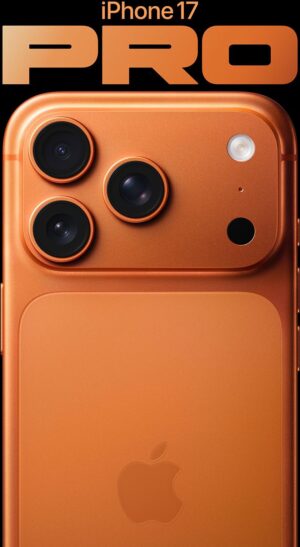
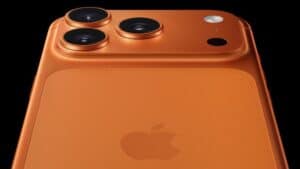
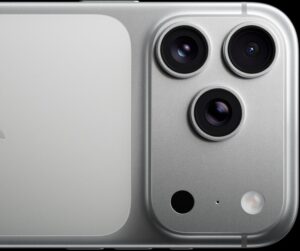
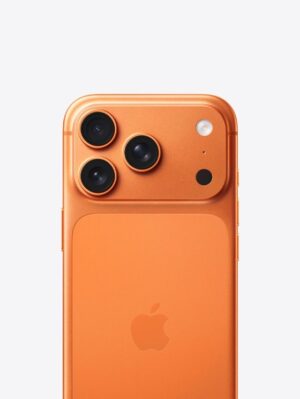
- Real iPhone 17 Pro models have triple rear-facing cameras. If the device has single or dual back-facing cameras, it’s a counterfeit.
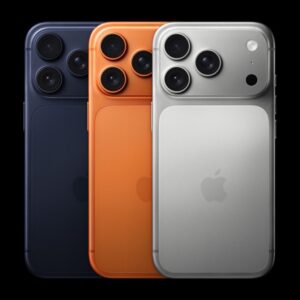
- The iPhone 17 Pro and iPhone 17 Pro Max have a camera plateau that spans almost the entire back of the iPhone. The camera plateau houses an upgraded camera system that includes a revamped Telephoto lens. If you see camera bump on the back of phone you are inspecting, it’s fake.
- If you’ve got scales, check the weight too. Real iPhone 17 Pro weighs at 206 grams (7.27 ounces), while the iPhone 17 Pro Max weighs 233 grams (8.22 ounces).
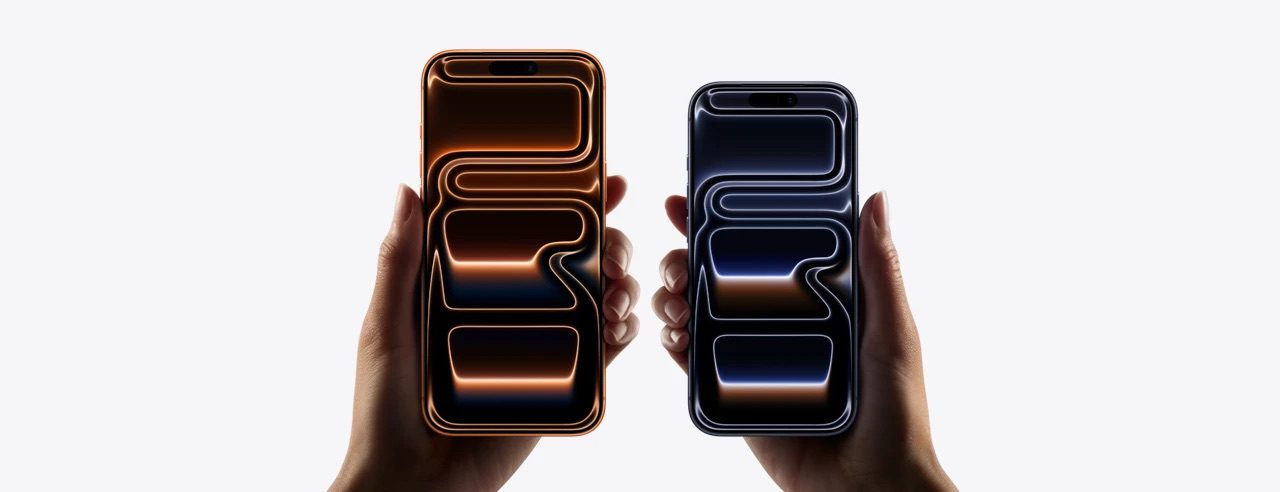
- iPhone 17 Pro and iPhone 17 Pro Max are available in three colors: Silver, Cosmic Orange, and Deep Blue. The iPhone 17 Pro and iPhone 17 Pro Max replicas may have different colors.
How to know if iPhone 17 Pro or iPhone 17 Pro Max is real by checking the software
Well-executed dodgy iPhone 17 Pro and iPhone 17 Pro Max aren’t so easy to detect from the outside; they only become apparent once you start using them. Fakes are most easily identified by their inability to replicate the interface and general user experience of a genuine iPhone 17 Pro or iPhone 17 Pro Max.
- Before buying the device, open it in front of the seller and check if it turns on. If the device doesn’t power on, keep hold of your money.
- If you power on the device, does the Apple Logo appear on the screen? If it doesn’t, that’s a sign that it’s fake.
- Swipe through a few screens and apps. Does the touchscreen respond instantaneously to your swipes? If the phone feels slow and sluggish, it’s fake.
- Check whether the data shown in the Settings app (such as serial number and IMEI) matches what’s printed on the box (see the next section to learn how to find iPhone 17 Pro and iPhone 17 Pro max serial number). If the device serial number doesn’t match what’s on the box, it’s a fake.
How to tell if the iPhone 17 Pro or iPhone 17 Pro Max is fake by checking the serial number
We’ve discussed various ways to tell if the iPhone 17 Pro or iPhone 17 Pro Max is fake just by looking at it, but if you’re not sure, try out the one surefire method: Ask Apple.
Apple runs a website that lets users check if their products are still under warranty. This is great for checking real Apple products, of course, but it also has the added benefit of telling you when you’re using a fake Apple product.
So, to spot fake iPhone 17 Pro or iPhone 17 Pro Max using this trick, follow these steps:
- Find your iPhone’s serial number. You can find the iPhone 17 Pro and iPhone 17 Pro Max serial number in two ways.
- First, if the iPhone has been set up, you can open the Settings app and go to General. Now, tap About. The serial number will be listed on the page that opens.
- Second, if the iPhone hasn’t been set up, on the Hello screen, tap the (i) info button to see basic information about the iPhone, including the serial number.
- Once you have the the serial number, head to the Check Coverage website and enter it in the text field where it says, “Enter a device serial number”
- Complete the Captcha and then click Continue.
- If the tool returns information for that serial number (especially a valid purchased date), that means the iPhone 17 Pro is legit.
- If the serial number is identified as invalid, it’s definitely a fake iPhone 17 Pro.
Quick tip: Systems like this are why you should always keep your serial numbers private. Leaking your number online makes it easier for fraudulent manufacturers to make fake iPhone 17 Pro and iPhone 17 Pro Max with real serial numbers, which makes it harder to detect fakes.
How to tell if your iPhone 17 Pro or iPhone 17 Pro Max is fake by checking the price
Another way to tell if iPhone 17 Pro or iPhone 17 Pro max is fake is by checking the price. iPhone 17 Pro and iPhone 17 Pro Max aren’t cheap. If the deal sounds too good to be true, it’s probably is.
- The iPhone 17 Pro starts at $1099 for the base 256GB version, with 512GB, and 1TB capacities available in $100/128GB increments, up to $1,499 for the highest capacity.
- The iPhone 17 Pro Max has a starting price of $1199 for the 256GB version. It moves up in $100/128GB steps, with 512GB, 1TB, and 2TB models available for $1,399, $1,599, and $1,999, respectively.
If the iPhone 17 Pro or iPhone 17 Pro Max you are looking to buy costs much less than what’s mentioned above, it might not be real.
How to avoid being scammed
When buying online, it’s quite harder to spot a fake, because you don’t get to see the product until it’s been delivered, and getting a fake product means having to claim refunds and send products back to the seller, which is a hassle.
So what can you do?
Here’s my advice on staying safe:
- Only buy iPhone from Apple Store or a trusted authorized Apple dealer. While Amazon is an authorized Apple reseller, it’s all too easy to be viewing products that are listed by third-party sellers.
- If you can make the purchase in person, do that. With the phone in your hand, you can check the authenticity of the device by inspecting its exterior and checking its serial number on the Apple’s website.
- Try to avoid paying in cash due to the lack of a paper trail and the inability to recover payment. Credit cards are better than debit, cash cards, or bank transfers in this regard too. Your bank can usually dispute a transaction to obtain a chargeback. Always check your specific bank’s terms and conditions and you may have to send in a dispute form to initiate the process. PayPal also offers inclusive buyer protection when buying through them, specifically covering knock-off goods and used products.
- Try to obtain proof of purchase and a detailed item description from the seller to act as evidence, just in case. It’s also a good idea to familiarize yourself with the seller’s reputation online via reviews and forum posts before committing to a purchase. A quick Google search ahead of time might save you lots of agony after the fact.
- Forget eBay.
- Use of the word “genuine” is usually a dead giveaway for a fake product.
Conclusion
With all of the above tips, you’re now equipped with enough knowledge to spot a fake iPhone 17 Pro or iPhone 17 Pro max. The chances of encountering one are slim, but it’s always best to be prepared.