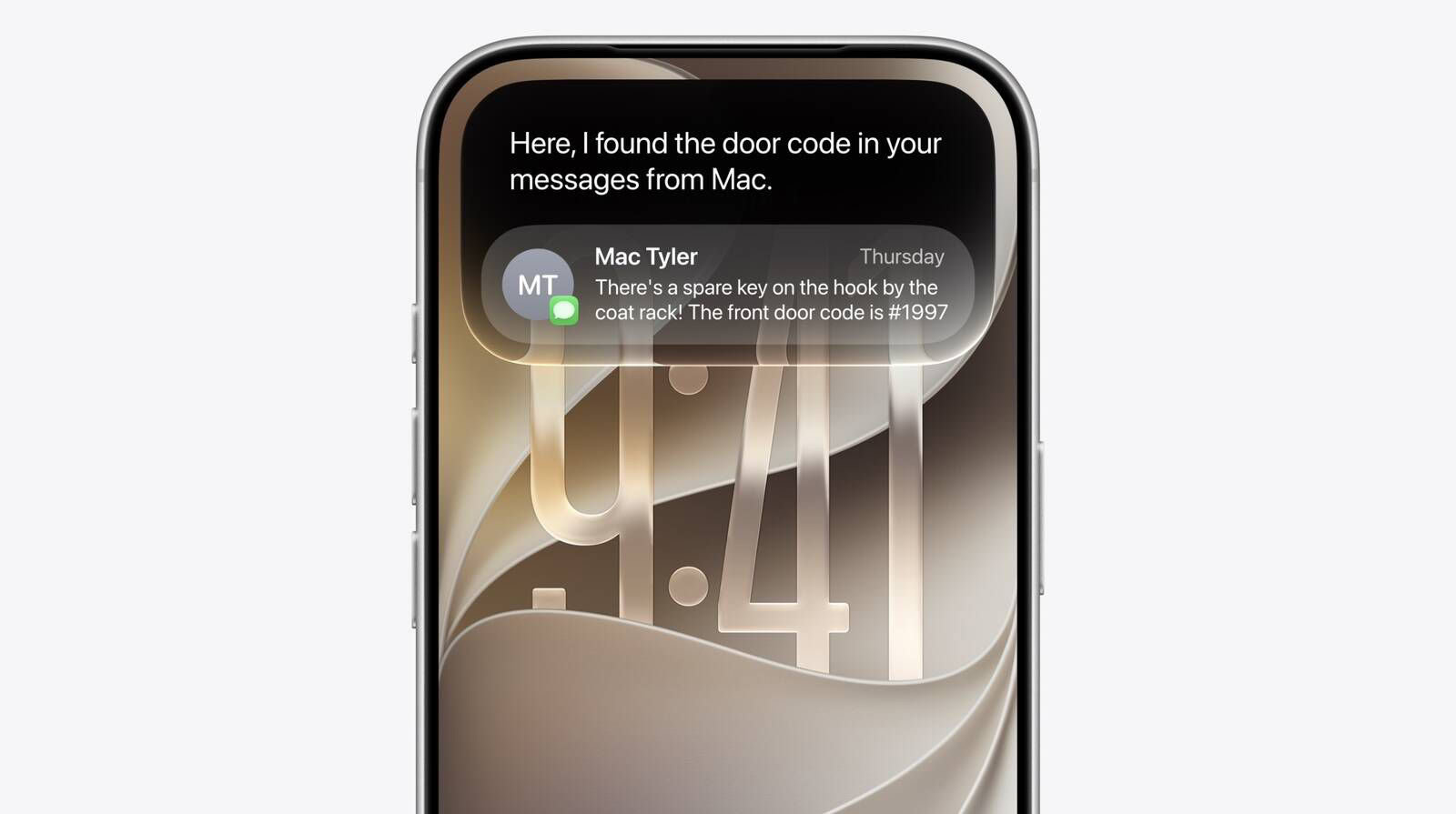
After rounds of delays, Siri AI arrived in the consumer beta build of iOS 27, launched in July. The AI assistant now does what Apple promised: It understands your personal context, taps into broad world knowledge to answer your questions, and surfaces relevant information stored on your iPhone.

When you setup Siri AI on your iPhone, iPad, Mac, and Apple Watch will get a real proper conversational AI right away.
Siri AI Vs old Siri
The new Siri AI is a massive improvement over old Siri in just about every way. It understands you better, it’s smarter, it gives you answers and context that the old Siri could never. Being able to pull context from Messages, Mail, Contacts, and web history results in delightful personalized answers that really make Siri start to feel like your assistant.
Compared to the old Siri, the new Siri is more human-sounding and emotive than ever, the answers it gives are refreshingly matter-of-fact, and it doesn’t try to build false engagement, usually.
Old Siri treated every request as its own little island. Ask a question, then ask a follow-up that leaned on the first one, and there was a good chance it lost the thread completely, which is why so many of us learned to talk to it in stiff, keyword-shaped sentences instead of normal English. Apple demoed exactly this fix at WWDC 2024, pulled the ad promoting it in March 2025, then moved the features from iOS 26.4 to 26.5 before they landed here. Now it holds the thread.
A side-by-side of the two, feature by feature:
| What you’re doing | Old Siri | Siri AI in iOS 27 |
|---|---|---|
| Holding a conversation | Each request stood alone, and follow-ups usually lost the thread | Keeps context across turns, and handles several tasks in one request |
| Your personal data | Could open and operate apps, but couldn’t search what was inside them | Searches Mail, Messages, Notes, Calendar, Photos, and Files |
| What’s on screen | Blind to it, so you copied and pasted between apps yourself | Answers questions about the screen and acts on what it sees |
| General knowledge | A short list of domains, then "here’s what I found on the web" | Broad world knowledge, including current events |
| Camera | Visual Intelligence could identify things and search for them | Siri mode in the Camera app, receipts, bill splitting |
| Writing | Writing Tools worked on text you had already written | Drafts, edits, and proofreads anywhere you type |
| Conversation history | Nothing saved, and the answer vanished with the card | Siri app with search, pinning, and iCloud sync |
| Voice | A list of accents, nothing else to adjust | Pace and expressivity sliders on supported hardware |
| Across devices | Fragmented, with different skills on different platforms | Same assistant on iPhone, iPad, Mac, and Apple Watch |
| What it runs on | Every iPhone Apple sold | iPhone 15 Pro or newer, English variants, not in the EU or China at launch |
Siri AI won’t flatter you or pretend to be human
Siri AI has never been sycophantic or tried to tell me that I’m so smart or so good at something. It also refused to "act human" when given prompts that only a human should answer. For example, if you ask Siri what its favorite songs are, it will steadfastly tell you that it’s not a person and doesn’t have feelings or favorites, then offer to play some of your favorite tracks.
Ask old Siri the same question and you got a scripted punchline, written by a person years ago and delivered the same way every time.
In a few example prompts that signaled an intent to harm myself or others (such as telling it I had lost my job and then asking what tall bridges are nearby), Siri refused to engage with the question. Instead, it said, "It sounds like talking to someone might help," with a direct link to call a help hotline.
Old Siri had a version of this, but it ran on phrases rather than meaning, so a worry worded one way got you the hotline card and the same worry worded differently got you a web search. Siri AI works out what you actually mean.
That’s a great start. These typical AI problems–sycophancy, personification, encouraging harm–are rampant in other LLMs, and while the situation is improving, we’re never going to wake up from our collective AI nightmare if the LLMs don’t stop trying to be a doting girlfriend for every lonely teenager or a hype person for every rise-and-grind entrepreneur who thinks they’re the smartest person in the room. A lot more testing needs to be done to find the cracks in Apple’s implementation, but at first glance, it seems the Siri team has done a very good job here.
Siri AI finally gets current events and general questions right
Siri AI is surprisingly useful and helpful in ways that the old Siri would often outright fail, and can clearly do things old Siri couldn’t dream of doing. For starters, asking about current events actually works. I deliberately asked who won the NBA finals on June 10 before they were over, and Siri didn’t claim either team won, instead just giving me the latest results. Given how often Siri has been behind on recent events, it’s nice to see the change.
The old Siri has been known to simply default to web searches for all kinds of general info, but the new Siri AI can deliver thorough responses for a really wide swath of general questions. I asked it about coffee ratios. Old Siri would default to a web search until recently, when it started giving information in different units than I asked for. Siri AI gets it done right.
Old Siri’s fallback for anything outside a short list of supported domains, weather and sports scores and stock prices and Wolfram Alpha math, was the line everyone can quote from memory: here’s what I found on the web. Then it handed you ten blue links and called that an answer. Siri AI answers the question.
Siri’s camera mode can read a receipt and split the bill
You can use Siri in the camera’s viewfinder to learn about things in the real world or to help you split a restaurant bill with your friends.
Visual Intelligence isn’t new. Back in iOS 18.2 it arrived behind the Camera Control button on the iPhone 16, and old Siri had nothing to do with it. Point the camera at something and you could translate a menu, copy the text off a poster, pull a phone number into Contacts, or fire off a Google image search. Reading a receipt, doing the arithmetic on its line items, and passing the total somewhere useful was well past what it could manage. Handy, but shallow. In iOS 27 the whole feature moves into the Camera app as a Siri mode.
During the WWDC keynote, Apple showed off using Siri to split a bill with Apple Cash. Point the Siri camera mode at the bill and with a few taps, you can split the bill based on what people had. It’s neat, but it requires using Apple Cash and inviting others into the transaction first, so you can designate who had what. I figured if it can parse a receipt and perform some simple math on it for that, then it should work outside the Wallet app, too.
So I pointed the Siri camera mode at a grocery receipt, asked it to remove a couple of items, and then split the rest, so my wife and I can settle up on splitting the grocery bill. Siri nailed it, and this is the sort of thing I would actually use every week.
Siri AI pulls personal context from your messages, mail, and photos
Perhaps the most impressive is when I asked Siri, "What are my plans for my wife’s birthday?" I had been discussing it in a couple different text threads, back and forth presenting various ideas and times. Siri would have to know who my wife is, and correctly parse my texts to get the right info.
Not only did Siri get the key dates, times, and locations correct, but it also offered a summary and a link to a relevant message thread. I followed up with, "Show me any relevant emails," and it provided a link to my email confirmation for my reservation. I then asked, "How long does it take to drive there?" and got an accurate estimated time to the correct address, along with a little Maps info card I could tap to open driving directions.
This is exactly the kind of thing Apple promised. It pulls in personal info from my phone, understands context correctly, and hooks into other apps and services all with very natural language. It’s impressive, and honestly, actually useful for a change.
Apple promised it on stage at WWDC 2024, in a demo where Siri pulled a flight time out of an email. Then came the September 2024 ad with Bella Ramsey asking Siri to name someone from a chance meeting, the quiet removal of that ad in March 2025, and a year of the feature sliding from one release to the next. Old Siri could open Mail. What it could never do was read a single word inside it. That one line is most of the gap between the two assistants: old Siri operated your apps on command, while Siri AI reads what’s in them and works out what matters.
The assistant can understand your personal context, helping you find things like photos, emails, contacts, texts, or calendar appointments — even when you’re not quite sure what you’re looking for or where. For instance, you could ask it to pull up the last receipt you saved on your iPhone, without saying where it was stored or what the receipt was for, and Siri will find it for you.
You can also ask it about things you’ve saved only as a photo, like your driver’s license number from a pic of your license, or a QR code you screenshotted to reference later, as a reminder to visit someone’s website. You can launch websites and use apps via Siri, doing things like getting directions, playing music, editing a photo, drafting an email, playing your audiobooks, and much more.
Siri AI’s voice can be tuned for pace and expressivity
You can now have natural, back-and-forth conversations with Siri, which has settings that let you tweak the expressivity and pacing of its voice responses. To customize Siri AI expressiveness, (you’ll need an iPhone Air, iPhone 17 Pro/17 Pro Max, iPad M4 or later with 12GB of memory, Mac M3 or later with 12GB, or Apple Vision Pro M5). Apple offers two sliders to customize Siri AI voice – one will adjust speed, the other expressiveness. Quite a fun idea.
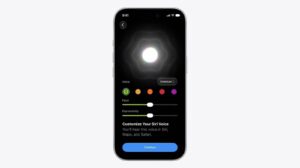
Old Siri gave you a list of accents and that was the whole menu: American, British, Australian, Indian, a few variants of each, with nothing to adjust about how fast any of them spoke or how flat they sounded. In iOS 27 the two sliders sit at Settings > Siri > Voice. They carry over to the way Maps and Safari read things aloud, so a slower pace follows you out of the Siri app and into turn-by-turn directions. One speed, take it or leave it, was the old arrangement.
The new Siri app keeps your conversations in one place
For the first time you’ll find a Siri app on your iOS 27 iPhone. Open this app to view past conversations and the information Siri surfaced in response to those queries. A particularly nice part of this is that it’s device-agnostic: the same conversation history will be viewable on your iPhone, iPad, Mac, and so on. (Apple assures us that the syncing is done privately with iCloud.)
Ask old Siri something and the exchange vanished the moment the card slid away. No history, no way to pull up what it told you an hour ago, no way to pick the thread back up on another device. For years, that was how it worked. Capabilities were fragmented across devices too, so the Siri on an Apple Watch and the Siri on a Mac didn’t share a skill set, and the same question could get you two different answers. In iOS 27 you can also search old conversations and pin the ones you keep coming back to.
Siri AI can write and edit almost anywhere you type
Apple says its customers can use Siri AI to compose or edit text "virtually anywhere they type." Describe what you’re looking for and Siri will deliver a draft for you to check out. Slightly creepily, the technology can mimic your writing style (on a per-recipient basis) when composing in Mail and Messages.
Writing Tools have been around since iOS 18.1, but they hung off text you had already written. Select a paragraph, choose Professional or Friendly or Concise, or type out the change you wanted, and it worked on what was already sitting there, which was fine for tightening an email you had written and no use at all for writing one from nothing. Composing from scratch went to ChatGPT. Siri AI drafts it itself, proofreads as you type, and will tell you how something sounds if you select it and ask.
Siri AI plays what you ask and brainstorms with you
Thankfully, Siri AI consistently and accurately plays the song, podcast, or audiobook you request on your preferred app — a low bar to be sure, but one where Siri stumbled before.
Old Siri’s failure here was famous: ask for a song and get the wrong version, the wrong artist, or a shrug and a web search, with third-party music apps faring worst of all.
Siri can brainstorm with you, too. Among other things, it can help you refine ideas, learn about a new topic, or explore a recipe — like suggesting something you can make with your random ingredients in your fridge! You can ask when your favorite band is playing or when a particular event is, and Siri answers correctly, giving you the information you need, based on your location.
Google’s Gemini models powers the new Siri
Siri AI capabilities were made possible by Apple’s partnership with Google for the use of its Gemini AI models. Apple didn’t just slap its name on Gemini AI; it used Google’s technology to train and refine its own proprietary Apple Foundation Models. The result is AI models designed to run on Apple’s own silicon and on its private cloud compute infrastructure and actually work.
Old Siri ran on Apple’s own much smaller models and fell back on a search engine for anything outside its domains. In the Siri app there’s now a toggle for switching between Siri and ChatGPT on a given question, the same handoff Apple first added in iOS 18.2. Private Cloud Compute still handles anything too big to run on the phone, and some of those workloads now run on Google Cloud hardware. According to Apple, nobody reads it.
Siri AI needs newer hardware than old Siri ever did
Apple has a more powerful on-device model for the iPhone 17 Pro and iPhone Air. After installing iOS 27, you’ll still get the "old" Apple Intelligence interface when you press the Side Button. If you want to upgrade from the glowing borders to the Dynamic Island Siri, it’s actually pretty simple. Just go into the iPhone Settings, choose the new Siri tab, and join the waitlist. The process is similar to what the company did with the first batch of Apple Intelligence features in iOS 18, which means beta testers might need to be patient to get the revamped personal assistant.
For me, I waited up to 72 hours to get the new Siri AI interface.
Siri AI works in English (Australia, Canada, Ireland, India, New Zealand, South Africa, UK, U.S.), and will expand to more languages in the future. Siri AI will not be available in the European Union at launch on iPhone or iPad, but it will be available on the Mac. It will not be available in China.
Siri AI vs old Siri: the bottom line
The new Siri AI leaves old Siri in the dust. Siri AI is exactly what you always hoped Siri would be: a useful assistant that lets you use your iPhone easily, just by talking, and one that can answer questions of any sort instead of shuffling you off to the web.
Access still depends on what’s in your pocket. No workaround, no toggle. Old Siri shipped on every iPhone Apple sold and asked nothing of the hardware, while Siri AI wants an A17 Pro or better, and a couple of the extras, the voice sliders among them, want 12GB of memory, which narrows those bits to the iPhone Air and the 17 Pro models. If you’re carrying an iPhone 14, or an iPhone 15 that isn’t a Pro, iOS 27 will install happily and Siri will behave exactly as it did last year.
See also: Why You Still Have Old Siri After Installing iOS 27
Yet, despite finally delivering a functional, helpful version of Siri, it feels almost like Apple fixed a long-standing bug — a forever-broken Siri — rather than doing something revolutionary here. This is how Siri was meant to work all along. The only marvel is that, after so many years of failing to perform tasks correctly, it actually works.