The market for fake Apple AirPods is flooded, as many can’t resist owning these cool-but-expensive earbuds at a fraction of the cost. But sure enough, there are plenty of ways to spot the fakes from the real deal. If you’ve recently purchased a pair of AirPods Pro 2 at an unusually low price and wonder if they’re genuine, help is at hand. This guide offers ten foolproof ways to identify fake AirPods Pro 2.
1. Check the Serial Number
The most reliable way to verify AirPods Pro 2 authenticity is through Apple. Apple has an online tool to check a product’s warranty status. Enter the AirPods’ serial number, and if they appear, they’re legitimate. If not, you’ve identified fake AirPods Pro 2. Here’s how:
- Visit Apple’s coverage checking tool in your web browser.
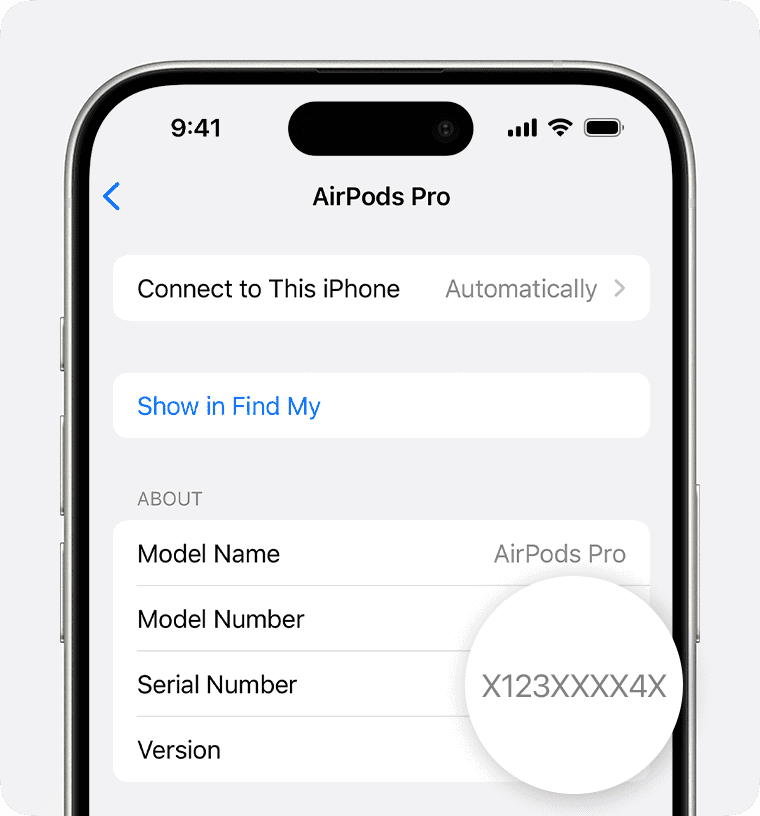
- Locate your AirPods’ serial number on the box, on the underside of the lid of your Charging Case, or, if already connected to your iPhone, head to Settings > Bluetooth > tap the inext to the AirPods name.
- Enter the serial number and CAPTCHA, then click Continue.
- If the tool shows info for that serial number, including a valid purchase date, your AirPods are real. If the serial number doesn’t exist in Apple’s database or shows up as a different product, you’re likely holding a fake.
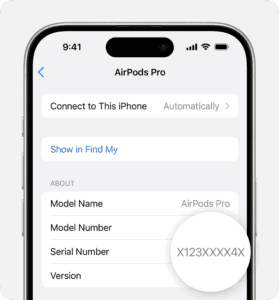
Insider Tip: According to a former Apple technician, counterfeiters sometimes clone legitimate serial numbers. Therefore, cross-referencing the serial number with the purchase receipt or packaging is crucial. Also, ensure that the serial number matches across all components of the AirPods, including both earbuds and the charging case.
2. Check the Model Number
Genuine AirPods Pro 2 have specific model numbers you can verify against Apple’s official list. On AirPods Pro 2, the model number appears on the underside of each AirPod, starting with the letter A. Authentic AirPods Pro 2 with MagSafe Charging Case (USB-C) will have model numbers like A3047, A3048, or A3049. AirPods Pro 2 with MagSafe Charging Case (Lightning) will have model numbers like A2931, A2699, or A2698. If your model number deviates from these, it’s a red flag.
Insider Tip: Tech enthusiasts suggest checking the font of the model number. Apple’s sophisticated laser etching is hard to replicate, so any inconsistencies in the font or its clarity can indicate a counterfeit product.
3. Check the Firmware Version
Firmware is another crucial checkpoint. Genuine AirPods Pro 2 automatically update their firmware when connected to an iOS device. To check the firmware version, connect your AirPods to your device, and go to Settings > General > About > AirPods. Alternatively, go to Settings > Bluetooth, then tap the Info button next to the name of your AirPods. Scroll down to the About section to find the firmware version. Compare the firmware version with the latest one available on Apple’s support page.
Insider Tip: A tech blogger once received a pair with outdated firmware that couldn’t update, a tell-tale sign of a fake. If the AirPods refuse to update to the latest firmware, it’s a clear indication that they are not genuine.
4. Try to Pair The AirPods or Check Battery Life
Another reliable way to check if AirPods Pro 2 are fake is by testing a feature only genuine AirPods possess.
When attempting to pair AirPods Pro 2 with an iPhone or iPad, or when opening already-paired AirPods nearby, a window appears on the device’s screen. This feature, relying on Apple’s W1 chip, is unique to genuine AirPods. It’s highly unlikely that fake AirPods can replicate it.
To detect fake AirPods Pro 2 using this method, follow these steps:
- Ensure the AirPods are charged.
- Hold the AirPods near an iPhone or iPad with Bluetooth turned on. Open the case with the earbuds inside.
- If the AirPods are already set up with the device, the battery screen will appear, confirming their authenticity.
- If the AirPods haven’t been set up with this device, wait for the connection screen to appear. If it does, your AirPods Pro 2 are genuine.
If these steps are followed and the information from steps 3 or 4 don’t appear on your device’s screen, your AirPods Pro 2 may be fake.
Pro tip: You may see a "Cannot Verify AirPods" alert on your iPhone if you try to connect fake AirPods to the device.
5. Check the Active Noise Cancellation
One of the standout features of the AirPods Pro 2 is active noise cancellation (ANC). This feature should seamlessly reduce ambient noise, allowing for a more immersive listening experience. When you’re wearing both AirPods, press and hold the force sensor on either AirPod to switch between Active Noise Cancellation, Transparency mode, and Off. If your AirPods fail to effectively block out background noise, their ANC might be non-functional or poorly replicated.
Insider Tip: Test the noise cancellation in a noisy environment. Genuine AirPods should significantly muffle external sounds, whereas fakes might offer minimal to no noise reduction.
6. Check the Transparency Mode
Transparency mode lets outside sound in, so you can hear what’s going on around you. When you’re wearing both AirPods, press and hold the force sensor on either AirPod to switch between Active Noise Cancellation, Transparency mode, and Off. If the mode is barely noticeable, the AirPods might be counterfeit.
Insider Tip: Experts suggest comparing the transparency mode against other Apple devices with similar features. The difference in quality can often highlight the authenticity of your AirPods.
7. Check the Volume Controls
Apple’s AirPods Pro 2 offer intuitive volume control through touch-sensitive stems. To turn the volume up or down, place your thumb on the stem of either AirPod, and use your index finger to swipe up or down on the Touch control. If your AirPods do not respond to touch gestures or the gestures are inconsistent, it could be a sign of a counterfeit product. Genuine AirPods respond promptly and accurately to touch inputs.
Insider Tip: Practice using the touch controls in various situations. Consistent failures or a lack of response are strong indicators of non-genuine AirPods.
8. Check the Ear Tip Fit Test
Genuine AirPods Pro 2 come with four sizes of ear tips. The medium size comes already attached. Extra small, small, and large sizes are in the box that your AirPods Pro came in, under the tray, nested inside the charging cable. When you use the best-sized ear tips for you, you get the best sound quality and superior noise cancellation. The Ear Tip Fit Test is designed to ensure a proper fit for optimal sound quality and noise cancellation. Here’s how to access this feature:
- With your AirPods Pro 2 in your ears and connected to your iPhone or iPad, go to Settings > Bluetooth.
- Tap the More Info button next to your AirPods in the list of devices.
- Tap Ear Tip Fit Test.
- Tap Continue, then tap the Play button.
If you don’t see Ear Tip Fit Test or repeatedly fails, it may indicate a counterfeit pair.
Insider Tip: Swap the ear tips with genuine Apple replacements. Counterfeit AirPods may not accommodate official accessories properly, revealing their lack of authenticity.
9. Check the Find My App
Apple’s "Find My" app is a reliable tool for tracking lost devices, including AirPods Pro 2. Genuine AirPods should appear in the app when paired with an iOS device. Go to the Find My app on your iPhone, then tap Devices to see your AirPods Pro 2. If your AirPods are missing from the app, it’s a strong indication they might be fake.
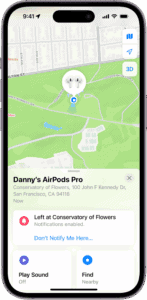
Insider Tip: Test the Find My feature by intentionally misplacing your AirPods. Genuine AirPods will show their current or last known location, whereas fakes will not appear at all.
10. Check The Packaging, Manufacturing, and More
The serial number and AirPods-specific features are the most reliable ways to identify fake AirPods Pro 2, but other methods can be used. These involve some guessing, so we recommend the previous options, but you can also consider these:
- Price: Apple products are not cheap. AirPods Pro 2 costs $249. Paying significantly less, such as $50 for AirPods Pro 2, suggests they may not be genuine.
- Wireless Charging Case: The case with AirPods Pro 2 supports Qi wireless charging. It’s unlikely that counterfeit versions include this expensive feature. If the case doesn’t charge on a Qi mat, it might be fake.
- Packaging: The quality of Apple packaging is as high as its products. The box fit is tight, printing is high-quality, and sticker placement is precise. If the packaging doesn’t meet these standards, the AirPods Pro 2 could be fake.
- Build Quality: Apple is known for the high quality of its devices. Plastic should be seamless, ports tight and sturdy, and the color vivid. If your AirPods Pro 2 have poor build quality, loose parts, or off-color, they may be counterfeit.
Personal Experience: The Day I Almost Bought Fake AirPods Pro 2
A few months ago, I decided to treat myself to a pair of AirPods Pro 2 after hearing so many positive reviews from friends and online. I was excited to enhance my music experience and take advantage of the noise-cancelling feature. I found a great deal from an online marketplace, and after a quick search, I thought I’d struck gold–until I noticed a few red flags.
First, I checked the serial number on Apple’s official website, and while it was valid, the model number didn’t match what I expected. I brushed it off, thinking maybe it was an older batch. However, when I received the AirPods, I decided to dig deeper. The sound quality was subpar, and I couldn’t get the Active Noise Cancellation feature to work at all. It was then I realized I had made a grave mistake.
Frustrated, I took a closer look at the packaging. The fonts were slightly off, and the ear tips didn’t fit securely in my ears. I also noticed that the "Find My" app couldn’t locate the AirPods, which was a deal-breaker for me. I quickly returned them and made sure to purchase from an authorized retailer this time.
This experience taught me the importance of vigilance when purchasing tech products, especially online. It’s essential to verify serial and model numbers, check sound quality, and ensure all features work as advertised. Now, I share this story to remind others to do their due diligence to avoid falling for counterfeit products.
What to Do If You Have Fake AirPods Pro 2
Discovering that you have fake AirPods Pro 2 can be disappointing, but it’s crucial to take action. First, contact the seller for a refund or exchange. If purchased from a reputable retailer, they might have a return policy for counterfeit products. Report the seller to the platform where you bought the AirPods to prevent future scams.
Insider Tip: Document all correspondence with the seller and keep evidence of the purchase. This can be useful if you need to escalate the issue with consumer protection agencies.
How to Spot Fake AirPods Pro 2: Final Words
In a market flooded with counterfeit products, being informed is your best defense. Spotting fake AirPods Pro 2 requires a keen eye for detail and an understanding of Apple’s quality standards. By following the steps outlined above, you can protect yourself from falling victim to counterfeiters and ensure that your audio experience remains top-notch. Remember, investing a little time to verify authenticity can save you from a myriad of problems down the road. Stay vigilant, and always choose quality over cost-cutting shortcuts.
![Genuine vs Fake AirPods][Genuine vs Fake AirPods](https://Insider Tip: Always purchase from authorized retailers or directly from Apple to minimize the risk of acquiring counterfeit products. Knowing what to look for and where to buy can make all the difference.
See also: How to Spot a Fake Apple Watch