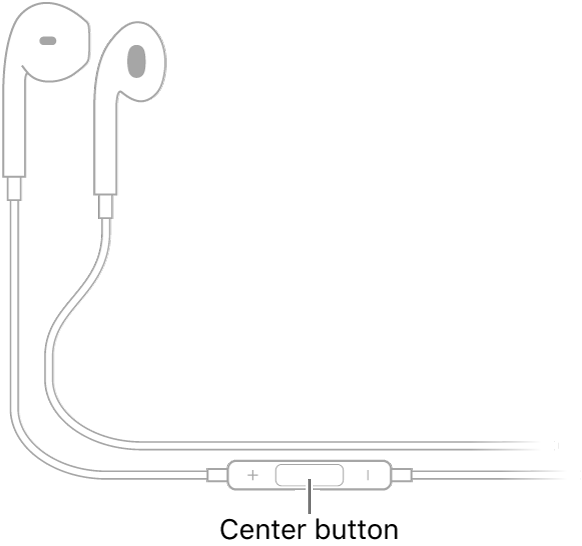
You can use EarPods (sold separately) to listen to music and videos and to make calls on iPhone. EarPods feature a microphone, volume buttons, and the center button.
The center button does most of the work. You use the center button to answer and end calls, control audio and video playback, and use Siri, even when iPhone is locked. With it, you can also pause, skip forward, skip backward, or fast-forward, and manage calls using your EarPods.
Control audio with your EarPods
- Pause: Press the center button. Press again to resume playback.
- Skip forward: Press the center button twice quickly.
- Skip backward: Press the center button three times quickly.
- Fast-forward: Press the center button twice quickly and hold.
Manage calls using your EarPods
- Answer an incoming call: Press the center button.
- End the current call: Press the center button.
- Switch to an incoming or on-hold call, and put the current call on hold: Press the center button. Press again to switch back to the first call.
Ask Siri with your EarPods
Press and hold the center button until you hear a beep. Let go, then ask Siri to perform a task or answer your question.