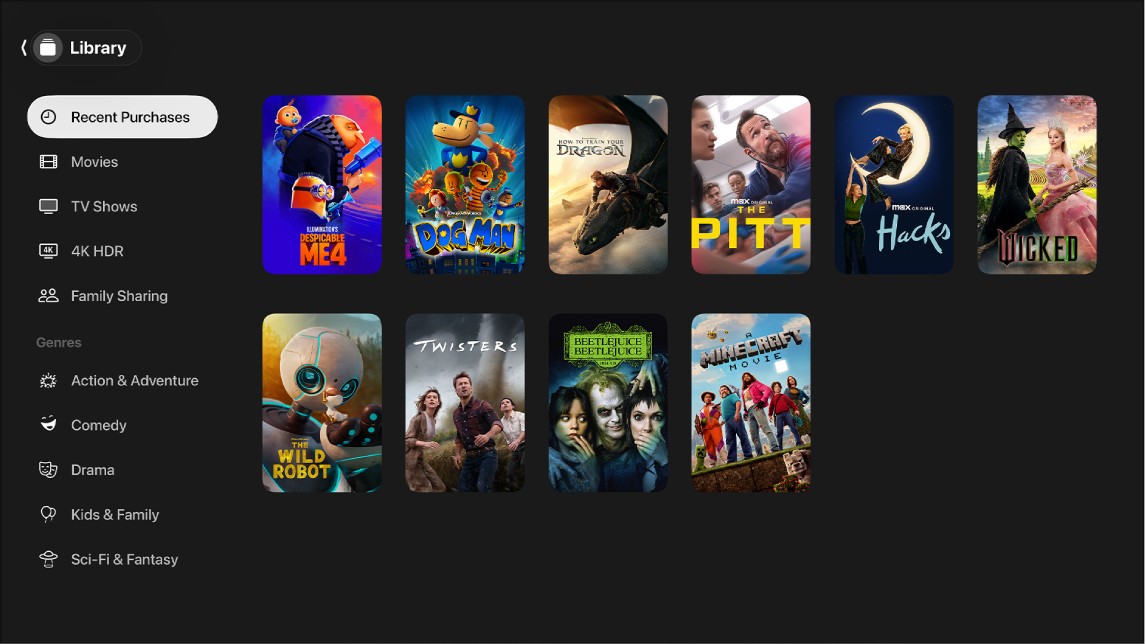
The Library screen in the Apple TV app on Apple TV 4K includes your purchases and rentals, organized by category. You can browse the movies and TV shows you’ve purchased or rented, or filter by category or genre.
If you’ve set up Family Sharing, your other family members’ purchases appear in your library as well. Switching to someone else’s collection is easy, too. Movies play right from there, and TV shows list their available episodes.
Browse your library
- Go to the Apple TV app on Apple TV 4K.
- Open the sidebar and then select Library.
- Browse movies and TV shows you’ve purchased or rented, or select a category or genre in the Library sidebar to filter items.
- Select a movie to play it, or select a TV show to see available episodes.
Access another family member’s collection
With Family Sharing set up on your Apple Account, purchases from your other family members appear in your library, and you can easily switch to another person’s collection.
- Go to the Apple TV app on Apple TV 4K.
- Open the sidebar and then select Library.
- Go to Family Sharing and select a family member.
That family member’s library appears. You can browse their collection and select an item to play it.
- To go back to your library, press the Back button or the Menu button on your remote.
For more on sharing, read our guide, Use Family Sharing on Apple TV 4K.
Not all features and content are available in all countries or regions or on all Apple TV hardware models.
See also