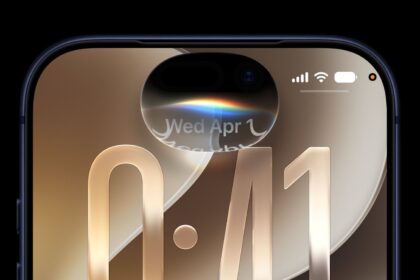
Apple provided developers with the second beta of iOS 27, introducing the first changes and refinements to the new operating system since it debuted after the WWDC keynote. Because we’re early in the beta testing process, there are quite a few new features and changes in iOS 27 developer beta 2, which we’ve rounded up below.
Write with Siri
There is a new Write with Siri button above the keyboard in Notes, Mail, Messages, and more. It makes it easier to locate the option to use Siri for writing. In the first beta, the Write with Siri tool was only available when selecting text.
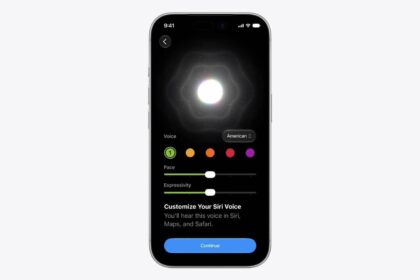
Siri Voice Customization
The Siri voice customization feature available on the iPhone 17 Pro and iPhone Air now has Pace and Expressivity labeled as “Coming Soon.” The options did not work in the first iOS 27 beta.
Wallet App Insights
The Wallet app has a new “Insights” feature that’s accessible by tapping on the three-dot icon in the upper right corner.
Insights is not fully implemented, but a splash screen for the feature says users will be able to connect accounts to Wallet to see spending insights, recurring transactions, account balances, and more. Apple says up-to-date account information will be available through the feature.
Apple TV
In iOS 27 beta 2, Apple updated the Home app to add support for remotely updating an Apple TV.
The Apple TV is now listed in the Updates section of the Home app’s Settings interface, and tapping on the Apple TV update button installs the latest software without needing to turn on the Apple TV.
RCS
Apple added support for replying to a specific message in an RCS conversation with an Android user.
You can now long press on a message to get to the option to reply to a message, and it works the same way that it does with iMessages.
iOS 27 also displays tapback/reaction emoji on images and videos properly. In iOS 26, it would use a text descriptor, such as [x loved an image] instead of showing the emoji. In iOS 27, the emoji shows up on the image or video as it does in an iMessage conversation.
iCloud Backup Notifications
Code in iOS 27 suggests Apple will now send notifications if an iCloud backup doesn’t work properly.
“There’s a problem with our server, so you may not be able to backup or restore your device right now. Try again later,” reads the notification.
AirPort Utility
Apple says the AirPort Utility app will no longer be available for download in iOS 27. Users who already have the app can re-download it, but AirPort Utility functionality is not guaranteed in iOS 27.
Visual Intelligence
In the Siri section of the Settings app, there’s a new Visual Intelligence option. Highlight to Image Search is turned off by default, and Apple says turning it on will automatically send images to third parties when highlighting subjects to find similar images.
Camera App
There are now yellow highlights around the camera tools button when a hidden camera feature like exposure adjustment is enabled.
Create a Pass
In the Create a Pass feature in Wallet, there are texture options available when choosing a color.
HomeKit Cameras
You can long press on incoming notifications from HomeKit Secure Video cameras to watch the video from the motion alert and to turn on lights that are located near the camera.
HomeKit Accessories
If you had HomeKit accessories like Philips Hue lights that were unresponsive after installing iOS 27 and tvOS 27, the beta 2 updates fix the problem.
Weather
Some of the light blue text in the Weather app has been updated to be lighter and brighter, making it easier to read. Precipitation levels, condition descriptor, and wind mph reading are now the brighter color.
Siri App
There’s a new option to select multiple conversations to delete in the Siri app.
Photos
The AI tools in the Photos app are now available for RAW images.
iOS 27 Info
iOS 27 is available to developers right now, but Apple plans to release a public beta in July. iOS 27 is set to launch in September alongside new iPhones.