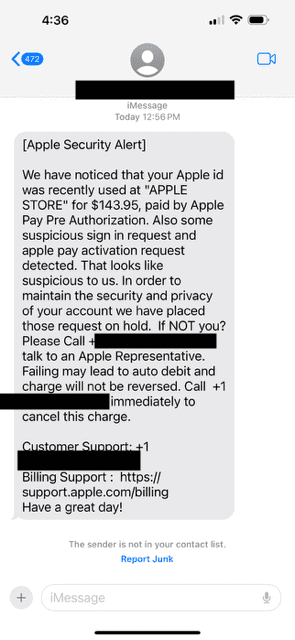
If you’ve received a text message claiming to be from Apple about a suspicious charge or login attempt, just ignore it–it’s likely ascam. A new scam is circulating, tricking people into thinking there’s an unauthorized Apple Pay charge on their account. The screenshot below shows how the message look:
You may receive messages like this through text messages or emails.
Looks real, right? That’s the whole point. Scammers rely on fear and urgency to get you to react without thinking. But here’s the truth: Apple does not monitor your purchases this way.
How to Know It’s a Scam
Apple doesn’t randomly send security alerts through text messages. If your Apple account has an issue, Apple will notify you when you log into your account. Apple will not notify you via a sketchy text message.
Scammers are becoming smarter at making these messages look genuine. Sometimes, the only red flag is a small typographical error, a fake sender email, or a link that doesn’t actually lead to Apple’s website. That’s why it’s advisable to double-check through Apple’s official website instead of trusting the message.
Here are a few ways to tell if a message is fake:
- Apple will always address you by the name on your Apple account — If an email or text starts with "Dear Customer"or "Dear Client", it’s definitely a scam. That said, if scammers have access to leaked data, they may use your actual name, so don’t trust it just because it looks personalized.
- Apple emails come from @apple.com — But be cautious! It’s also possible to fake email addresses. Official emails about your Apple account always come from [email protected].
- Hover over links before clicking— If you’re on a computer, hover your cursor over a link (without clicking) to see where it actually leads. If it’s not an Apple website (apple.com), you should not click through.
- Apple won’t ask for personal details via email or text — If a message asks for your social security number, credit card details, or Apple account password, it’s a scam.
- Scammers like urgency — If the message pressures you to act right now, be suspicious. Apple will never threaten to auto-debit your account if you don’t respond immediately.
- Apple doesn’t call you unless you ask them to — If someone calls claiming to be from Apple about a problem with your account, disconnect the call. Apple will never do that.
What to Do If You Get a Message Like This
If you receive one of these scam texts, don’t panic–just don’t engage. Here’s what you should do instead:
- Don’t call the number. The scammers will try to trick you into giving them personal information.
- Don’t click on any links. These links could steal your Apple account credentials or install malware.
- Verify independently. If you’re worried about a charge, go to Apple’s official website(appleid.apple.com) or check your transactions in Settings > [Your Name] > Subscriptions on your iPhone.
- Report it to Apple. Forward suspicious messages to [email protected], then delete them.
- Block the sender. On an iPhone, open the message, tap the sender’s name or number, then select Block this Caller.
- Enable two-factor authentication (2FA). Adding an extra layer of security to your Apple account helps prevent unauthorized access. Go to Settings > [Your Name] > Password & Security to turn it on.
Apple’s Official Scam Prevention Resources
Want to dive deeper? Apple has official guides on avoiding scams. Here are some useful links straight from Apple: