Several iPhone users have said that they are unable to sign in to their Google Account on Safari in iOS. Are you having this problem on your iPhone 18 Pro or iPhone 18 Pro Max? This article lists several troubleshooting tips that you can use if you run into this problem. This is an important problem because unless you fix it, you will not be able to access and get the most out of all the Google products and services you use such as Gmail, Google Drive, Google Calendar, Google Maps, and YouTube.
Users have said that the Google Account Sign-in page (https://accounts.google.com) gets stuck at loading when attempting to enter a password. They see a blank page. It appears that this problem occurs on Safari and users who are using the other browsers (e.g., Chrome, Edge, etc) do not experience this problem. Furthermore, it appears that users cannot automatically sign in to the Google Account in Safari when signed in to the Mail app or Google app. Thus, it further appears that, because of this problem, users are unable to add a new email account in Apple Mail to the iPhone 18 Pro.
1. Update your iPhone 18 Pro
Update your device to the latest version of iOS. You can update your device wirelessly by going to Settings > General > Software Update and if there is an update, follow the onscreen instructions to update your device.
2. Delete the history and cookies from Safari in Settings
Clear the history, cache and cookies to see if this fixes your problem. Here is how:
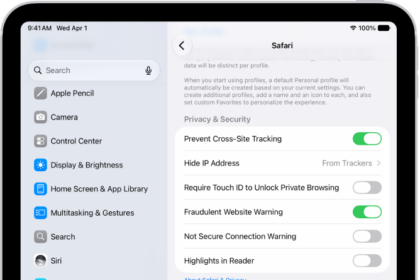
- On your device, tap Settings > Apps > Safari, and tap Clear History and Website Data.
- Then go to Settings > Apps > Safari > Advanced > Website Data, then tap Remove All Website Data.
Now restart your device and test again.
3. Check your settings
Please review the following settings:
- Settings > Apps > Safari > Advanced and ensure that Block All Cookies is turned off.
- Settings > Apps > Safari > Advanced and ensure that JavaScript is turned on.
- Settings > Apps > Safari > Page Zoom, change the zoom and set it to 100%, and try again.
4. Google status check
If you are still having this problem, it is a good idea to check Google’s system status. Because there may be an outage for a Google service. It is possible that Gmail or Google Drive may be down. If this is the case, the problems are on Google’s end. If this is not the case, then this suggests the problem is not with Google but with the device trying to connect to the Google service. Here is how:
- Open a browser like Safari.
- Visit the Google Workspace Status Dashboard.
- Find the service(s) that is not working and you are looking to see if they are running or not.
5. Check for security programs
Google says: “If you use a firewall, proxy, or anti-virus program, temporarily turn off the program. Then try to sign in to your Google Account.”