






Apple AirTags have been around for a while now. If you aren’t familiar with item trackers, you may not understand the point of this $29 white plastic puck. So what exactly are AirTags, and more importantly, how do they work if you decide to buy one? Well, that’s exactly what I will be explaining in this article.
An AirTag is just a tiny tracking device. You can put it in a book bag, in your purse, or on your keys. That way, the next time you inevitably misplace any of those items, you can easily track them down.
But what exactly is the AirTag device itself? Well, it’s a 1.2-inch plastic puck with a stainless steel back. That back piece can actually be removed by applying pressure and rotating left. Inside you’ll find a replaceable coin cell battery, like those found in watches, that’ll keep AirTag powered for over a year. Once it dies, just replace it with a fresh battery; no charging required. There’s also technology inside AirTag that you can’t see, like a speaker, Bluetooth, and Apple’s U1 chip.
After unboxing AirTag, the first thing you’ll do is connect it to your iPhone 6S or later by holding it nearby, then tapping the connect button—kind of like the way you tap the screen of your iPhone. Finally, name your AirTag so you’ll know which item it’s attached to, and that’s it.
Unfortunately, AirTags can’t be paired with Android smartphones, but they can help out iPhone users if they find a lost AirTag, which I’ll explain later.
Apple AirTags work by using Bluetooth to send out secure signals, which are picked up by nearby Apple devices (iPhones, iPads) in the massive “Find My” network; these devices anonymously relay the AirTag’s location to iCloud, allowing you to see it on a map in the Find My app, with features like Precision Finding (on newer iPhones) and playing a sound to help you locate lost items, all while keeping your location private through encryption.
If you’re lucky, you’ll never have to use AirTag at all. But if something is lost or left behind, you’ll navigate to the Find My app on your iPhone and tap the Items tab. Here you’ll see all your connected AirTags. If the item you’re looking for is nearby—for example, keys that are somewhere in the house—you can ping its AirTag by tapping Play Sound. This will send out an auditory noise that’ll give you a good idea of its location, and you can simply follow the sound to find the item.
But there’s a more intuitive method to locating nearby items that’ll only work for users with an iPhone 11 and newer, and it’s called Precision Finding. Just tap the Find button under your item, and your iPhone will begin searching for the AirTag’s signal. This can take about 30 seconds and may require you to move around the area if the signal’s weak. But once you’re within 30 to 40 feet of the AirTag and it locks on, your iPhone will literally point you in the right direction. Green means go, while black means you aren’t quite on the right path. It’ll even notify you if the AirTag is on a different floor. As you move closer, you’ll see the distance shrink. Once the iPhone is about four inches away, likely close enough to find the item, the word "here" will appear on the iPhone.
But let’s say the item you’re trying to locate isn’t nearby. For example, what if you left your bag somewhere after a busy day running errands? Well, this is where the Apple Magic comes in. AirTags can actually post their location to your Find My app through nearby iPhones. It sends out a Bluetooth signal that’s captured by a stranger’s iOS device that happens to be within range, then reported straight to you. All without that person even knowing it happened. It’s completely secure, anonymous, and encrypted. And it’s efficient, so it doesn’t affect that person’s battery life or data usage. That means the dreaded offline message that plagues most lost devices won’t be an issue with AirTag, so you’ll be able to locate your item on a map and track it down.
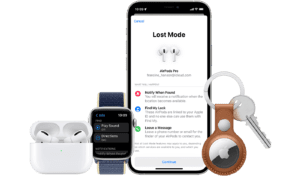
But if for some reason the location of your AirTag hasn’t been updated yet, you can put it into lost mode. This will send you a notification once it has been located by a nearby iOS device. You can even set up the AirTags to give someone your contact information if they scan it. iPhone users can scan AirTags by using the Find My app, tapping Items, and then Identify Found Item. Android users can also help out by simply tapping their NFC-enabled phone to the AirTag, which will open a website link giving them information to contact the owner.
And if your AirTag happens to get splashed, rained on, or left in a puddle, you don’t have to worry, since it’s water resistant up to one meter.
Also, Apple prevented AirTags from being used maliciously—for example, secretly being dropped in a bag or purse to try and track someone. They do this by tracking how long an AirTag has been traveling close to someone after leaving its owner. Eventually, that person’s iPhone will receive a notification saying an AirTag is nearby. If they can’t find it, it’ll begin playing a sound.
And if you’re wondering how this works if you’re an Android user being tracked by someone else’s AirTag, it doesn’t work. So you’ll just have to keep an eye out for suspicious-looking Apple users. So that is how Apple’s AirTags work.





 in the massive "Find My" network)