How to get a warning when you visit websites that use HTTP on iPhone

You can have Safari on iPhone warn you when you visit websites that use HTTP, which doesn't provide a secure connection.

By Moses Johnson - Editor
0 Min Read

On iPhone, websites use HTTP or HTTPS to transmit information to and from Safari, and HTTP doesn’t provide a secure connection. You can choose to receive a warning when you visit websites that use HTTP , with a setting called Not Secure Connection Warning.
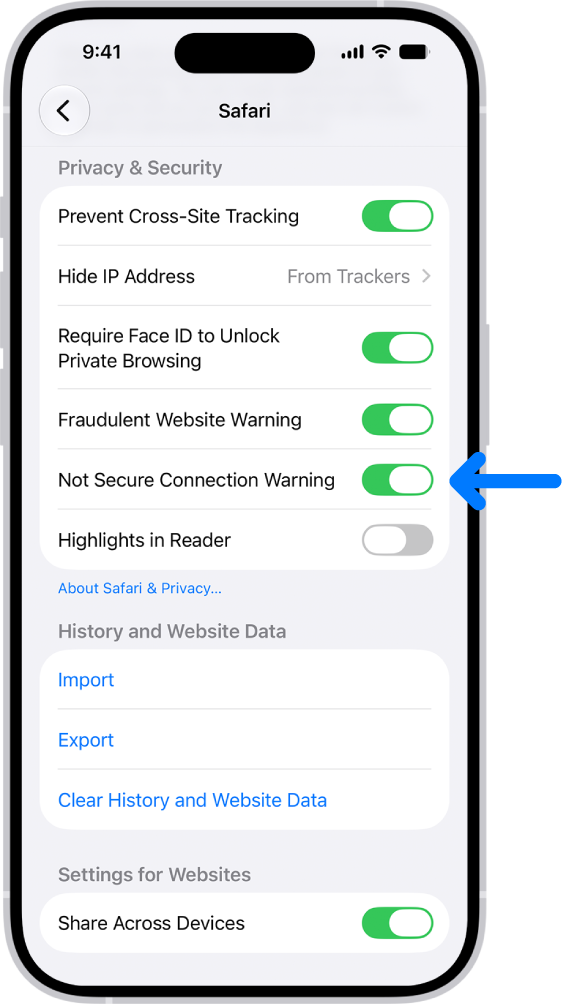
The Not Secure Connection Warning control, located below Privacy & Security on the Safari screen in Settings.

  1. Start the Settings app on your iPhone.
  2. Tap Apps, then tap Safari.
  3. Below Privacy & Security, turn on Not Secure Connection Warning.
TAGGED:
Follow:
Moses Johnson is the Editorial Director of GeeksChalk.com, who has a keen eye for news, rumors, and all the unusual stuff around Apple products. Moses is commonly referred to online as The Professor, with decades of experience in tech under his belt.
Leave a Comment