This issue happened to me yesterday. Suddenly, when I launched the Mail app on my iPhone 18 Pro, no email messages were displayed, and it said “No Mail,” even though I had thousands of emails. I tried to refresh the page by swiping down, but the emails were still not loading. This was happening regardless of whether I tried to view All Inboxes or individual inboxes. See All Inboxes Disappeared in Mail on iPhone 18 Pro.
This is a strange issue that prevents you from not only receiving and seeing your existing emails, but also from sending new emails.
In this article, I explain the steps that I used to fix my problem.
Fix the No Mail problem in the iPhone 18 Pro Mail app
- The first thing to do is to relaunch the Mail app. This could be a temporary glitch, and restarting the app may fix it. In fact, this is how I fixed the issue on my iPhone:
- Go to your Home Screen and swipe up from the bottom of the screen. Find the Mail app and swipe it up, then go to your Home Screen again and reopen the Mail app. If it is still not working, restart your iPhone 18 Pro and try again.
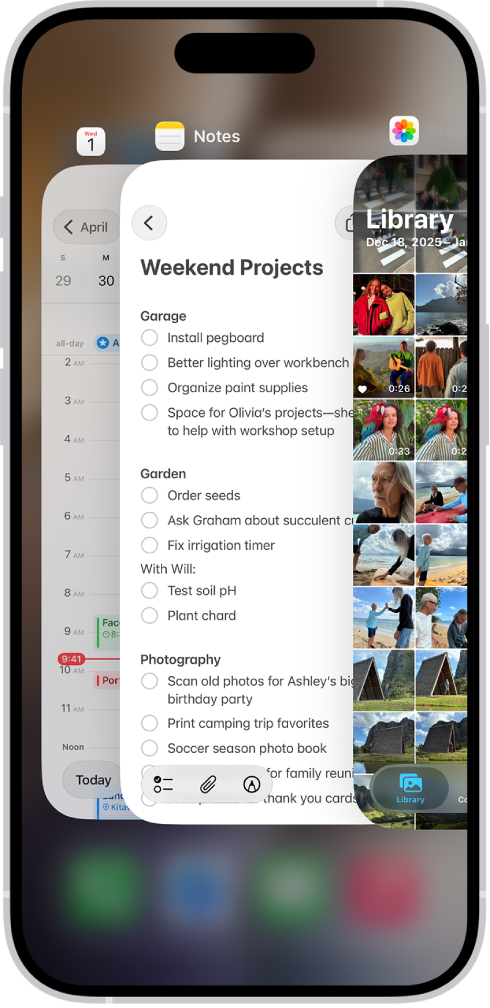
- Go to your Home Screen and swipe up from the bottom of the screen. Find the Mail app and swipe it up, then go to your Home Screen again and reopen the Mail app. If it is still not working, restart your iPhone 18 Pro and try again.
- The second thing you should check is whether this is an Apple problem. If this issue occurs with iCloud Mail, this could be the reason. It is possible that Apple is having a temporary issue with its mail servers, and thus the Mail app on your iPhone isn’t connecting with Apple’s servers. This problem could be due to a temporary outage or scheduled maintenance.
- Go to the Apple System Status page, look for the iCloud Mail option, and check if there is any notification indicating that the mail servers are experiencing issues.
- The Mail app works using remote servers. If you do not have an Internet connection, the Mail app may not work. Ensure that your iPhone 18 Pro is connected to the Internet. If you’re not connected to Wi-Fi or cellular data, the Mail app won’t be able to fetch new email. If this issue occurs on cellular, ensure that Mail is allowed to use cellular data. You can check this by going to Settings > Cellular and check if Mail is enabled.
- Do you use VPN? Sometimes VPN may cause issues. Turn it off and try again.
- If you are having this issue only with one account, and if it seems the problem is persistent, you may want to consider whether there is a problem with that account’s email server. If not, you might try removing that email account and then adding it back.