Facebook-f Twitter
GeeksChalk Logo GeeksChalk Logo
Notification
  • Home
  • iPhone
  • iPad
  • Mac
  • Apple Watch
  • Pages
    • About Us
    • Contact Us
    • Advertise With Us
  • 🤩 Trending:
  • 100 new iOS 26 features for iPhone
  • 10 Best iOS 26 Tips & Tricks
  • iPhone 16: Everything We Know
  • iPhone 16 Pro: Everything We Know

GeeksChalk is the leading source for all things iPhone, Mac, iPad, Apple Watch, Vision Pro, and more

GeeksChalkGeeksChalk
  • Home
  • iPhone
  • iPad
  • Mac
  • Apple Watch
Search

Popular Post

iPhone 14 Pro and iPhone 14 Pro Max are shown in gold.
iPhone

How to Fix iPhone not sending text messages to Android

iPhone 15 Pro in black titanium, white titanium, blue titanium, and natural titanium finishes.
iPhone

Apple CarPlay GPS Not Working, Showing Wrong Location: Fix

iPhone outline with an Apple logo
iPhone

Need to restore an iPhone backup? Here’s how

The iPhone’s Messages app, showing iMessages and SMS messages side-by-side.  
Troubleshooting

Is Your iPhone Not Sending Pictures? Here’s How to Fix It

Follow US
Copyright © 2026 www.GeeksChalk.com
iPad Pro in silver
GeeksChalk > Troubleshooting > Why Is My iPad Asking For The Wrong Apple Account? Here’s The Fix!

Why Is My iPad Asking For The Wrong Apple Account? Here’s The Fix!

In this article, I'll explain why other people's Apple Accounts are showing up on your iPad and explain how to stop your iPad from asking for the wrong Apple Account.

Last updated: April 17, 2026 7:45 pm
By Abigail Shilets - Staff Writer
Share
2 Min Read

You’re setting up your new iPad or you’ve restored from a backup, and all of a sudden your iPad begins asking for passwords for other people’s Apple Accounts. You don’t even know who these Apple Accounts belong to, so why are they showing up on your iPad? In this article, I’ll explain why other people’s Apple Accounts are showing up on your iPad and explain how to stop your iPad from asking for the wrong Apple Account.

Why Is My iPad Asking For Passwords For Apple Accounts I Don’t Recognize?

Your iPad will ask for the wrong Apple Account and password when there are apps, songs, movies, TV shows, or books that were purchased with someone else’s Apple Account. Your iPad is asking for their Apple Account and password as part of the Apple authorization process.

In other words, there are purchased items on your iPad that are linked to that person’s Apple Account, and your iPad won’t let you access them without permission from the person who originally purchased them.

How Do I Know Which Apps, Music, Movies, TV Shows, and Books Have Been Purchased With Someone Else’s Apple Account?

Unfortunately, there’s no easy way to list which items are linked to which Apple Accounts. The rule of thumb is that if an app won’t download or a song, movie, or TV show won’t play, it’s most likely linked to another Apple Account. You’ll need to get that person’s password to be able to download it.

How To Stop Your iPad From Asking For The Wrong Apple Account

If you’ve just restored your iPad and you’re being prompted for Apple Account passwords that belong to people you don’t know, it’s often easier to set up your iPad as new instead of going through and trying to weed out every purchase that wasn’t made with your Apple Account. It might seem a bit drastic, but starting fresh might save a serious headache.

To set up your iPad as new, head to Settings > General > Transfer or Reset iPad and choose ‘Erase All Content and Settings’.
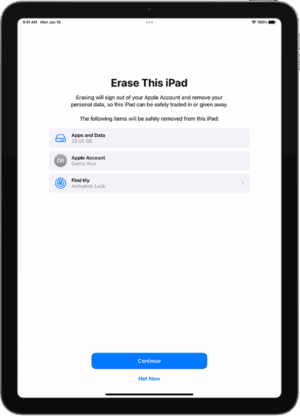
The Erase This iPad screen.

After your iPad reboots, choose to set up your iPad as new instead of restoring from an iCloud backup. From then on, make sure that you use your personal Apple Account for all purchases.

How To Share Your Apps, Music, Movies, TV Shows, and Books

With the release of iOS 8, Apple introduced a new feature called Family Sharing that allows up to 6 people to share apps, music, movies, TV shows, and books. Apple has created a section about Family Sharing on their website, and their article called "How to set up Family Sharing on your iPhone, iPad, or Mac" is a great place to start.

Thanks so much for reading and I look forward to hearing your questions and comments below. I’ll do my best to help you out along the way.

All the best,

See also: How to reset an iPad to factory settings

TAGGED:Apple Account
ByAbigail Shilets
Staff Writer
Follow:
Abigail is a staff writer for GeeksChalk based in Pennsylvania. She covers news, how-tos, and user guides for iPhone, iPad, Mac, and Apple Watch. Before becoming a writer Abigail studied computer science at University and also worked at Apple for more than two years. When not creating masterpiece for GeeksChalk, you can usually find Abigail hiking, climbing, or otherwise unplugged.
Leave a Comment Leave a Comment

Leave a Reply Cancel reply

Your email address will not be published. Required fields are marked *

Recent News Flash

iOS 27

What’s new in iOS 27 developer beta 2: Wallet App Insights, Siri Voice Customization and more

An iPhone on a nightstand with StandBy mode on, featuring a colorful clock

StandBy Mode Not Working After iOS 27 Update on iPhone? Fix

iOS 27 Apple notes

How to fix iPhone keyboard issues after iOS 27 update

iOS 27 messages

How to Fix iPhone Not Sending Messages After iOS 27 Update

Trending Now

iPad showing Apple Arcade, iPhone playing music, and MacBook showing Apple TV+.

iOS 27, iPadOS 27, watchOS 27, macOS 27 supported devices

iOS 27

Download iOS 27 beta on Your iPhone. How to Get It Right Now

iOS 27 Apple Music features

All the new Apple Music features in iOS 27

Explore More

Recommended For You

Incoming Call on an iPhone

How to Fix “Call Failed” in iOS 27

An iPhone showing the "Back Up Now" option  

iPhone Can’t Back Up to iCloud After iOS 27 Update? Here’s The Fix

iPhone shown in Camera app with a tappable QR code link.

iPhone QR Code Scanner Not Working After iOS 27 Update? Here’s The Fix

iOS 27

iPhone Can’t Connect to a VPN on iOS 27? How to Fix it

GeeksChalk Logo GeeksChalk Logo
  • Home
  • Contact Us
  • Advertise
  • Our Staff
  • Editorial Guidelines
  • Terms
  • Privacy
  • Accessibility
  • Copyright
  • About Us
  • Fact Checking Policy
  • Correction Policy
  • Ethics Policy
  • Ownership Policy
Copyright © 2026 www.GeeksChalk.com
Welcome Back!

Sign in to your account

Username or Email Address
Password

Lost your password?