Why your iPhone messages turn green, quick answer
If your iPhone messages turn green, it means that the message was sent using RCS or MMS/SMS instead of iMessage. There are several possible reasons for this:
- The person that you sent the message to doesn’t have an Apple device.
- iMessage is turned off on your device or on your recipient’s device.
- Your device is not connected to the internet.
- iMessage is temporarily unavailable on your device or on your recipient’s device.
- You might need to update your settings for Messages after you set up a new device.
It may be frustrating when message conversations on your iPhone turn green, but there are reasons why that happens.
iMessage is an internet-based platform where users can send messages between Apple devices. It works over WiFi or by using your cellular data plan. iMessage requires an internet connection to function—either through WiFi or cellular data—and cannot work without one of these connections. SMS text messaging, in contrast, uses traditional cellular network services to deliver texts and does not require data or WiFi.
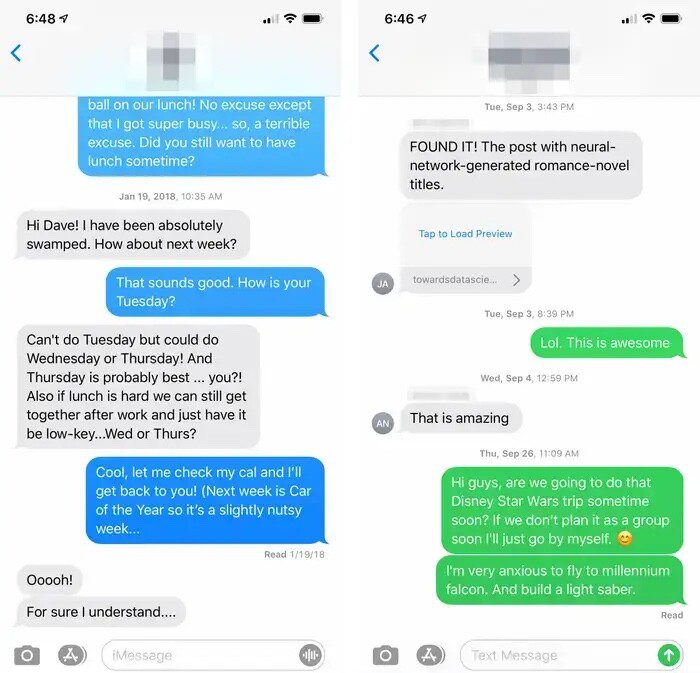
The iPhone supports both iMessage and SMS/MMS/RCS texts. To make it clear which is being used, every message you send is color coded. Blue means the message was sent through iMessage, while green means it was sent as an SMS, MMS, or RCS text.
If all of your messages are green, it’s possible that your iPhone is not connected to the internet. There’s also a chance that iMessage is turned off on your iPhone. To have your messages appear in blue bubbles, make sure that you have a working internet connection and that iMessage is enabled on your iPhone. To check if iMessage is enabled on your iPhone:
- In the Settings app, tap Apps.
- Tap Messages.
- Turn on iMessages.
- If needed, tap Send & Receive to choose whether to start new conversations from your phone number or email address.
Similarly, it’s possible that iMessage is turned off on your recipient’s device. Contact your recipient and ask them to make sure iMessage is enabled on their device.
If you’re messaging an Android user, the entire conversation will be green since iMessage only works between Apple devices. But if you were having a blue conversation that suddenly turned green, there are a few things that may have happened. It could be a possibility that the recipient blocked your number, since Apple doesn’t deliver any type of notification that you’ve been blocked. However, a green bubble alone is not a definitive indication of blocking, as there are many other more common causes.
More common causes of your iPhone message turning green include the recipient phone being off, running out of battery, being in airplane mode, or if they’re simply out of range of their cellular network or don’t have WiFi access. All you can do in moments like these is to wait until the recipient is back online. Although once they are, you still won’t know for sure if the message was delivered with SMS, since delivery confirmations and read receipts are only available while having a blue conversation through iMessage.
In fact, most features you typically enjoy with iMessage won’t be available when you’re iPhone messages turn green. When messaging turns to SMS/MMS or RCS (green bubbles), you lose access to typing indicators, read receipts, proper Tapback reactions display, end-to-end encryption, high-quality media sharing, and audio messages.
These messaging capabilities have proven to be so essential that iPhone users are actually less likely to date people using Android. According to surveys, 23% of iPhone users say a green bubble is a dating dealbreaker, and 22% of iPhone users think less of people who send green bubble messages. This social stigma was even cited by the U.S. Department of Justice in its antitrust lawsuit against Apple.
While it is disappointing to see a green message appear in the middle of a conversation, or when contacting a new person, all you can do is hope you didn’t get blocked, or that the Android user you’re starting a conversation with someday switches to iPhone.