Many iPhone users like to charge their device to 100%. Likely since it’s a satisfying number that ensures your device will last as long as possible. But it’s not something you should do on a regular basis, and I’ll explain why below.
The type of batteries used in most modern electronics, including the iPhone, is lithium ion, and its capacity is only good for a certain number of charges, or cycles, before it begins to degrade. You can actually check how much your battery has degraded right now by going to Battery Settings and tapping Battery Health. My iPhone 16 Pro Max is at 94% of its full capacity, which means 6% of the battery cells have worn out from being charged and discharged over the last year.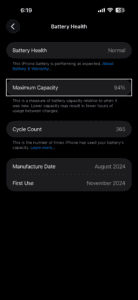
Obviously, we want to prevent our batteries from wearing out as much as possible, which is why charging all the way to 100% and allowing the battery level to drop down to 10% or less is considered bad practice. These deep discharges exhaust the lithium battery cells faster than charging to 80 or 90%, and then getting it back on its charger by the time it reaches 30 or 40%. This not only ensures you get as much battery life out of your iPhone for as long as possible for those days when you really need it, but it also prevents performance issues caused by deeply degraded batteries. Apple tries to alleviate this issue with software features like optimized battery charging and Charge Limit.
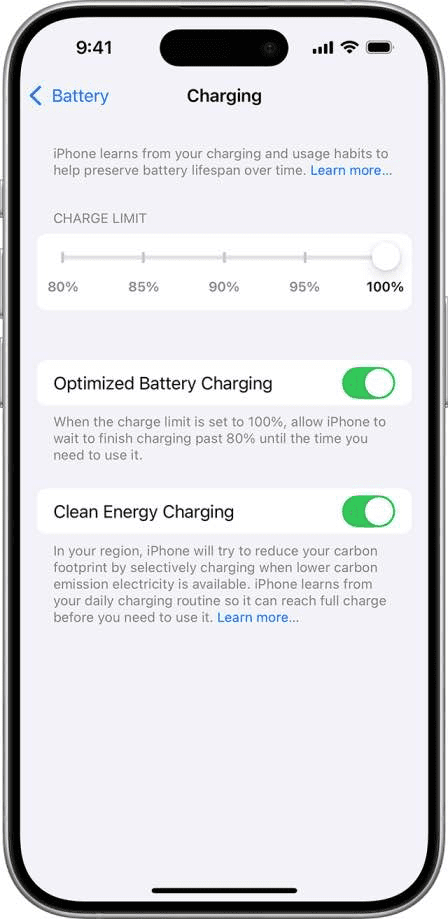
optimized battery charging pauses your phone’s charge level at 80% until you’re likely to begin using it. That means iPhone will try to learn your daily charge routine and finish charging the battery past 80% right before you’re scheduled to take it off the charger, so it won’t sit at 100% for hours at a time.
Charge Limit prevents the iPhone from ever charging to 100%. This should help extend the battery’s lifespan even further. Your iPhone will charge to within a few percentage points of your chosen limit and then stop charging. If the battery charge level drops more than 5 percent while connected to power, charging will resume, again charging to within a few points of your chosen limit.
It’s worth noting that ddeep discharges also negatively affects the battery, which is where low power mode comes in. At 20%, your iPhone will automatically begin throttling performance and background tasks to prevent the battery from draining even further. While that means more battery life for the user, it also means a higher likelihood that the device will be connected to power before reaching an extremely low battery percentage. So it’s best to keep your battery level between 40 and 80% when possible, so on those busy days when you need every minute of battery life, your device will be there to deliver.
See also: iPhone: Optimized Battery Charging Vs Charge Limit (Which Is Better for your battery?)