Noticed that your message contains a mistake? — a dubious double-entendre, an insulting innuendo, a phonetic faux pas, or something worse and lacking alliteration. What to do? If the message is an SMS, MMS, or RCS, there’s nothing you can do to get it back. Move on (or start dusting off your excuses — or your resume).
But if the message is an iMessage, you can unsend and edit it, giving you the opportunity to fix a typo or pull back a message that you accidentally sent to the wrong person.
Note: To unsend or edit text messages on iPhone, you must be using iMessage with iOS 16, iPadOS 16.1, macOS 13, visionOS 1, or later. If you unsend a message to someone who’s using an earlier operating system, the original message remains in the conversation, and you’re notified that the recipient may still see the original message. If you edit a message to someone who’s using an earlier operating system, they receive follow-up messages with the preface “Edited to” and your new message in quotation marks. SMS, MMS, or RCS text messages can’t be edited or unsent. However, SMS, MMS, or RCS text messages can be edited in a group conversation as long as there’s at least one other iMessage user in the group.
How to unsend a message on iPhone
- In Messages, tap a conversation.
- Long-press the message you want to unsend.
- Tap Undo Send to recall the message;
Note: The Undo Send command is available for only 2 minutes after you send the message, so you need to move quickly.
Edit a sent message
Your iPhone lets you edit a recently sent message up to five times within 15 minutes of sending it.
- Open the Messages app on your iPhone.
- Select a conversation with the message you want to edit.
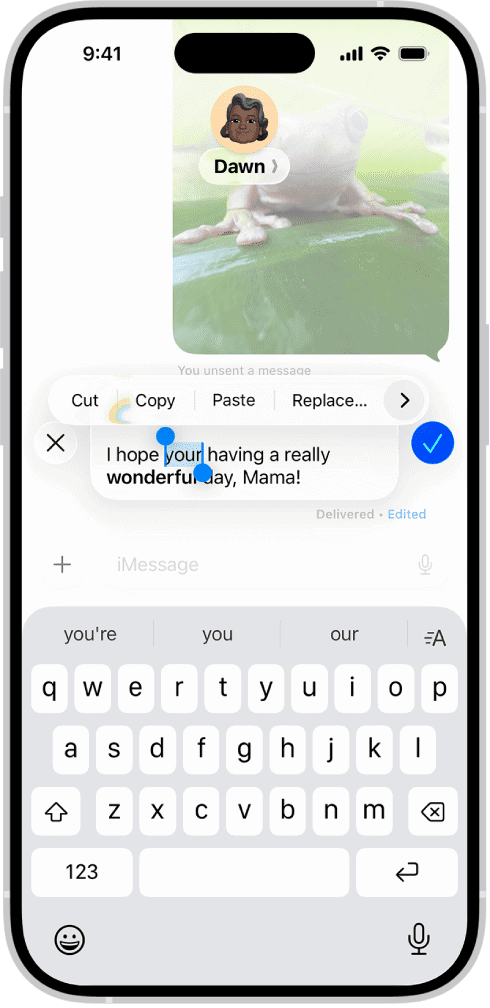
- Long-press the message bubble, then tap Edit.
- Make any changes, then tap the Send Edit button to resend with edits or the Cancel Edit button to revert.
Note: The message is marked as Edited in the conversation transcript.
The message bubble updates to reflect your edits on both your iPhone and your recipient’s device, and both of you can tap Edited to see previous versions of your message.