If an "unknown caller" label appears on your phone screen during an incoming call, it means the caller ID information isn’t there. Your carrier may not have received any caller ID data from the calling party, or it may have received corrupted data that it can’t decode into a proper phone number. Meanwhile, receiving a "no caller ID" call means the caller has deliberately hidden their number. While these incoming calls typically come from legitimate callers hiding their identity for privacy, some may come from scammers or telemarketers. Read the article to find out about the dangers of answering unknown calls and how to find out the unknown caller’s phone number.
Most of us have encountered a moment when your smartphone rings and you don’t know who is calling. When this happens, most phones will display either “Unknown Caller” or “No Caller ID” to indicate that this information isn’t available. However, these phrases mean slightly different things, so it’s helpful to know the difference before you answer a call. Continue reading to No Caller ID and Unknown phone calls.
What does "unknown caller" mean?
A call labeled “Unknown Caller” means that the caller ID information isn’t available. This could be due to a network error, a problem on a carrier’s end, or simply an incompatibility between phone networks.
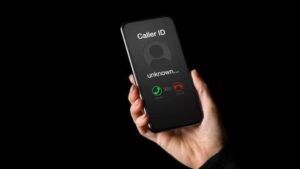
An unknown caller can be the result of a network glitch. The caller could be someone you know, but their caller ID isn’t correctly passed on to your phone for whatever reason. During its initial rollout years ago, Verizon’s HD Voice feature broke caller ID for many customers. That’s ancient history now, but it demonstrates how these things can happen.
"Unknown caller" may also appear on your phone during an incoming call if someone is trying to reach you from abroad. Your phone service provider may not recognize a foreign caller ID due to differences in telecommunication systems.
Lastly, if you see “Unknown caller” on every incoming call, it’s a good idea to contact your carrier and confirm you’re subscribed to a plan that includes caller ID and that your carrier hasn’t inadvertently switched it off on your account. While most modern plans include caller ID as part of the base package, there was a time when they charged extra for it, and back-end systems still treat it as an add-on, which means it can also be removed.
What is "no caller ID"?
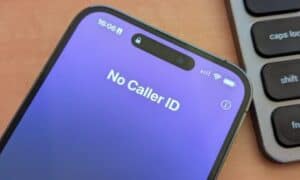
If you see "no caller ID" when receiving a call, it means that the caller has blocked their number from appearing on your screen. In other words, they want to keep their identity under wraps. Note that some Android phones will show this as “Private Number” instead — a more accurate description that means the same thing.
How does No Caller ID work?
Anyone can easily set up No Caller ID for just one call or all calls. To turn off Caller ID for every call on an iPhone, go to Settings > Apps > Phone > Show My Caller ID, while on most Android phones, you can go to the Phone app > Settings > Calls > Additional Settings > Caller ID.
Most mobile carriers will let you block caller ID when placing a call by prefixing the number with #31#. If caller ID is turned off in your settings, you can temporarily send caller ID for a specific call by dialing *31# before the number. North American landline carriers typically use *67 to block caller ID. However, we recommend checking with your carrier to confirm their specific codes.
Who uses No Caller ID?
People use No Caller ID for different reasons. Individuals and organizations sometimes hide their IDs to remain anonymous and control how others use their contact information. For example, fundraisers or telemarketers hide their phone numbers to prevent return calls.
While "no caller ID" may come from legitimate callers, scammers or stalkers use this function to conceal their identity when carrying out malicious deeds. It allows them to target large numbers of phone numbers without being detected and facing legal consequences. A hidden number can also provoke unsuspecting people to answer out of curiosity, which aids deceptive scammers’ practices.
It’s also possible for landlines to be set up with their caller ID permanently disabled. This is quite common for organizations where security and privacy are important, such as hospitals and women’s shelters.
Differences between "unknown caller" and "no caller ID"
Now that you’re aware of what "unknown caller" and "no caller ID" mean, let’s look at the differences between the two:
| Category | Unknown Caller | No Caller ID |
|---|---|---|
| Definition | The phone service provider doesn’t transmit the caller’s information. | The caller intentionally hides their phone number. |
| Cause | Technical issues, international calls, or system limitations. | The caller blocks their ID on purpose. |
| Usage | Typically unintentional, resulting from network or system-related factors. | Usually intentional, used for privacy or anonymity. |
| Frequency | Common with calls from different network carriers or countries. | Common in personal privacy scenarios or business contexts. |
| Caller’s Intent | Doesn’t necessarily indicate the caller wants to hide their identity. | Shows a clear intent to remain anonymous. |
| Recipient’s Action | Can be concerning but may also be harmless, such as calls from unknown but legitimate sources. | Often seen as suspicious due to intentional identity blocking. |
How to manage anonymous calls
You should always proceed with caution if you can’t identify a caller. This is especially important if someone rings you and "No Caller ID" appears on the screen, as they have intentionally kept their number hidden. But an Unknown Caller is also something to be wary of, since it becomes harder to truly identify who’s at the other end of the line.
Letting the call go to voicemail is often a good idea. Simply answering a call is a signal to scammers that your number is active, which could lead to more similar calls in the future. The Live Voicemail feature is particularly helpful for these situations because it allows you to pick up the call if the voicemail transcript indicates it’s someone you want to speak with. Follow the tips below to manage anonymous calls, including those from "unknown callers," "no caller ID," or potential one ring phone scam numbers:
- Ask your phone service provider to block calls from telemarketers. Some phone service providers have "Do not call" lists and allow their customers to block unwanted calls from telemarketers. However, this will not protect you from scam calls.
- Report and block spam calls. Reporting spam calls will block the scammer’s number on your phone and prevent them from reaching others with the same malicious strategy.
- Avoid sharing your number. Your phone number is personal and meant for trusted contacts only. Never display it publicly.
- Don’t trust "calls from the government." Sometimes, scammers pretend to be government officers, asking you to pay false fines or disclose personal information. Never reveal any of your personal information via phone call.
You can also silence these calls on your phone so they don’t disturb you. However, this trick doesn’t block unknown callers.
Unfortunately, the "Silence unknown callers" feature is only available on iPhones.
On your iPhone, go to Settings, then tap Apps followed by Phone and go to Silence Unknown Callers. Hit the toggle to turn it on.
How to block "no caller ID" phone calls
While the iPhone allows you to silence unknown callers, Android users can block them. Set your Android phone to reject anonymous calls.
On your Android smartphone, go to the Phone app, then tap on the three dots in the top-right corner followed by Block numbers. Toggle on the switch next to Block unknown/private numbers.
Use apps to block unidentified calls
AT&T ActiveArmor, for instance, has a free version that blocks spam and fraud calls, and also lets you block all unknown callers. The advanced version, which costs $4 a month, includes tools like reverse number lookup and caller ID for unknown numbers. ActiveArmor is available for iOS and Android.
Verizon’s Call Filter app also offers spam detection, a spam filter and the option to report numbers, all for free. For an additional $4 a month, you’ll also get caller ID, spam lookup, a personal block list and a spam risk meter. Call Filter is automatically enabled for Android users on a postpaid plan, and is available in the App Store for iPhone.
T-Mobile’s Scam Shield has a free option that includes full caller ID, scam reporting and scam blocking. There’s also a premium option for $4 a month per line, which offers reverse phone number lookup and voicemail transcriptions that are automatically texted to you. You can download the Scam Shield app in the App Store or Google Play.
Be sure to check with other wireless carriers to see if they offer something similar. Some wireless carrier plans may include access to the premium features as well.