For the potentially more than $1,000 question — when should you upgrade your iPhone? Well, the simple answer would be when it stops working. If something happens to it that will cost more to fix than the iPhone is worth, like a shattered display or a busted battery, it’s time to upgrade. If you’ve run out of iOS updates and security patches, it’s time to upgrade. Otherwise, you might want to take a long, hard look at your current iPhone before you relegate it to a friend (or sell it to someone else). When you decide to upgrade, you’ll probably have an all-new slate of iPhone models; the latest models being the iPhone 17, the higher-end iPhone 17 Pro and 17 Pro Max, and the thinner iPhone Air.
Regardless, it’s easy to hold off on an upgrade — especially considering that a brand new model may set you back as much as $1,000.
While you should definitely weigh your options, you should also watch out for symptoms that your iPhone is dying. An old iPhone with outdated software may be annoying, but it may also, more importantly, leave you vulnerable to cyberattacks.
Here are the signs you shouldn’t ignore, as well as the best time to buy a new iPhone:
You can’t download the latest iOS
The most, and perhaps only, pressing reason to get a new iPhone is if you cannot download new iOS updates.
For security purposes, you should always update your iPhone to the latest iOS available. Updates often fix flaws in older systems that leave your phone and data vulnerable to hackers and cyberattacks.
You should update to the latest iOS 26 version.

Your battery dies halfway through the day, even on a full charge.
Product defects aside, your iPhone battery should last you through a day of typical usage.
If you’re noticing, however, that your iPhone is dying more and more quickly after a full charge, it may be time to get a new one or replace its battery. If your iPhone randomly dies throughout the day, it’s a sure sign your iPhone’s battery is on its last legs. To check the battery health of your iPhone, go to Settings > Battery > Battery Health. If the Maximum Capacity is below 80%, consider replacing the battery or upgrading your iPhone.
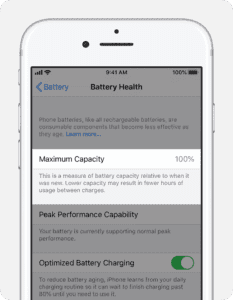
Keep in mind iPhone batteries lose capacity every time you charge it from zero to 100%. And if you’re charging your iPhone incorrectly, your battery may only work properly for a year or less.
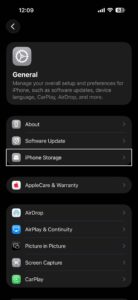
You don’t have enough storage space to save, well, anything on your phone.
There’s a reason that iPhones now come with at least 128GB of storage: The more sophisticated iPhones and apps get, the more storage they typically require. New operating systems and software updates can also take up a significant chunk of space on your iPhone.
Basically, you can’t do much with 64GB (or fewer) of storage anymore, unless you never update your iPhone (again, don’t take this risk), download apps, take pictures, or use other new features. But at that point, you might as well abandon iPhones altogether.
You can’t get anything done because your iPhone is always lagging.
A lack of storage space on your iPhone will also slow it down. If your apps are freezing, or your touchscreen has stopped working properly, it may be time to upgrade to a new model.
Before you take the leap however, make sure your iPhone isn’t running slowly for other reversible reasons. For example, deleting old photos and disabling motion effects are easy, quick ways to speed up your phone.
Your phone screen is so cracked, you might cut your fingers any second.
I had my iPhone 13 Pro for three full years before I finally caved and bought the iPhone 16 Pro. (But not before I accidentally dropped my 13 Pro in the toilet, twice.)
So what changed my mind?
Well, not only did I cut my finger on my phone’s extremely cracked screen, the LCD also continued to deteriorate until I couldn’t see anything except a huge black dot and some blurry lines. Probably because entire chunks of glass were missing from the screen, at that point.
Your iPhone is a constant source of stress and frustration.
iPhones are, for all intents and purposes, designed to make our lives easier: Apps can help us do everything from cook to clean. iPhone cameras keep getting better, eliminating the need to carry around a heavy DSLR. Games make long commutes more bearable. And new models come with increasingly advanced and cool features.

Of course, deciding whether it’s worth it to splurge on a new iPhone for its features is up to you. And ultimately, as long as you can still download software updates, there’s no real, immediate need to get a new iPhone.
But if you spend most days wanting to smash your iPhone with a hammer, you may want to invest in new model — even if just for the peace of mind.
You hate your current iPhone, but you’re not sure when’s the best time to buy a new one.
One of the biggest barriers to replacing a dying iPhone is the price of a brand new model. When I finally decided to replace my iPhone 13 Pro, I debated for months whether or not I should buy the iPhone 15 Pro or wait half a year for the release of the iPhone 16 Pro. Eventually, I decided to wait, mostly because I’m a sucker for new features, and the allure of Live Photos and a better camera was hard to resist.
If you’re wondering whether or not to buy an iPhone 17 right now, or wait for the iPhone 18, consider the fact that the cost of the iPhone 17 may drop $100 when the 18 comes out in September.

In general, you can expect the price of old models to drop when new ones are released. So if you’re more motivated by price than by cool features, take the time to do your research, read reviews, and decide which trade-offs you’re willing to make.
See also: How long does an iPhone last? How to spot warning signs and lengthen its lifespan.